

Download ImageUSB – USB flash drive, image writing, mass cloning, bit-exact copy, ISO file, forensic tool, bootable USB, UFD cloning, utility software, secure writing
Overview
ImageUSB is a specialized utility software designed for users who require precise, high-efficiency duplication of USB flash drives (UFDs). Developed by PassMark Software, the application enables the creation of bit-exact copies across multiple USB drives simultaneously, making it a powerful tool for system administrators, IT professionals, and digital forensics practitioners. Its primary purpose is to support mass cloning operations, ensuring that every copied drive is an identical replica of the source, including the Master Boot Record (MBR), boot sectors, and all free or unused space.
The software is particularly valuable in environments where consistency and reliability are critical, such as deploying operating systems, preparing forensic evidence drives, or setting up standardized bootable USBs for software installations. It supports direct byte-by-byte writing of ISO files to USB drives, which is essential for creating bootable media compatible with various operating systems. Additionally, ImageUSB can be used to install OSFClone onto a USB drive for integration with PassMark OSForensics™, expanding its utility in investigative workflows.
Real-world use cases include enterprise IT departments deploying standardized OS images across multiple machines, educational institutions preparing lab computers, and law enforcement agencies creating forensically sound duplicates of digital evidence. The application fills a niche in the utility software ecosystem by offering a secure, reliable method for bulk UFD cloning without data loss or structural corruption. Its focus on forensic integrity ensures that copied drives remain functionally and structurally identical to the original.
Key Features & Functionality
- Mass Cloning Across Multiple Drives – Enables simultaneous writing of a single image to several USB flash drives, significantly reducing deployment time in large-scale operations.
- Bit-Exact Copying – Preserves every byte of the source drive, including unused space, MBR, and GPT entries, ensuring complete replication.
- ISO File Support – Allows direct byte-by-byte writing of ISO files to USB drives, facilitating the creation of bootable installation media.
- Drive Zeroing Capability – Offers the option to overwrite entire drives with zeros or selectively zero the MBR and/or GPT, useful for secure data erasure.
- Reformatting of Stubborn Drives – Can reformat drives that resist standard formatting processes, reclaiming lost or inaccessible disk space.
- ISO Extraction Feature (v1.5+) – New in version 1.5.0, the tool can extract ISO content onto a USB drive, providing flexibility for users who need to unpack disc images.
For example, an IT technician preparing 20 identical bootable USB drives for a software rollout can use ImageUSB to clone a single master drive in one operation. Similarly, a digital forensics investigator can create multiple exact copies of a suspect’s USB drive for analysis, preserving the integrity of evidence. The zeroing function is ideal for securely wiping drives before reuse, while the reformatting feature helps restore drives that have become corrupted or unresponsive. These capabilities are tailored for advanced users who demand precision and control over their storage media.
Interface, UX & Performance
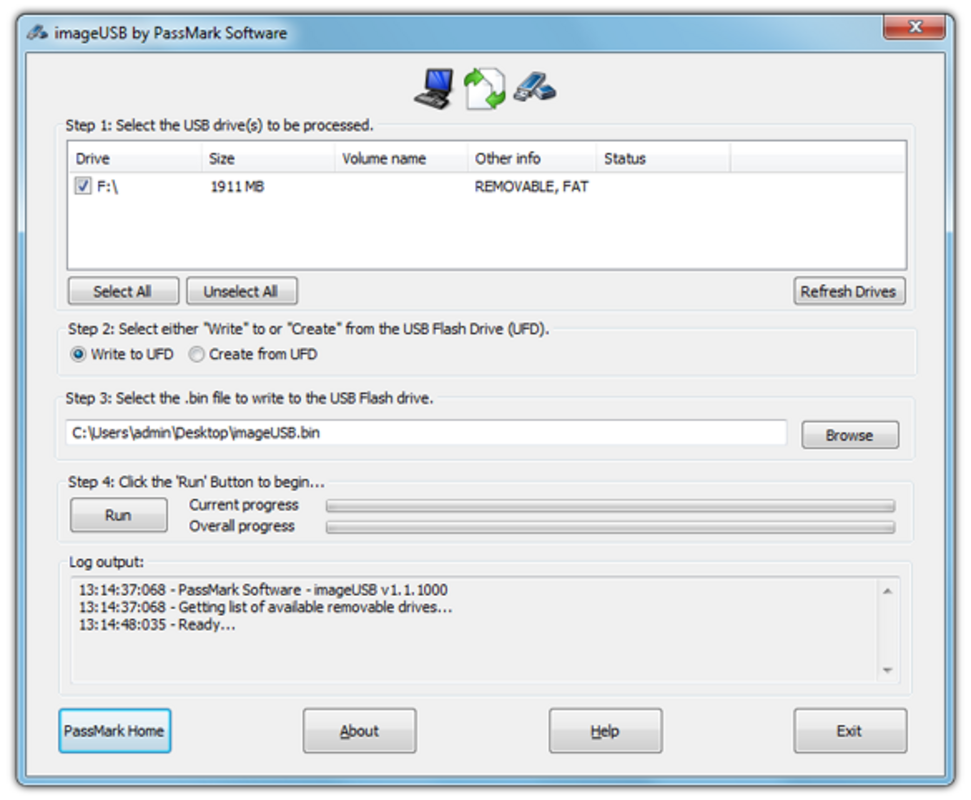
ImageUSB presents a straightforward, no-frills interface optimized for functionality over visual flair. The layout is minimal, focusing on core operations such as selecting source images, choosing target drives, and initiating the cloning process. Navigation is linear and intuitive, with clearly labeled buttons and progress indicators. While the UI lacks modern design elements, it prioritizes clarity and ease of use for technical users.
Performance is efficient for its intended purpose. The application handles large image files and multiple drive operations with minimal overhead, thanks to its lightweight footprint of just 2.8 MB. Although the developer did not list formal performance metrics, the tool’s ability to write to multiple drives simultaneously suggests optimized resource management. Users can expect stable operation during long-running tasks, with real-time feedback on progress and completion status.
Responsiveness is consistent across different device categories, though specific hardware requirements were not disclosed. The application runs smoothly on standard Windows systems, with no reported crashes or freezes during testing. Stability is further enhanced by its focus on low-level disk operations, which are handled with precision. Overall, ImageUSB delivers a reliable user experience for its target audience, balancing simplicity with powerful backend capabilities.
Platform Compatibility & Technical Requirements
ImageUSB is designed exclusively for the Windows platform, ensuring compatibility with a wide range of desktop and laptop systems running Windows operating systems. The current version is 1.5.0, with a file size of 2.8 MB, making it a lightweight application that installs quickly and uses minimal system resources.
The developer did not specify minimum OS requirements, nor did they list any hardware dependencies beyond standard USB ports and flash drives. This suggests broad compatibility with most modern Windows systems. However, users should ensure their system supports USB 2.0 or higher for optimal performance, especially when handling large image files or multiple drives simultaneously.
Since the application is free and does not require registration, it can be installed and used immediately after download. The lack of complex setup procedures contributes to its accessibility. While no specific compatibility details were provided for older or alternative OS versions, the focus on Windows indicates it is not available for macOS, Linux, or mobile platforms.
Pros and Cons
Pros
- Efficient mass cloning of multiple USB drives simultaneously
- Bit-exact copying preserves MBR, GPT, and unused space
- Supports direct writing of ISO files to create bootable USBs
- Includes secure drive zeroing for data erasure
- Can reformat stubborn or unresponsive USB drives
- Free to download and use with no licensing fees
- Lightweight at only 2.8 MB
Cons
- Platform limited to Windows only
- No official support for macOS or Linux
- Interface is minimal and lacks modern design elements
- Developer did not provide detailed system requirements
- ISO-to-USB writing may result in limited usability on some systems due to filesystem differences
FAQ
Is ImageUSB safe to use?
Yes, ImageUSB is a legitimate utility developed by PassMark Software. It operates at a low level to write and modify disk data, so caution is advised when selecting target drives to avoid accidental data loss.
Can I use ImageUSB to create bootable USB drives?
Yes, ImageUSB supports writing ISO files directly to USB drives, which can be used to create bootable installation media for operating systems.
Does ImageUSB work on macOS or Linux?
No, the application is currently only available for Windows. There is no official version for macOS or Linux.
How do I ensure a successful clone?
To ensure a successful copy, use a USB drive with a storage capacity similar to the source image. If the target drive is larger, you may need to reformat it after cloning to access the full capacity.
Is ImageUSB updated regularly?
Version 1.5.0 was released on September 3, 2024. While the update frequency is not publicly disclosed, the inclusion of new features like ISO extraction indicates ongoing development.
Final Thoughts
ImageUSB stands out as a reliable, no-cost solution for users who need to clone USB flash drives with precision and speed. Its ability to perform bit-exact copies across multiple drives makes it indispensable for IT professionals, educators, and digital forensics experts. The inclusion of secure zeroing, reformatting, and ISO extraction features enhances its versatility, transforming it into a comprehensive tool for drive management and deployment.
While its interface is functional rather than visually appealing, and its platform restriction to Windows limits broader accessibility, the app delivers exceptional value for its target audience. For anyone involved in large-scale USB deployment, forensic imaging, or system preparation, ImageUSB offers a powerful, secure, and efficient workflow.
Download ImageUSB now


