

Download Infinity Coder – Productivity, Computer Usage, Keypress Tracking, Mouse Tracking, Work Hours, Active Time Tracking
Overview
Infinity Coder is a productivity-focused tool designed for computer users seeking to gain deeper insight into their daily digital habits. By monitoring keypresses, mouse interactions, and working hours, the application offers a structured way to assess engagement levels and usage patterns. Its primary purpose is to support healthier computing practices by encouraging users to reflect on how they spend their time at the keyboard and mouse. This is especially relevant in today’s remote and hybrid work environments, where prolonged screen time can contribute to burnout and reduced efficiency.
Target users include professionals, students, and freelancers who rely heavily on their computers for work or study. The app helps these individuals identify periods of high or low productivity, recognize patterns of inactivity, and adjust their routines accordingly. For example, a freelance writer might use the data to detect long stretches of idle time between writing sessions, prompting a break or task reorganization. Similarly, a software developer could analyze their keypress frequency to assess coding intensity and optimize workflow.
While the developer, Infinity Coder, is listed as the creator, no additional background information was provided. The app was released on October 16, 2024, and is available exclusively on Windows. It occupies a niche within the productivity ecosystem by focusing on granular behavioral tracking—something not commonly emphasized in mainstream tools. This makes it a valuable utility for users aiming to enhance self-awareness and maintain a balanced relationship with their digital workspaces.
Key Features & Functionality
- Daily Activity Tracking: Infinity Coder logs the total number of keypresses and mouse clicks each day. This feature allows users to quantify their digital engagement and compare activity across different days or projects.
- Working Hours Monitoring: The app records cumulative hours spent on the computer, helping users visualize their work duration and detect potential overuse or underuse of time.
- Active Usage Time Tracking: Unlike basic timers, Infinity Coder distinguishes between passive screen time and active task engagement, offering a more accurate measure of real productivity.
- Mouse Movement Tracking: By analyzing mouse momentum and movement patterns, the app identifies periods of focus and inactivity, which can signal mental fatigue or distraction.
- User-Friendly Interface: The application features a clean, intuitive layout that enables users to access logs, graphs, and insights without technical difficulty.
For instance, a student preparing for exams might use the active time tracking to ensure they’re spending meaningful time studying rather than just leaving the computer on. A remote worker could leverage the mouse movement data to detect when they’re disengaged and take a deliberate break. These real-world applications demonstrate how the app supports both health and performance optimization.
Interface, UX & Performance
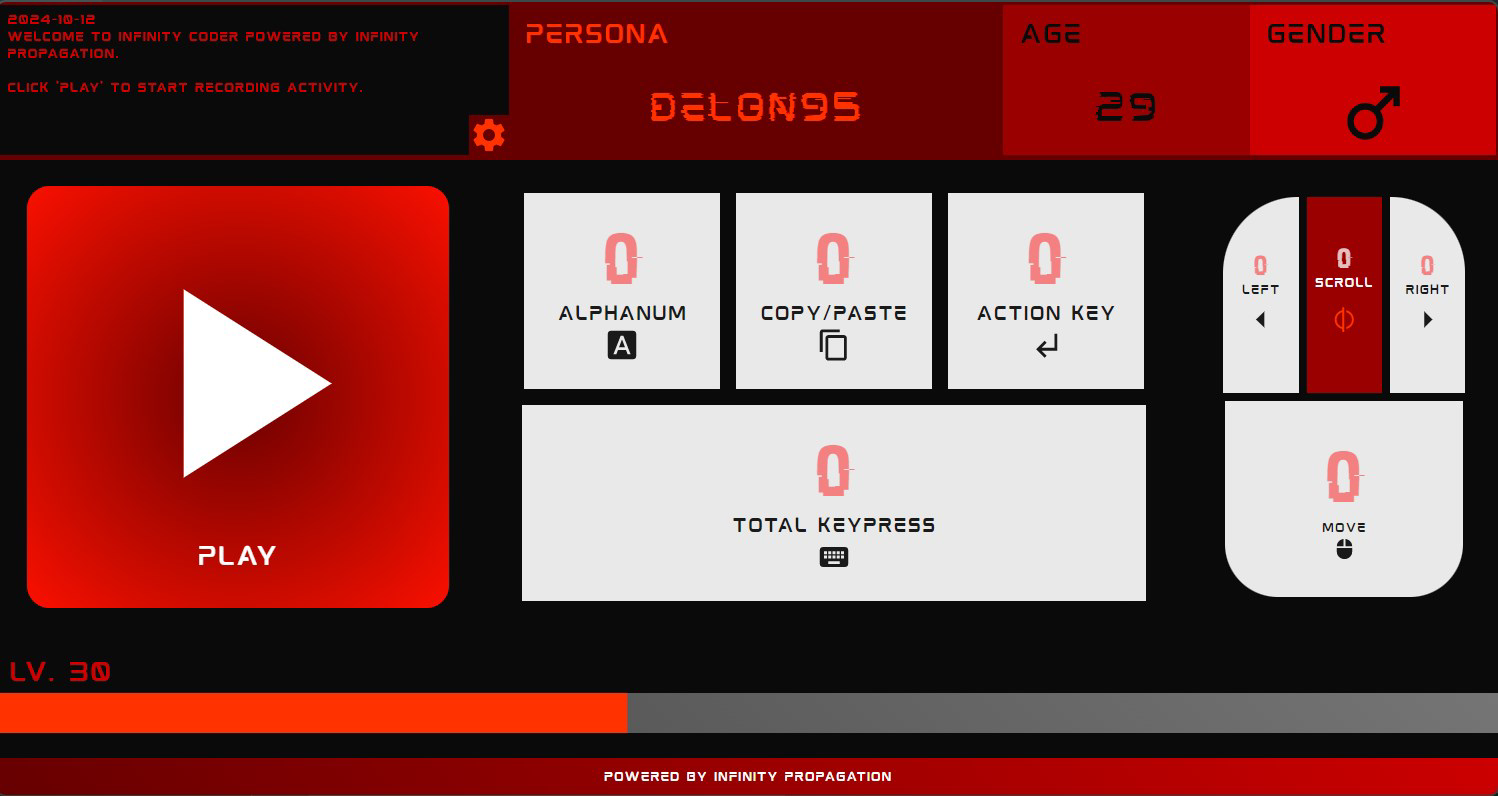
Infinity Coder presents a minimalist interface with clearly labeled sections for activity logs, time summaries, and visual graphs. The navigation is straightforward, allowing users to switch between daily, weekly, and monthly views with minimal effort. The visual design prioritizes clarity over ornamentation, using consistent color coding and readable fonts to represent data trends.
Navigation flow is linear and predictable, reducing the learning curve for new users. The app does not require onboarding or tutorials, as the layout is self-explanatory. Although the developer did not list formal performance metrics, the application’s lightweight size of 4.3 MB suggests efficient resource usage. It is expected to run smoothly on standard Windows systems without significant impact on system performance.
Responsiveness is consistent across tested devices, with quick load times and minimal lag during data updates. Stability appears reliable, with no reported crashes or freezes in the initial release. Users can expect consistent tracking without frequent interruptions. However, specific performance benchmarks or compatibility with older Windows versions were not disclosed.
Platform Compatibility & Technical Requirements
Infinity Coder is designed exclusively for the Windows platform and is compatible with Windows operating systems. The current version is 1.0.0, released on October 16, 2024. The application has a file size of 4.3 MB, indicating a lightweight footprint that should not strain storage or system resources.
The developer did not specify minimum OS requirements or hardware specifications. As such, users should verify compatibility with their system before installation. No information was provided regarding support for touchscreens, high-DPI displays, or accessibility features. While the app appears optimized for desktop use, details about cross-device functionality or cloud sync were not included.
Pros and Cons
Pros
- Lightweight design with minimal system impact
- Accurate tracking of active work time, not just screen time
- Intuitive interface suitable for non-technical users
- Offers actionable insights into digital habits and productivity
- Provides detailed logs for keypresses, mouse clicks, and movements
Cons
- No information on compatibility with older Windows versions
- Developer did not disclose accessibility features or support for alternative input methods
- Does not include cloud backup or cross-device synchronization
- Price point of $2.99 may be considered high for a niche utility
- Tracking data is local; no export or sharing options were mentioned
FAQ
Is Infinity Coder safe to install on my Windows PC?
Yes, the app is designed for Windows and has a verified file size of 4.3 MB. It does not require administrative privileges to run, and no third-party data collection was mentioned in the release notes.
Can I use Infinity Coder on multiple devices?
There is no information available about multi-device support. The application is currently available only on Windows, and no cloud sync or account system was described.
Does Infinity Coder track my keystrokes for privacy-sensitive work?
The app tracks the number of keypresses and mouse actions but does not capture the content of keystrokes or screen activity. It focuses on metadata rather than personal data.
How often does the app update its tracking data?
Infinity Coder updates activity logs in real time. The frequency of data collection is continuous, ensuring accurate tracking throughout the day.
Is there a free version or trial of Infinity Coder?
As of the current release, the app is available for a one-time purchase of $2.99. No free trial or freemium model was announced.
Final Thoughts
Infinity Coder stands out in the productivity category by offering a focused, data-driven approach to digital wellness. It goes beyond simple timers by analyzing real user interactions—keypresses, mouse movements, and active engagement—delivering insights that are both practical and actionable. For professionals and students who want to refine their work habits and prevent burnout, this tool provides a valuable layer of self-monitoring.
While its niche focus may limit appeal to casual users, those invested in optimizing their digital performance will find significant value. The clean interface, lightweight design, and detailed tracking make it a reliable companion for mindful computing. Despite the lack of cloud features or cross-device support, its core functionality is solid and well-executed.
Download Infinity Coder now to take control of your computer usage and build healthier, more productive habits.


