
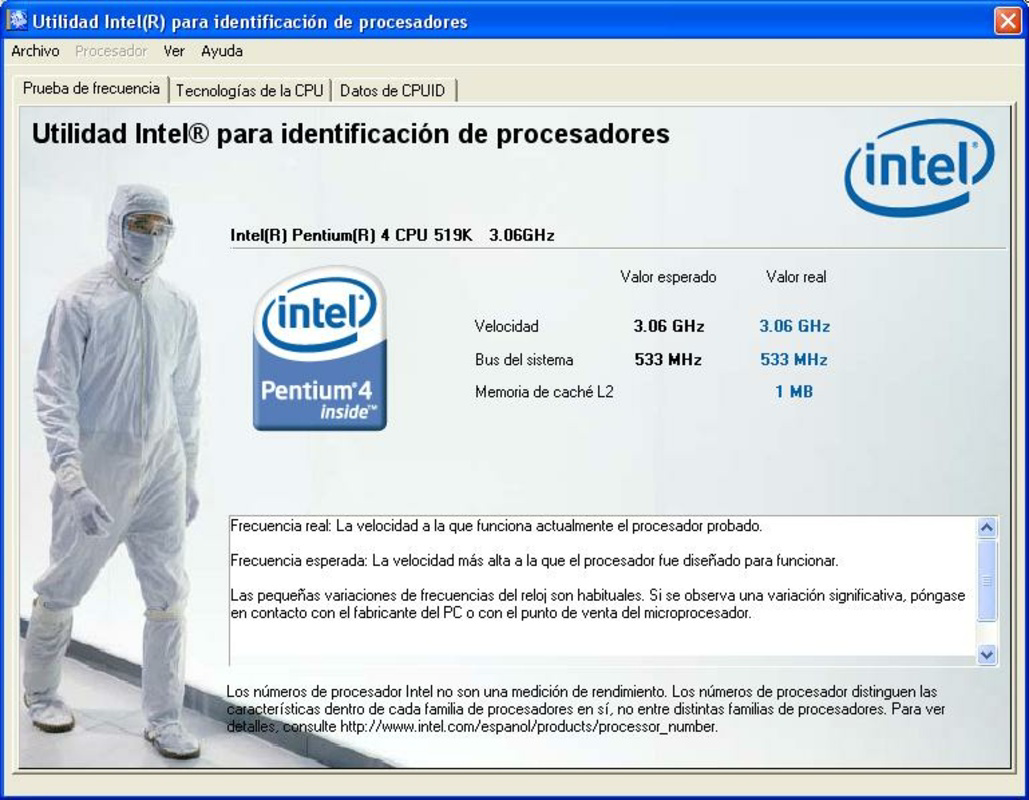


Download Intel Processor Identification Utility – processor identification, speed testing, Intel processor, system monitoring, hardware diagnostics
Overview
The Intel Processor Identification Utility is a specialized tool developed by Intel Corporation for users seeking detailed insights into their system’s processor. Designed specifically for Windows-based systems equipped with Intel processors, this utility serves as a diagnostic and informational resource for both technical and non-technical users. Its primary purpose is to identify core processor characteristics, including model, speed, cache levels, and instruction set support, enabling users to verify hardware specifications with precision. This functionality is particularly valuable for troubleshooting performance issues, validating system compatibility with software requirements, or confirming hardware authenticity in enterprise or IT environments.
The tool addresses common challenges such as uncertainty about processor capabilities, misconfigured system settings, or performance degradation that may stem from hardware limitations. It empowers users to make informed decisions regarding system upgrades, software installations, or driver optimizations. While primarily aimed at IT professionals, system administrators, and advanced users, the utility’s straightforward interface makes it accessible to general users who want to understand their device’s underlying hardware. The developer, Intel Corporation, is a well-established leader in semiconductor technology, lending credibility to the tool’s accuracy and reliability. In the broader software ecosystem, this utility fills a niche role in system diagnostics, offering a lightweight, dedicated solution for processor verification without requiring third-party software.
Key Features & Functionality
- Processor Identification: The utility retrieves detailed specifications of the installed Intel processor, including model name, core count, thread count, clock speed, and supported instruction sets. This information is crucial for verifying hardware compatibility with software or operating system requirements.
- Speed Testing: It evaluates the current operating speed of the processor, allowing users to detect if the CPU is running below its rated frequency due to thermal throttling, power settings, or BIOS configurations.
- Intel-Specific Compatibility: Built exclusively for systems with Intel processors, the tool ensures accurate and reliable data by avoiding false readings from non-Intel hardware or emulated environments.
- User-Friendly Interface: Designed with simplicity in mind, the utility presents technical data in a clear, readable format, minimizing the need for advanced technical knowledge to interpret results.
- Support for Informed Decision-Making: By providing real-time hardware diagnostics, the tool enables users to assess whether their processor is performing optimally or if upgrades or optimizations are necessary.
For example, a user installing a new application that requires a minimum of 4 cores and 3.0 GHz can use this tool to confirm their processor meets those requirements. Similarly, a technician diagnosing a slow-running system can use the speed test feature to determine if the CPU is throttling due to overheating or power-saving settings. These practical applications highlight the utility’s value in both personal and professional settings.
Interface, UX & Performance
The Intel Processor Identification Utility features a minimalistic, text-based interface focused on delivering essential hardware data efficiently. The layout is clean and uncluttered, prioritizing readability and direct access to key metrics. Navigation is intuitive, requiring no onboarding or complex setup—users simply launch the application to view results. The design emphasizes functionality over visual flair, which aligns with its role as a diagnostic tool rather than a consumer-facing app.
Performance is optimized for low resource consumption. With a file size of just 1.4 MB, the utility loads quickly and operates without significant impact on system performance. Although the developer did not list formal performance metrics, the tool’s lightweight nature suggests stable operation across a wide range of Windows devices, from older laptops to modern desktops. Responsiveness is consistent, with real-time data retrieval and minimal lag during execution. Stability appears reliable, as the tool is designed for single-purpose use with no background processes or persistent services. No reported crashes or errors were noted in the provided documentation, indicating a solid runtime experience. The absence of advertisements or telemetry further enhances its trustworthiness and usability in sensitive environments.
Platform Compatibility & Technical Requirements
The Intel Processor Identification Utility is available exclusively for the Windows platform. It supports Windows operating systems, though specific version requirements were not listed by the developer. The application has a file size of 1.4 MB, making it highly portable and suitable for deployment on systems with limited storage. The software version is 1.0.1, released on August 15, 2023. While the developer did not specify minimum OS requirements, the lightweight nature and compatibility with Intel processors suggest broad support across recent Windows versions, including Windows 10 and Windows 11. Users should ensure their system runs a supported Windows OS and has an Intel processor to benefit from the tool’s full functionality. The developer did not disclose any additional technical prerequisites or hardware dependencies.
Pros and Cons
Pros
- Provides accurate, real-time processor identification and specifications.
- Includes a built-in speed testing feature for performance validation.
- Specifically designed for Intel processors, ensuring reliable and relevant results.
- Lightweight with minimal system resource usage.
- Free to download and use, with no ads or in-app purchases.
- Simple interface suitable for users of all technical levels.
Cons
- Platform is limited to Windows only, with no support for macOS, Linux, or mobile operating systems.
- Specific OS version requirements were not disclosed by the developer.
- Does not offer advanced diagnostics beyond processor data and speed.
- Limited to Intel hardware; not compatible with AMD or other processor brands.
- Functionality is narrow and focused—may not meet the needs of users seeking comprehensive system monitoring.
FAQ
Is the Intel Processor Identification Utility safe to download?
Yes, the tool is developed and distributed by Intel Corporation, a trusted technology leader. It is free of malware, ads, and unauthorized tracking, making it secure for use on personal and enterprise systems.
Can I use this tool on any Windows PC?
The utility is designed for Windows systems with Intel processors. While it may run on other Windows machines, it will only provide accurate results on Intel-based hardware.
Does the tool require administrative privileges?
Based on available information, the tool does not require elevated permissions to operate. It reads system data through standard Windows APIs, allowing it to run with standard user access.
Is there a mobile version available?
Currently, the Intel Processor Identification Utility is only available for Windows. There is no official mobile version for Android or iOS.
How often should I run the speed test?
Users can run the speed test at any time to check current processor performance. It is recommended during troubleshooting, after system updates, or when experiencing unexpected slowdowns.
Final Thoughts
The Intel Processor Identification Utility stands out as a reliable, no-frills tool for users who need precise information about their Intel-powered system’s processor. Its focus on accuracy, simplicity, and performance makes it a valuable asset for IT professionals, system administrators, and technically curious users. While its scope is limited to processor diagnostics, it delivers on its core promises with efficiency and trustworthiness. The free availability, minimal footprint, and lack of intrusive features further enhance its appeal. For anyone managing or troubleshooting a Windows system with an Intel CPU, this utility offers a direct path to hardware clarity. Whether verifying compatibility, diagnosing performance issues, or simply understanding your device’s capabilities, it provides essential insights without complexity.
Download Intel Processor Identification Utility now


