

Download ISSTracker – Real‑time International Space Station Tracking Tool
Overview
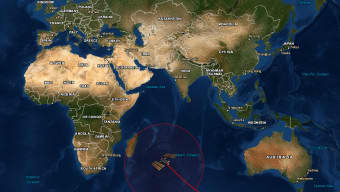
ISSTracker is a sleek, single‑page web utility crafted by Myflipside Media that puts the International Space Station (ISS) at your fingertips. Built on top of Google Maps, the app visualises the orbital path of the ISS in real time, letting users explore past, present, and future trajectories without leaving the browser. Whether you are an astronomy hobbyist, a teacher preparing a lesson, or simply a curious mind, ISSTracker offers a window into the constantly moving laboratory that circles Earth every 90 minutes. The interface is clean yet packed with powerful options: you can toggle between Satellite, Terrain, or Hybrid map styles, switch measurement units between Metric and English, and adjust the visibility ring that highlights the area from which the station is observable. A dedicated secondary page expands the experience with adjustable orbital‑path durations (from one‑third to six full orbits) and a historical sightings database that predicts when the ISS will be visible from any chosen ground location. While the tool assumes a basic familiarity with orbital terminology, its intuitive design ensures that anyone who can read a date and time format can quickly pinpoint the station’s location. The result is a fast‑loading, highly accurate, and visually engaging platform that feels like a personal space‑watch console right inside your browser.
Key Features and Capabilities
- Real‑time ISS position plotted on Google Maps with live updates.
- Multiple map types: Satellite, Terrain, Hybrid – all switchable instantly.
- Adjustable orbital path window: view 1/3, 1, 2, 3, 4, 5 or 6 orbits forward and backward.
- Metric and English unit support for distance, speed, and altitude.
- Visibility ring that highlights the ground area where the station can be seen.
- Historical sightings database – plan future viewings from any latitude/longitude.
- ISS‑centered map mode that keeps the station at the centre of the viewport.
- Simple date‑time input in UTC (YYYY‑MM‑DD HH:MM:SS+0000) or GMT‑converted format.
- Responsive design – works on desktop browsers and mobile browsers alike.
- Free, no‑registration required, and fully secure HTTPS connection.
Installation, Usage & Compatibility
How to Get Started
Because ISSTracker is a web‑based application, there is no traditional installation process. To begin, simply navigate to the official ISSTracker URL using any modern browser (Chrome, Firefox, Edge, Safari). The site loads over a secure HTTPS connection, ensuring that the data you receive is encrypted and safe from tampering. For users who prefer a desktop shortcut, you can drag the page’s tab to your desktop or create a Progressive Web App (PWA) shortcut – most browsers will prompt you with an “Add to Home screen” option, turning the web‑app into a native‑like icon.
Using the Tracker Effectively
Once the page loads, you’ll see a large map centred on Earth with a bright marker representing the ISS. Below the map, enter the desired date and time in the UTC format (e.g., 2025-10-25 14:30:00+0000). If you have a local time, convert it to GMT before entering. After submitting, the map refreshes, displaying the station’s exact location, its orbital track, and the visibility ring. Use the map‑type selector to switch between Satellite, Terrain, or Hybrid views, depending on whether you want a realistic Earth image or a topographic overview. The unit toggle lets you switch between kilometres and miles for speed and altitude. If you need a broader temporal view, click the “Advanced” tab to adjust the orbital‑path duration – this is particularly useful for planning observation sessions or teaching orbital mechanics. The secondary “Sightings” page lets you type in a city or coordinates; the tool then calculates the next windows when the ISS will be visible, complete with rise/set times and elevation angles.
Compatibility: Because ISSTracker runs entirely in the browser, it is compatible with all major operating systems – Windows 10/11, macOS Ventura and later, Linux distributions, as well as Android and iOS mobile browsers. The responsive layout automatically adapts to different screen sizes, ensuring a smooth experience on tablets and smartphones without loss of functionality.
Pros, Cons, FAQ & Conclusion
Pros & Cons
- Pros:
- Instant, real‑time tracking with no download required.
- Highly visual interface that makes complex orbital data easy to understand.
- Free and secure – no hidden fees or invasive ads.
- Supports both Metric and English units for global audiences.
- Advanced features like adjustable orbit windows and historical sightings.
- Cons:
- Requires an internet connection; offline functionality is not available.
- Time‑input format can be confusing for users unfamiliar with UTC.
- Google Maps API limits may affect performance during very high traffic periods.
- Daylight map style was removed in the latest version, which some users miss.
Frequently Asked Questions
Do I need to create an account to use ISSTracker?
No. ISSTracker is completely free and does not require registration. You can start tracking the ISS immediately after visiting the site.Can I view the ISS path on a mobile device?
Yes. The web app is fully responsive and works on Android and iOS browsers. You can even add it to your home screen as a PWA for quicker access.What is the “visibility ring” and how is it useful?
The visibility ring marks the region on Earth where the ISS is currently above the horizon and can be seen with the naked eye (or with binoculars). This helps users quickly identify if the station is observable from their location.How accurate is the real‑time position data?
ISSTracker pulls live telemetry from NASA’s official TLE (Two‑Line Element) data, which is updated multiple times per day. The resulting position accuracy is within a few kilometres, sufficient for both hobbyist viewing and educational purposes.Can I export the orbital data for use in other software?
While the web interface does not provide a direct export button, the underlying TLE data is publicly available from NASA’s website, and advanced users can copy the coordinates displayed on the map using browser developer tools.Conclusion – Your Gateway to the Stars
ISSTracker stands out as a lightweight, free, and visually compelling solution for anyone who wants to keep tabs on humanity’s orbiting laboratory. Its real‑time map, adjustable orbital windows, and sight‑seeing calculator make it an indispensable tool for educators, amateur astronomers, and space enthusiasts alike. Because the app runs directly in the browser, you avoid the hassle of installations while still enjoying a high‑quality, secure experience. If you’re looking for a quick way to answer the question “Where is the ISS right now?” or to plan the next night‑time viewing session, ISSTracker delivers accurate results in seconds. Download ISSTracker today and start exploring the night sky with a new perspective.



.png)




