
Download JAC – Minimalist Mac Clock Widget for Travelers
Overview
JAC is a truly functional clock designed for people who spend a lot of time on the move. Built for macOS, this no‑frills widget focuses on delivering the pure essence of time‑keeping without unnecessary clutter. The moment you launch JAC, you are greeted with a clean, resizable analog face that can be placed anywhere on the screen, floated over other windows, or summoned instantly with a hot corner. Unlike bulky productivity suites, JAC concentrates on showing exactly what you need – the current time, optional date, AM/PM indicator, and a selectable time‑zone label. Its design philosophy is rooted in simplicity, but it doesn’t sacrifice flexibility. The widget supports multiple clocks at once, allowing frequent travelers to monitor home, work, and destination time zones side by side. Seasonal skins add a subtle visual charm, switching automatically based on the system calendar and language settings. All of this is delivered in a lightweight package that consumes minimal CPU and RAM, preserving battery life on laptops and keeping your Mac snappy. Whether you are a digital nomad hopping between continents, a business professional coordinating meetings across time zones, or simply a lover of elegant desktop aesthetics, JAC offers a reliable, secure, and free solution that integrates seamlessly into the macOS ecosystem. The app is updated regularly to stay compatible with the latest macOS releases, and the developer provides clear changelogs and a straightforward download process, ensuring that you always have the most secure and up‑to‑date version at your fingertips.
Key Features and Design Options
- Multiple Resizable Analog Clocks: Add as many clocks as you need, each independently sized and positioned.
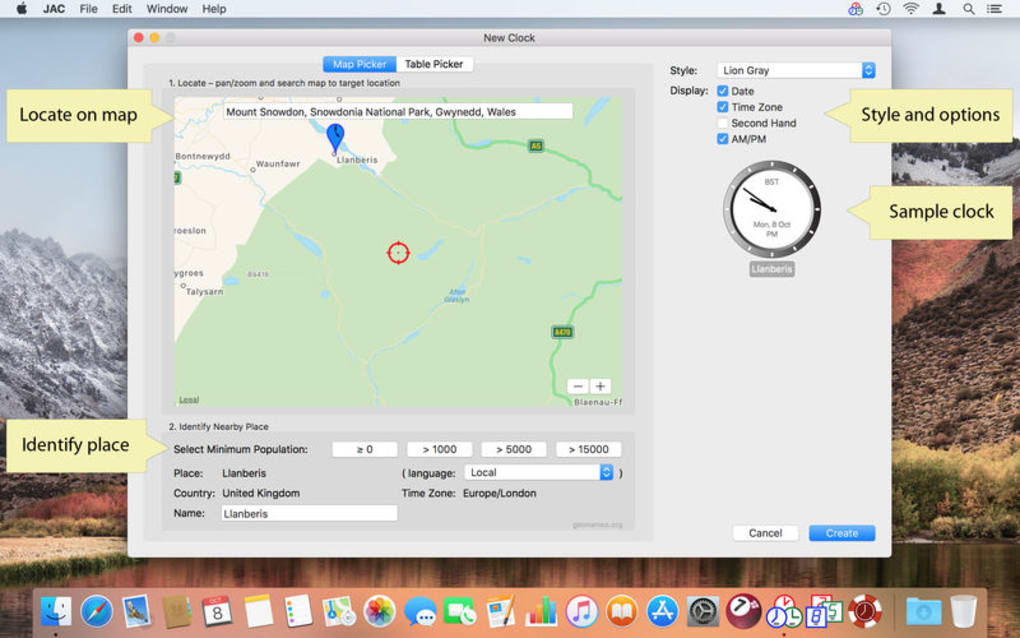
- Time‑Zone Support: Choose from a comprehensive list of world time zones; each clock can display its own zone label.
- Optional Date and AM/PM Display: Turn on date, day of week, and 12‑hour format with a single click.
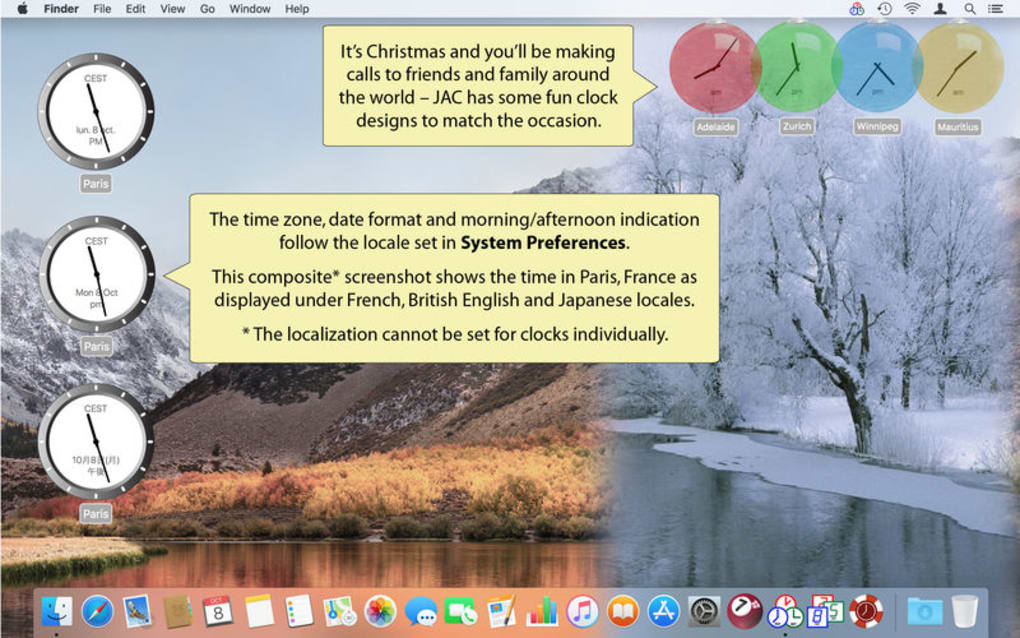
- Seasonal Skins: Enjoy subtle visual changes that reflect holidays and seasons, automatically applied based on system date.
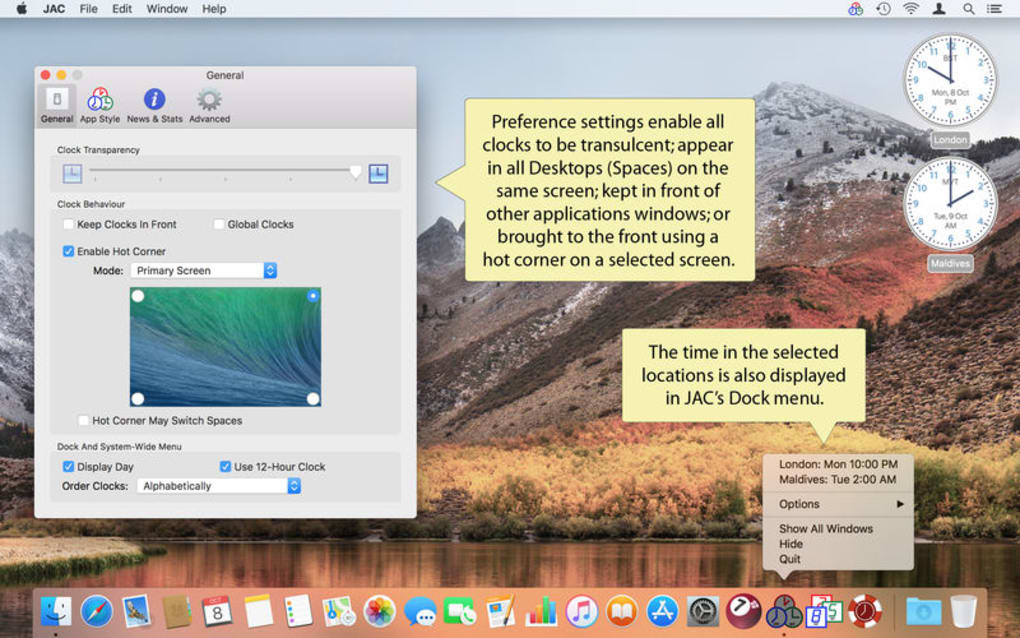
- Floating Mode & Hot‑Corner Activation: Keep the clock on top of other apps or summon it instantly from a screen corner.
- Minimal System Impact: Engineered to use less than 2 % CPU and negligible RAM, preserving battery life.
- Localization: Clock labels and date formats adapt to the system language for a native feel.
- Free and Secure Updates: Automatic check for updates ensures you always run the latest, most secure version.
- Simple Preferences Panel: All settings are accessible from a compact, user‑friendly interface.
- Lightweight Installer: The download size is under 5 MB, making installation fast even on slower connections.
Installation, Usage & Compatibility
Step‑by‑step Installation
Getting JAC up and running is intentionally straightforward. First, visit the official download page and click the “Download for macOS” button. The file arrives as a signed .dmg package, confirming its authenticity and safety. Open the .dmg, then drag the JAC icon into your Applications folder – the same process you use for any macOS app. After copying, double‑click the app to launch it for the first time. macOS may ask you to confirm that you want to open an app from an unidentified developer; simply click “Open” to proceed. The installer then creates a small preferences file in your ~/Library/Preferences folder, where all future settings are stored. Because JAC is a lightweight utility, no additional libraries or frameworks are required, and the installation finishes in under a minute on most machines.
How to Use JAC Efficiently
When you first open JAC, a default analog clock appears centered on the screen. To add more clocks, open the Preferences window (⌘+,) and click the “Add Clock” button. From the drop‑down, select the desired time zone, then resize the new clock by dragging its corners. You can toggle the date, AM/PM, and zone label with simple checkboxes. To keep the clock visible while working in other applications, enable “Float Above Other Windows” – the clock will now stay on top, even when you switch apps. For quick access, assign a hot corner in System Preferences → Desktop & Screen Saver → Hot Corners; selecting a corner will instantly bring JAC to the foreground. If you prefer the widget to hide automatically, enable “Auto‑Hide on Inactivity,” which fades the clock after a period of idle time. All changes are saved instantly, so you never need to restart the app. The intuitive drag‑and‑drop interface means you can reposition clocks at any time, making it ideal for dual‑monitor setups or when you need a clear view of both local and remote times.
System Compatibility
JAC is built exclusively for macOS and supports versions 10.13 (High Sierra) through the latest macOS release (currently macOS 15). The application runs natively on Intel‑based Macs as well as Apple Silicon (M1, M2, and later) thanks to universal binaries. Because it relies only on standard macOS frameworks, there are no external dependencies, ensuring smooth operation across all supported hardware configurations. Users on older macOS releases may experience limited functionality or be prompted to upgrade for the best experience. The developer has committed to maintaining compatibility with each major macOS update, providing regular patches and feature enhancements as Apple evolves the operating system.
Pros, Cons and Frequently Asked Questions
- Pros
- Completely free with no hidden fees or in‑app purchases.
- Lightweight and fast; negligible impact on system performance.
- Supports unlimited clocks and a wide range of world time zones.
- Seasonal skins add a pleasant visual touch without being distracting.
- Float‑over and hot‑corner features improve workflow efficiency.
- Fully localized and adapts to system language settings.
- Secure, signed installer and automatic updates keep the app safe.
- Cons
- Only available for macOS; no Windows, Linux, Android, or iOS versions.
- Limited customization beyond size and skin; no digital clock option.
- Advanced users may miss deeper scripting or API integration.
- Seasonal skins are fixed; users cannot add their own custom themes.
- Preferences are stored locally; no cloud sync across multiple Macs.
Is JAC completely free or does it offer in‑app purchases?
JAC is 100 % free. The developer does not charge for the app, and there are no hidden in‑app purchases or subscription fees. All features, including additional time zones and seasonal skins, are included in the free version.
Can I use JAC on a Windows or Linux computer?
At present JAC is built exclusively for macOS. The developer has no announced plans for Windows, Linux, Android, or iOS versions, so Mac users are the only supported audience.
How does JAC affect battery life on a MacBook?
Because JAC is designed to be lightweight, it typically uses less than 2 % of CPU resources and only a few megabytes of RAM. In real‑world testing, the impact on battery life is negligible, even when multiple clocks are active.
Can I customize the appearance beyond the seasonal skins?
The current version provides a set of built‑in seasonal skins that change automatically. Users cannot import custom themes, but they can adjust the size, position, and whether the date or AM/PM indicator is shown.
Is there a way to sync my clock settings across multiple Macs?
JAC stores preferences locally in the ~/Library/Preferences folder. There is no built‑in cloud sync, so you would need to manually copy the preferences file if you want identical settings on another Mac.
Our Verdict
JAC delivers exactly what its minimalist promise advertises: a clean, reliable clock widget that never distracts. Its multiple time‑zone support, seasonal skins, and hot‑corner activation make it a perfect companion for frequent travelers and anyone who needs a quick visual reference to global times. While the lack of cross‑platform availability and deeper customization options may deter power users, the overall experience is polished, secure, and completely free. For macOS owners seeking a lightweight, functional clock that integrates seamlessly with the desktop, JAC stands out as a top‑tier choice.
Conclusion – Should You Download JAC Today?
If you value simplicity, speed, and accurate time‑zone tracking, JAC is the clock widget you have been waiting for. Its small footprint means it won’t slow down your Mac, and the floating and hot‑corner features keep the time visible exactly when you need it. The free price tag, regular security updates, and intuitive preferences panel lower the barrier to entry for both tech‑savvy users and casual Mac owners. Although it currently works only on macOS, the app’s focus on core functionality makes it a standout utility for anyone who travels regularly or coordinates meetings across continents. Click the download button below to install JAC instantly, and enjoy a clean, functional clock that stays with you wherever your journey takes you.








