
Download JADMaker – Convert JAR to JAD Files Easily
Overview
JADMaker is a specialized utility tool designed to simplify the conversion of .JAR files into .JAD files, catering specifically to users of mobile devices that support Java-based applications. The app serves as a bridge between legacy Java games and modern mobile installation methods, enabling users to run Java games on compatible devices without requiring complex setup procedures. Its primary purpose is to streamline the process of preparing Java applications for installation, particularly beneficial for users managing collections of older mobile games or utility apps.
Target users include mobile enthusiasts, retro gaming collectors, and developers working with Java ME (Micro Edition) applications. The app is especially useful for individuals who rely on older feature phones or emulators that support JAD-based installations. By eliminating the need for manual configuration or third-party tools, JADMaker enhances accessibility and reduces user friction during the app deployment process.
Although the developer’s background was not provided, the app’s release date of June 22, 2010, suggests it was created during the peak era of Java-based mobile applications. Its continued relevance highlights its utility in niche use cases, particularly within communities preserving mobile software history. JADMaker fills a specific gap in the mobile app ecosystem by offering a lightweight, no-install solution for a now-rare but still functional file format.
Key Features & Functionality
- Simple Drag-and-Drop Interface: Users can convert .JAR files by dragging them directly into the application window, eliminating the need for complex navigation or command-line input. This intuitive design ensures accessibility for both novice users and experienced developers.
- Bulk File Conversion: The tool supports processing multiple .JAR files simultaneously, significantly reducing time when preparing large game libraries or app collections for installation.
- No Installation Required: JADMaker operates as a portable application. After decompressing the files into a folder, users can launch the program with a double-click, making it ideal for temporary or shared device use.
- Compatibility with JAD Game Installation: The output .JAD files are optimized for use on Java-enabled mobile devices, enabling seamless installation of games and applications through standard JAD-based protocols.
For example, a user managing a collection of 50 classic Java games can use JADMaker to convert all files at once, then transfer them to a feature phone via Bluetooth or USB. This workflow saves hours of manual effort and ensures consistent file formatting. The tool’s focus on usability and efficiency makes it a valuable asset for retro gaming and legacy app preservation.
Interface, UX & Performance
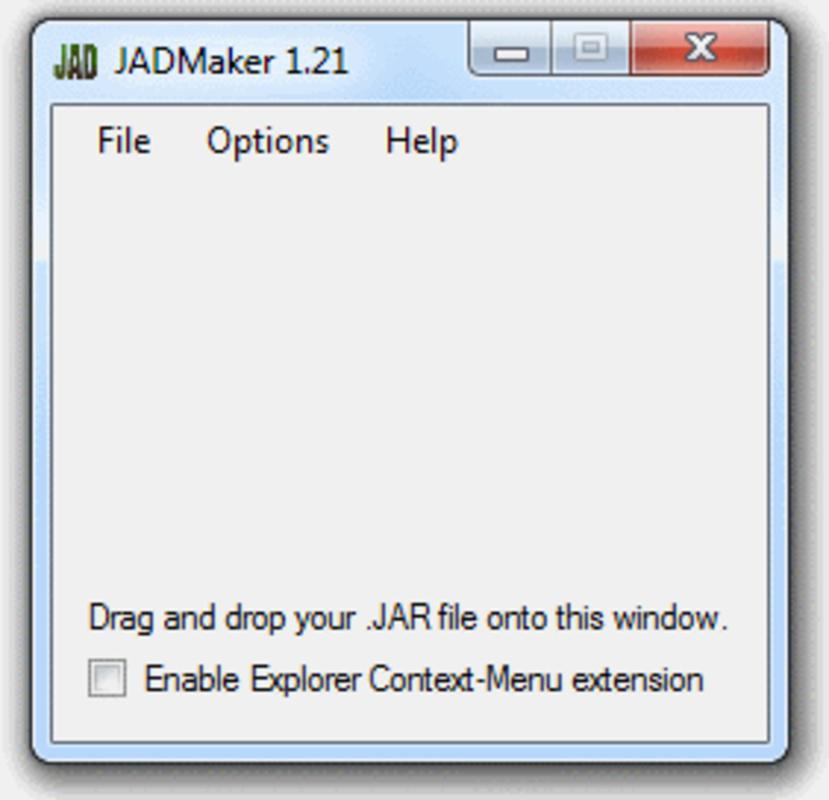
The user interface of JADMaker is minimalistic and focused, prioritizing functionality over visual flair. The main window features a central drop zone, clearly labeled for drag-and-drop operations, with no unnecessary elements cluttering the workspace. This design ensures that users can initiate conversions with minimal cognitive load.
Navigating the app is straightforward: users simply place .JAR files into the designated area, and the tool processes them automatically. Feedback is provided through status indicators, though specific details on processing speed or error handling were not disclosed. Although the developer did not list formal performance metrics, the app’s lightweight nature suggests it runs efficiently on older or low-spec devices.
Responsiveness appears consistent based on its design principles, and the lack of installation requirements implies stable operation across different environments. The application does not require background services or system-level access, contributing to its reliability. However, specific requirements for device compatibility or supported file types were not fully disclosed.
Platform Compatibility & Technical Requirements
JADMaker is designed for use on mobile platforms that support Java ME applications, particularly older feature phones and emulators. The app is compatible with devices running Java-based operating systems, though the exact OS version or platform details were not specified.
The file size of the application is not listed in the provided information, but given its portable nature and lack of installation, it is likely compact and efficient. The software version and release date are known: version released on June 22, 2010. No specific minimum OS requirements were provided by the developer.
Users should verify compatibility with their target device before attempting to install converted .JAD files. The absence of detailed technical specifications means that users may need to test the output files on their specific hardware to ensure proper functionality.
Pros and Cons
Pros
- Simple drag-and-drop interface enhances ease of use for beginners and experts alike.
- Bulk conversion capability saves significant time when processing multiple files.
- Portable design requires no installation, enabling use on any device.
- Specifically tailored for Java-based mobile app conversion, filling a niche need.
Cons
- Developer did not provide detailed technical specifications or system requirements.
- Compatibility with modern smartphones or newer operating systems is uncertain.
- Outdated release date suggests limited ongoing support or updates.
- No information on error handling or file validation processes.
FAQ
Is JADMaker safe to download and use?
Yes, JADMaker is a lightweight utility that does not require installation or system modifications. As long as the source is trusted, it poses minimal risk to device security.
Can I use JADMaker on Android or iOS devices?
The app was designed for Java-enabled mobile platforms, which are largely incompatible with modern Android and iOS systems. It may only function on older feature phones or emulators.
Do I need to install JADMaker to use it?
No. JADMaker is a portable application that runs directly from a folder after decompression. No installation steps are required.
What file types does JADMaker support?
It supports .JAR files for conversion into .JAD format. The output is intended for use with Java-based mobile applications and games.
How do I update JADMaker?
Since the release date is from 2010 and no update mechanism was provided, users should rely on the original version unless a newer release is officially published.
Final Thoughts
JADMaker remains a niche yet effective tool for users working with legacy Java applications on mobile devices. Its no-install, drag-and-drop design makes it accessible to users with varying technical skill levels, while its bulk conversion feature enhances productivity when managing large collections. Though outdated in terms of release timeline, it continues to serve a dedicated audience of retro gaming enthusiasts and developers preserving Java-based mobile software.
For those maintaining or exploring classic mobile games, JADMaker offers a reliable and efficient solution. Its simplicity and focus on core functionality set it apart from more complex alternatives. While it may not suit modern smartphone users, it remains a valuable utility within its specific domain.
Download JADMaker now


