Image

Xavier Slim

Updated 4 years ago

Launch your Java application as a Windows file (if you know how)

If you're looking for an easy way to open your Java apps then JavaExe can help (although, if you're not familiar with this type of app, this is not the program you're looking for).

Top Recommended Alternative

Simplifying Java apps

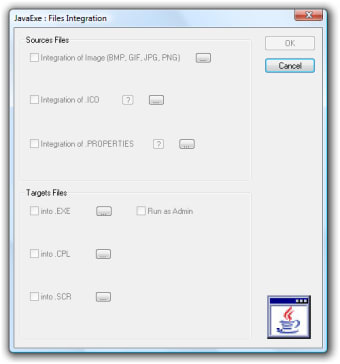
JavaExe helps you open your Java apps in the same way you would any normal Windows program that you've downloaded. To do this, you must copy the program into the registry (the first folder you open) of your Java app and give it exactly the same name as your main Executable Jar File (this will be shown under the "type" menu). This will then allow you to run the application as an .exe file.

For this to work, you must already have Java Runtime Environment installed, and make sure you are using the correct version for 32-bit or 64-bit machines.

It works

Not being a big user of Java apps, nor having much experience in launching them as an .exe file, it's very difficult to judge how good this program is.

But it works and, once you've familiarized yourself with the instructions, it's actually really easy to do.

For Java apps not websites that use Java

If you're a whiz with Java apps and they are something you use regularly, JavaExe will likely be useful for you. But if you're looking to download Java for your computer to access certain websites that use it then you are in the wrong place - it's Java Runtime Environment you're looking for.


Image

Xavier Slim

Xavier Slim has experience in English writing supported by academic recognition and creative competitions. He has worked on tutoring and editorial projects, developing content that balances clarity with creativity. His interests in writing and technology inform his practical approach to reviewing digital tools.

  • Pros

    • Really easy to use once you've read the instrutions
  • Cons

    • Not intuitive
Image
 0/1

App specs

  • License

    Free

  • Version

    3.2

  • Latest update

  • Platform

    Windows

  • OS

    Windows 95

  • Language

    English

    Available languages

    • English
    • French
  • Downloads

    911.1K

    Last month's downloads

    • 147
  • Size

    7.70 MB

  • Developer

Program available in other languages


User reviews about JavaExe

4.5

1 reviews

Add review

Main reviews for you

  • Image

    Anonymous user

    I have need so program. yes i do i use that at my work program and it very praktik. nessery and original program

More

You may also like

Alternatives to JavaExe

Explore Apps

Latest articles

Laws concerning the use of this software vary from country to country. We do not encourage or condone the use of this program if it is in violation of these laws.
Softonic

Is JavaExe safe?

94/100

Score result: Clean

This file passed a comprehensive security scan using VirusTotal technology. It is safe to download.

  • Virus free
  • Spyware free
  • Malware free
  • Verified by Security Partners

    VirusTotal logo

Scan Info

Last scan
Monday, November 20, 2023
Scan provider
VirusTotal · Full report

File Integrity

File
JavaExe.zip
SHA256
5ce92986c1bc25cbd575761afae3c8a8f87c45111da426f6af29b69b08826d8c
SHA1
2e74891288abaae7620b972f977a74d5433e04fd

Softonic security commitment

JavaExe has been thoroughly scanned by our advanced security systems and verified by industry-leading partners. This file comes from the official developer and has passed all our security checks, showing no signs of viruses, malware, or spyware. For more information, visit our Security and Trust Center