
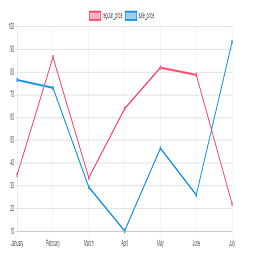
აღწერა
Chart plugin to view price changes of woocommerce product.
- 1-Place the Php code do_shortcode( ‘[chartprice]’ ); in the single page product.
- 2-use shortcode [chartprice] in product post.
- 3-change setting in woocommerce page setting.
Arbitrary section
-
for change format date use php code below in function.php file:
ეკრანული სურათები

Plot in product 
Settting


დაყენება
This section describes how to install the plugin and get it working.
e.g.
- Upload plugin folder to the /wp-content/plugins/ directory
- Activate the plugin through the ‘Plugins’ menu in WordPress
ხდკ
1-Place the Php code do_shortcode( ‘[chartprice]’ ); in the single page product.
2-use shortcode [chartprice] in product post.
3- for change format date use php code below in function.php file:
    add_filter('chart_price_apply_filter_format_date', 'format_date');

    function format_date($date)

    {

    $date=date('Y/m/d');//defult Y-m-d

    return $date;

    }
მიმოხილვები


მონაწილეები & დეველოპერები
“Plot prices woocommerce product (product price history)” ღია პროგრამული უზრუნველყოფაა. შემდეგმა ადამიანებმა წვილი შეიტანეს მის განვითარებაში.
მონაწილეები
გადათარგმნეთ Plot prices woocommerce product (product price history) თქვენს ენაზე.
დაინტერესებული ხართ დეველოპმენტით?
დაათვალიერეთ კოდი, შეამოწმეთ SVN რეპო, ან გამოიწერეთ შექმნის ჟურნალი : RSS.
ცვლილებები
1.0
*head version of plugin
1.1
*chang js file to chart js
2.0
*add the variable product to plot
