

Download Kast – Free Video Sharing, Streaming Parties & Watch‑Together App
Overview
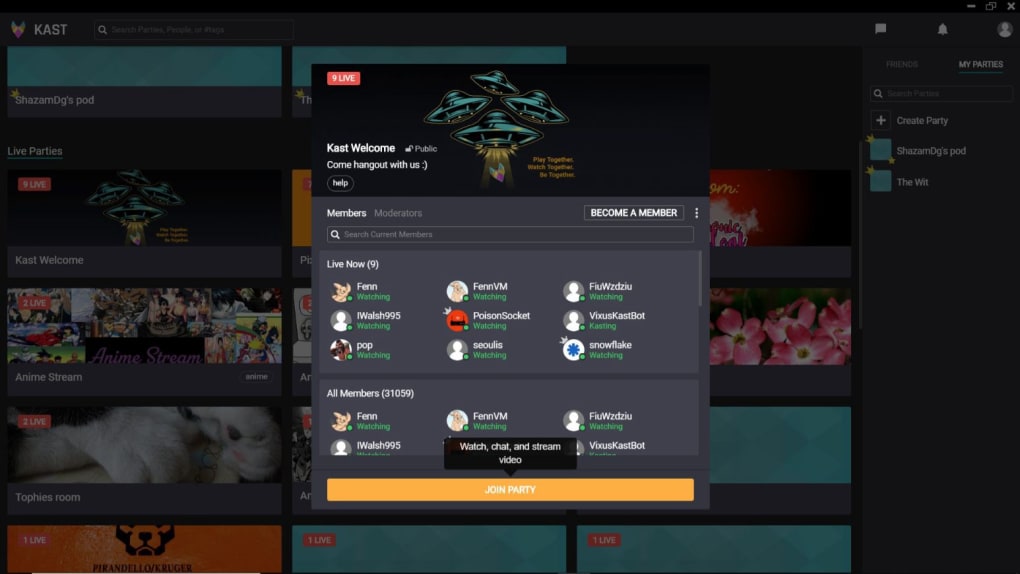
Kast is a cross‑platform video‑sharing application built by Evasyst that turns ordinary streaming into a social experience. Whether you want to binge‑watch the latest series, replay classic movies, or showcase a gaming session, Kast lets you host or join a party with up to a hundred participants. The app combines screen capture, voice, text, and video chat into a single dark‑themed interface that feels instantly familiar. On launch, users are greeted with a clean home screen where ongoing public parties are displayed, each showing the host, current viewers, and a brief description. By clicking a party you can see the moderator list, chat activity, and even a live thumbnail of the shared content. The “My Parties” tab keeps track of every room you’ve entered, making it easy to jump back in later. Invitations are straightforward: generate a private link, search friends, or let Kast match you with random viewers who share similar interests. While the concept is compelling and the UI is polished, real‑world performance has been a mixed bag. Users frequently report choppy video, low‑resolution streams, and occasional audio drop‑outs, which can dampen the collaborative vibe. Despite these hiccups, Kast remains a free, no‑ads option for anyone looking to create a virtual couch‑potato session without paying for premium services.
Key Features
- Live screen sharing for movies, TV shows, games, and desktop apps.
- Integrated voice, text, and video chat to keep conversation flowing.
- Public and private party modes with customizable titles, headers, and tags.
- Instant invitation system – share a link, search friends, or let Kast suggest participants.
- “My Parties” dashboard that tracks every room you’ve joined or created.
- Cross‑platform support for Windows, macOS, Android, and iOS devices.
- Dark‑mode UI optimized for long viewing sessions.
- Free to download with no hidden subscription fees.
- Real‑time participant list with moderator controls for managing chat and stream quality.
- Built‑in privacy settings – private parties are completely inaccessible without a direct link.
Installation & Usage Instructions
Getting started with Kast is a breeze, regardless of your operating system. For Windows users, visit the official Kast website, click the “Download for Windows” button, and run the installer. The setup wizard walks you through standard steps – accept the license, choose an install location, and finish. macOS users click the “Download for macOS” link, which provides a .dmg file; simply drag the Kast icon into your Applications folder. Mobile users can find Kast for free on the Google Play Store (Android) or the Apple App Store (iOS). After installation, launch the app and create a free account using an email address or a social login (Google or Facebook).
Once logged in, the home screen displays a feed of active public parties. To join, tap a party card, review the description, and press “Join Party.” You’ll be prompted to enable microphone and camera permissions – these are essential for voice and video chat. If you prefer a private gathering, hit “Create Party” in the top‑right corner. Here you can set a party name, upload a header image, write a short description, add tags (e.g., “Comedy,” “Gaming”), choose a language, and decide whether the room is public or private. After creating the room, a unique link appears – copy it or share it directly via email or messenger.
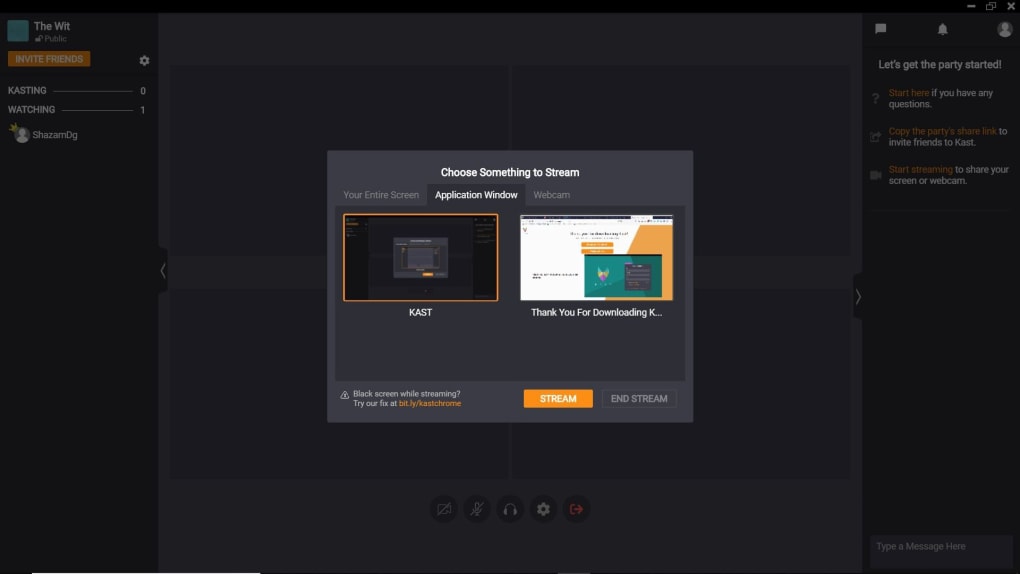
While inside a party, use the bottom toolbar to start screen sharing, turn on your webcam, or mute/unmute yourself. The chat panel slides out from the right, allowing you to type messages or use emojis. If the host enables video chat, you’ll see participant video feeds in a grid layout. To leave, click the “Leave Party” button in the top‑left corner. All settings can be adjusted on the fly, making Kast adaptable to movie nights, study groups, or multiplayer gaming sessions.
Compatibility, Pros & Cons
Kast runs on Windows 10/11, macOS 10.15 or later, Android 6.0+, and iOS 13+. The desktop versions support both Intel and Apple Silicon processors, while mobile apps are optimized for tablets and phones.
Pros
- Free, ad‑free experience with no hidden costs.
- Supports both public and private rooms, giving flexibility for different audiences.
- All‑in‑one chat (voice, video, text) eliminates the need for third‑party communication tools.
- Intuitive dark UI that reduces eye strain during long sessions.
- Cross‑platform sync – start a party on a laptop and continue on a phone.
Cons
- Video and audio streams can be choppy, especially on slower internet connections.
- Resolution often drops to 480p, which may not satisfy users expecting HD quality.
- Occasional latency between screen share and participant view, leading to desynchronization.
- Limited moderation tools; hosts cannot easily mute disruptive users without leaving the room.
- Customer support is minimal, with most help provided via community forums.
FAQ
Is Kast completely free or are there hidden charges?
Kast is free to download and use. There are no subscription fees, premium tiers, or hidden ads. All core features – screen sharing, chat, and party creation – are available at no cost.
Can I host a private party that only my friends can join?
Yes. When you create a new party, you can set its privacy to “Private.” A unique link is generated, and only those who receive the link can access the room. Uninvited users are automatically blocked.
What internet speed is recommended for smooth streaming?
For the best experience, a stable broadband connection of at least 5 Mbps upload and 10 Mbps download is recommended. Lower speeds may result in choppy video and audio lag.
Does Kast support subtitles or closed captions?
Kast itself does not embed subtitle files, but if the source video contains embedded subtitles, they will be visible to all participants. External subtitle files need to be handled by the host’s media player before sharing the screen.
Is there a limit to how many people can join a single party?
Kast allows up to 100 participants per party. This includes both viewers and active chatters. Larger audiences may experience increased latency, so it’s best to keep the group size manageable for smooth interaction.
Conclusion & Call to Action
Kast offers a compelling vision of social streaming – a place where friends can gather virtually, share a screen, and chat in real time without juggling multiple apps. Its free price tag and cross‑platform reach make it an attractive option for casual movie nights, remote study groups, or gaming sessions. However, the platform’s technical shortcomings – notably choppy video, low resolution, and occasional audio glitches – can undermine the overall experience, especially for users with higher expectations of HD quality. If you’re looking for a lightweight, no‑cost solution and are willing to tolerate occasional hiccups, Kast is worth a try. For those who prioritize flawless streaming and robust moderation tools, exploring alternatives such as Teleparty, Disney+ GroupWatch, or paid services like Netflix Party may be more satisfying.
Ready to host your next virtual watch‑party? Download Kast now and invite your friends with a single click. Experience the fun of watching together – and decide for yourself whether Kast meets your streaming needs.








