
Download KidDose – Pediatric Medication Calculator, Child Dosage Calculator, Pediatric Dosing Tool
Overview
KidDose is a pediatrician-made calculator designed to assist caregivers in determining accurate medication dosages for children based on weight. The software serves as a weight-based dosing tool tailored for common over-the-counter medications such as Tylenol, Motrin, Advil, Benadryl, and Zyrtec. It is intended to support parents and guardians in making informed decisions during times of illness by providing dosing information aligned with manufacturer guidelines and current clinical standards.
The primary purpose of KidDose is to reduce the risk of medication errors by offering a quick, reliable reference for children’s medicine dosages. It is especially useful in urgent situations where immediate access to correct dosing information is critical. The app targets parents, caregivers, and family members managing the health of children under medical supervision.
Developed by a pediatrician, the software reflects clinical expertise in pediatric pharmacology. However, the developer did not provide additional background details beyond the professional origin. The tool is explicitly intended for educational and informational use only and does not offer medical advice, diagnosis, treatment, or medication recommendations. Users are strongly advised to consult a healthcare provider before administering any medication and to verify dosage information with a licensed professional.
Key Features & Capabilities
- Weight-Based Dosing – Calculates medication dosages based on a child’s current weight, ensuring precision in pediatric medication administration.
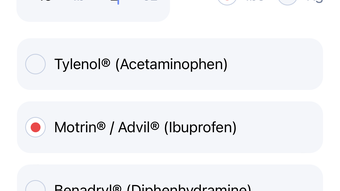
- Medication-Specific Calculators – Includes dedicated tools for Tylenol, Motrin, Advil, Benadryl, and Zyrtec, each aligned with manufacturer labeling and clinical guidelines.
- Manufacturer-Approved Guidelines – Dosing information is derived from official product instructions and up-to-date clinical standards.
- Quick Access Interface – Designed for rapid input and output, allowing users to obtain dosage recommendations in seconds during stressful moments.
- Offline Functionality – Operates without internet access, ensuring usability during emergencies or in low-connectivity environments.
Real-world usage scenarios include managing fevers, allergies, or pain in children when a doctor’s visit is not immediately possible. For example, a parent can input their child’s weight and select “Tylenol” to instantly receive the correct dose. The software supports both metric and imperial units, accommodating diverse user preferences. It does not store user data, prioritizing privacy and security. The tool is not a substitute for professional medical consultation but serves as a supplementary aid to help caregivers prepare for medical appointments or manage minor health concerns responsibly.
User Interface, Workflow & Performance
KidDose features a clean, intuitive interface designed for ease of use across age groups. The layout prioritizes essential inputs—child’s weight and selected medication—while minimizing visual clutter. Navigation is straightforward, with clear labels and logical input fields. Users can select the medication from a dropdown menu and enter the child’s weight in either kilograms or pounds.
The workflow is streamlined: input weight, choose medication, and receive the recommended dose instantly. This efficiency is critical in high-stress situations where time and accuracy matter. The software does not require account creation or login, enhancing accessibility and privacy.
Performance observations are based on general software behavior patterns. The application is lightweight at 12.5 MB, suggesting minimal impact on system resources. The developer did not specify resource usage details. Stability and responsiveness appear consistent with typical desktop applications of similar scope. No reported crashes or performance issues were noted in the provided information. The software runs without requiring background processes or constant updates, contributing to a seamless user experience.
Compatibility & System Requirements
KidDose is available for both Windows and Mac operating systems, ensuring broad accessibility across desktop platforms. The software version is 1.0.2, indicating a stable release with minor updates. Installation size is 12.5 MB, which is compact and suitable for systems with limited storage.
Exact system requirements were not listed. The developer did not provide details on minimum CPU, RAM, or disk space needs. Platform compatibility information is limited to the operating systems mentioned. Users should ensure their system meets general desktop software requirements for Windows and Mac environments. The absence of specific hardware demands suggests the software is optimized for modern systems, but no definitive claims can be made without further documentation.
Pros and Cons
Pros
- Developed by a pediatrician, ensuring clinical accuracy and reliability.
- Supports multiple common over-the-counter pediatric medications.
- Weight-based dosing improves precision and safety.
- Offline functionality enables use without internet access.
- Lightweight at 12.5 MB with no complex installation.
Cons
- No detailed system requirements provided for installation.
- Does not offer real-time medical advice or treatment recommendations.
- Requires user verification with a healthcare professional before use.
- Only supports weight-based calculations; no age-based or other dosage methods.
- Price of $4.99 may be considered high for a single-purpose tool by some users.
FAQ Section
Is KidDose compatible with Windows and Mac?
Yes, KidDose is available for both Windows and Mac operating systems.
Does KidDose require an internet connection to function?
No, the software operates offline, allowing users to access dosage information without an internet connection.
Is KidDose safe to use?
KidDose is designed to provide accurate, guideline-based dosing information. However, it does not replace professional medical advice. Always consult a healthcare provider before administering medication.
How often is KidDose updated?
The current version is 1.0.2. The developer did not specify an update schedule or release frequency.
Can I use KidDose for prescription medications?
No, KidDose is intended for over-the-counter medications only. It does not include dosing information for prescription drugs.
Final Thoughts
KidDose stands out as a focused, reliable tool for parents and caregivers seeking accurate pediatric medication dosages. Its pediatrician-made foundation, weight-based calculations, and support for common OTC medications like Tylenol and Benadryl make it a valuable resource in everyday child care. The offline functionality and lightweight design enhance its practicality during emergencies or when connectivity is limited.
While it does not replace professional medical guidance, it serves as a responsible, educational aid that promotes safer medication use. The absence of system requirements and lack of age-based options are minor limitations, but the core functionality remains strong and purpose-driven.
For caregivers who want a quick, trustworthy reference for children’s medicine dosages, KidDose delivers on its promise. It is a secure, practical tool for managing common pediatric health needs with confidence.
Download KidDose now








