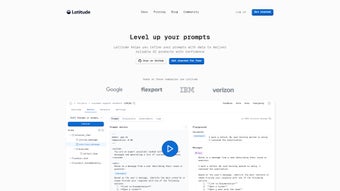

Download Latitude – AI‑Powered Data Exploration & Collaboration Tool
Overview
Latitude is a web‑based AI productivity platform that transforms the way teams explore, analyse, and visualise data. Built for modern data‑driven organisations, Latitude connects to a wide range of data sources—cloud warehouses, on‑prem databases, and SaaS applications—allowing users to query, transform, and visualise data without leaving the browser. Its standout AI SQL Assistant turns natural‑language prompts into accurate SQL queries, while an infinite‑canvas visual programming interface lets analysts design data pipelines with drag‑and‑drop blocks. Integrated with dbt (data build tool), Latitude ensures that models, tests, and documentation stay in sync across the organisation. Real‑time collaboration features, keyboard shortcuts, and shareable dashboards accelerate decision‑making, making Latitude a comprehensive hub for data teams looking to adopt a fast, secure, and collaborative analytics workflow.
Key Features That Set Latitude Apart
- AI‑Driven SQL Assistant: Type a question in plain English and watch Latitude generate, validate, and run the corresponding SQL query instantly.
- Infinite Canvas Visual Programming: Build data workflows using a drag‑and‑drop interface that scales infinitely, ideal for complex transformations.
- Rich Visualisation Library: Choose from dozens of chart types—bar, line, heatmap, funnel, and more—to create interactive dashboards.
- Seamless dbt Integration: Sync dbt models, tests, and snapshots directly within Latitude, ensuring a single source of truth for metrics.
- Multi‑Source Connectivity: Connect to Snowflake, BigQuery, Redshift, PostgreSQL, MySQL, and numerous SaaS APIs with just a few clicks.
- Real‑Time Collaboration: Multiple users can edit queries, visualisations, and pipelines simultaneously, with change‑tracking and commenting.
- Keyboard Shortcuts & Command Palette: Speed up exploration with built‑in shortcuts for common actions like run query, add chart, or switch canvas.
- Secure, Role‑Based Access Control: Granular permissions let admins define who can view, edit, or publish data assets.
- Versioned Data Pipelines: Every change is versioned, enabling rollback and audit trails for compliance.
- Export & Embed Options: Export dashboards as PNG, PDF, or embed them in internal portals with a single line of iframe code.
Installation, Setup, and Everyday Use
Latitude is a cloud‑native SaaS application, which means there is no traditional “install” process on a local machine. Getting started is as simple as creating an account, configuring your data connections, and inviting teammates.
Step‑by‑Step Onboarding
- Sign Up & Verify Email: Visit the Latitude homepage, click “Get Started”, and complete the short registration form. A verification link will be sent to your inbox.
- Choose a Subscription Plan: Latitude offers a 14‑day free trial, after which you can select a Professional or Enterprise tier based on user count and feature set.
- Connect Data Sources: From the Settings → Data Connections page, add credentials for your warehouses (e.g., Snowflake, BigQuery) or SaaS APIs (e.g., Salesforce). Latitude uses encrypted TLS connections and never stores raw passwords.
- Enable dbt Integration: Link your dbt Cloud or local dbt project by providing the repository URL and authentication token. Latitude will automatically import models and tests.
- Invite Team Members: Use the Collaboration tab to send email invitations. Assign roles (Viewer, Analyst, Admin) to control access.
- Start Exploring: Open a new canvas, type a natural‑language query in the AI Assistant, and let Latitude generate the SQL. Visualise the result instantly, then drag the chart onto the canvas for further analysis.
Everyday Workflow Tips
Power users maximise productivity by leveraging the command palette (⌘+K / Ctrl+K) to jump between canvases, run queries, or insert pre‑built chart templates. Keyboard shortcuts such as Ctrl+Enter to execute a query, Shift+N to create a new node, and Alt+S to save a snapshot dramatically reduce mouse‑clicks. For teams that need governance, the built‑in audit log records who performed each action, which is searchable from the Admin console.
Because Latitude runs entirely in the browser, it works on any modern operating system. The platform is optimized for Chrome, Edge, and Firefox, with responsive design for tablets and high‑resolution displays.
Supported Operating Systems: Windows 10+, macOS 11+, Linux (any modern distro), Chrome OS, iOS Safari (mobile view), Android Chrome (tablet view).
Pros, Cons, and Frequently Asked Questions
Pros
- AI‑driven SQL generation removes the learning curve for non‑technical users.
- Infinite canvas visual programming encourages rapid prototyping of complex pipelines.
- Deep dbt integration keeps data models consistent across the organisation.
- Real‑time collaboration mirrors the experience of shared Google Docs for data.
- Role‑based security and audit logs satisfy most compliance requirements.
Cons
- Being a SaaS solution, it requires a reliable internet connection; offline work is limited.
- Advanced custom visualisations may need external libraries or embedding.
- Pricing can be a barrier for very small teams or freelancers.
- Learning the infinite canvas interface may take a few sessions for new users.
FAQ – Your Latitude Questions Answered
Is Latitude compatible with on‑premise databases?
Yes. Latitude supports secure VPN or SSH tunnelling to connect to on‑premise PostgreSQL, MySQL, SQL Server, and Oracle instances. You simply provide the connection details and upload the SSH key or certificate within the Data Connections UI.
Can I export a dashboard to PowerPoint?
While Latitude does not export directly to PowerPoint, you can download dashboards as high‑resolution PNG or PDF files and then insert them into your presentation slides.
How does the AI SQL Assistant handle ambiguous queries?
When the natural‑language prompt is ambiguous, the assistant returns a clarification dialog showing multiple possible interpretations. You can select the intended meaning, after which the refined SQL is generated.
Is there a way to schedule automatic refreshes of my dashboards?
Yes. Latitude includes a Scheduler feature where you can set cron‑style refresh intervals for specific queries or entire canvases. Results are cached and the visualisations update automatically for all collaborators.
What support options are available for Enterprise customers?
Enterprise plans receive 24/7 priority email support, a dedicated Customer Success Manager, and optional on‑site training sessions. SLA guarantees include a 1‑hour first‑response time for critical incidents.
Conclusion – Is Latitude Right for Your Team?
Latitude delivers a compelling blend of AI‑enhanced query building, visual programming, and collaborative dashboards—all wrapped in a secure, cloud‑first architecture. For organisations that already rely on dbt for data modelling, Latitude becomes a natural extension that surfaces those models to business users without sacrificing governance. The platform’s real‑time editing experience and extensive chart library empower analysts to move from raw data to actionable insights in minutes rather than hours.
If your team values a unified workspace where data engineers, analysts, and product managers can co‑create and iterate, Latitude is a strong candidate. The subscription cost is justified by the time saved on manual SQL writing and the reduction in context‑switching between separate BI tools. However, teams that need heavy offline capability or ultra‑custom visualisations may need to supplement Latitude with specialised desktop tools.
Ready to experience faster, AI‑driven data exploration? Start your free 14‑day trial today and see how the AI SQL Assistant and infinite canvas can transform your data workflow. Download Latitude now and give your team the secure, collaborative edge it deserves.



.png)




