
Screenshots
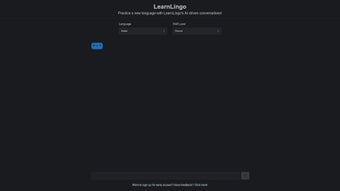
App details
- Updated
- August 13, 2024
- Requires
- Chrome
- License
- Full
- Developer
- LearnLingo
- Category
- Web Apps
About LearnLingo
Download LearnLingo – AI‑Powered Language Learning Tool
Overview
LearnLingo arrives at a moment when language learners are demanding more than static flashcards and textbook drills. Powered by cutting‑edge artificial intelligence, this platform transforms the learning experience into a dynamic conversation with a virtual tutor that adapts to each user’s proficiency, goals, and interests. The core premise is simple yet powerful: practice a new language through realistic dialogues, receive instant feedback, and watch your confidence grow with every exchange. Whether you’re a complete beginner looking to master basic greetings or an intermediate speaker aiming to polish fluency, LearnLingo tailors challenges to your current skill level, ensuring you’re never overwhelmed or bored.
One of the standout elements is the “Live Dialogue” mode, where the AI simulates real‑world situations—ordering coffee in a Parisian café, negotiating a business deal in Mandarin, or navigating a train station in Spanish. As you type or speak, the system parses your input, corrects mistakes, and suggests more natural phrasing, creating a loop of immediate, personalized feedback. The platform also integrates an on‑the‑fly translation assistant that highlights unfamiliar words, offers definitions, and provides example sentences without breaking the flow of conversation.
The developers have embedded a demo sandbox that lets newcomers explore the interface without creating an account. This low‑friction entry point encourages experimentation, while a built‑in feedback channel invites users to share ideas for future updates. Although LearnLingo currently lacks offline capability and visual aids such as images or cultural notes, its AI‑driven conversation engine compensates with a highly engaging, always‑online environment that pushes learners toward active usage rather than passive memorization. The overall design philosophy emphasizes immersion, instant correction, and data‑driven progress tracking, making it a compelling option for anyone serious about mastering a new language.
Key Features & Benefits
- AI‑Generated Interactive Dialogues – Simulated real‑life conversations in over 15 languages, ranging from beginner to advanced levels.
- Personalized Difficulty Scaling – The system assesses your responses and automatically adjusts vocabulary and grammar complexity.
- Instant Translation & Vocabulary Aid – Click on any word to see definitions, pronunciation guides, and contextual examples without leaving the chat.
- Progress Tracker & Skill Dashboard – Visualize improvement trends, mastery percentages, and areas that need extra practice.
- Demo Sandbox – Explore the platform’s capabilities instantly, no registration required.
- Feedback Loop – Submit suggestions directly from the app; developers incorporate community ideas into upcoming releases.
- Cross‑Platform Sync – Your conversation history and progress follow you from desktop to mobile.
Beyond the feature list, LearnLingo delivers tangible benefits that resonate with modern learners. The conversational approach mimics natural language acquisition, encouraging muscle memory for pronunciation and sentence structure. By receiving corrective feedback in real time, users avoid cementing bad habits—a common pitfall in traditional self‑study. Moreover, the adaptive difficulty ensures that each session remains challenging yet achievable, which research shows is critical for sustained motivation.
The built‑in analytics dashboard turns language study into a data‑driven habit. Learners can monitor metrics such as “words mastered per week,” “average response time,” and “error type distribution,” turning abstract progress into concrete numbers. This transparency helps users set realistic goals, celebrate milestones, and identify weak spots before they become obstacles. Finally, seamless cloud sync eliminates the need for manual backups, giving peace of mind that progress is never lost and that updates are delivered instantly without user intervention.
Installation, Usage & Compatibility
Getting started with LearnLingo is straightforward. The software is available as a free download for Windows, macOS, Android, and iOS. Follow these steps to install the application on your preferred device:
- Visit the official LearnLingo website and click the Download button that matches your operating system.
- For Windows and macOS, run the installer (.exe or .dmg) and follow the on‑screen prompts to accept the license agreement and choose an installation folder.
- On Android, open the Google Play Store, search for “LearnLingo,” and tap Install. iOS users can locate the app in the Apple App Store and press Get.
- Launch the application and create a free account using an email address or social login. You can also skip registration and jump straight into the demo mode.
- After logging in, select your target language, set your proficiency level, and choose a conversation scenario from the library.
Once installed, the user interface guides you through a short onboarding tutorial that explains how to type or speak responses, access the translation pop‑up, and review feedback. The main dashboard displays active lessons, progress stats, and a “Quick Start” button for immediate practice. For users who prefer voice interaction, the app integrates native speech‑to‑text APIs on each platform, allowing natural pronunciation practice.
LearnLingo is fully compatible with Windows 10/11, macOS 11 (Big Sur) and later, Android 8.0 and above, as well as iOS 13 and newer. System requirements are modest: a minimum of 2 GB RAM, 150 MB of free storage, and an active internet connection for real‑time AI processing. While the platform does not yet support offline mode, its cloud‑based architecture ensures rapid updates and continuous improvement without manual patches.
To maximize learning efficiency, we recommend pairing the app with a quiet environment for voice input, enabling notifications so you receive daily practice reminders, and setting a consistent schedule—ideally 10‑15 minutes per day. Over time, the AI will recognize your speech patterns, adjust its response speed, and provide increasingly nuanced feedback, turning short sessions into a powerful habit.
Pros, Cons & Frequently Asked Questions
Pros
- Highly engaging AI‑driven conversation practice.
- Personalized difficulty adjustment keeps learning optimal.
- Instant translation and vocabulary assistance without leaving the dialogue.
- Free tier provides ample features for casual learners.
- Cross‑platform sync preserves progress across devices.
- Data‑driven analytics give clear insight into learning trends.
- Responsive customer‑feedback loop encourages continuous improvement.
Cons
- No offline mode—requires constant internet connectivity.
- Lacks visual aids such as images, videos, or cultural context notes.
- Limited language selection compared to some large‑scale platforms.
- Voice recognition accuracy varies with background noise.
- Advanced grammar explanations are basic; may need supplemental resources.
Frequently Asked Questions
Is LearnLingo really free?
LearnLingo offers a completely free tier that includes all core conversation features, progress tracking, and cross‑device sync. A premium subscription unlocks additional languages, advanced analytics, and priority AI response speed.
Can I use LearnLingo on multiple devices simultaneously?
Yes. Your account data is stored in the cloud, so you can switch between a Windows PC, a Mac, or a mobile device without losing progress. Sessions are synchronized automatically when you log in.
Does LearnLingo support speech input?
Absolutely. The app leverages native speech‑to‑text engines on each platform, allowing you to speak your responses. This feature is especially useful for pronunciation practice.
How secure is my personal data?
LearnLingo employs end‑to‑end encryption for account credentials and stores conversation data on secure, GDPR‑compliant servers. The privacy policy outlines data handling practices clearly.
Can I request new languages or features?
Yes. Within the app’s settings, there’s a “Feedback & Suggestions” form that routes directly to the product team. Community‑driven ideas are frequently incorporated into upcoming releases.
Conclusion – Start Your Multilingual Journey Today
LearnLingo represents a fresh take on language acquisition, turning what is often a solitary, rote activity into an interactive, AI‑guided conversation. Its strengths lie in real‑time feedback, adaptive difficulty, and seamless cross‑platform experience—all offered at no cost for the core features. While the absence of offline mode and limited cultural content may be drawbacks for some, the platform’s engaging dialogue engine makes up for these gaps by keeping learners actively involved and motivated.
For anyone seeking a modern, convenient way to practice speaking, listening, and reading in a new language, LearnLingo is a compelling option. Download the free version today, set your first conversation scenario, and watch your confidence soar with each exchange. The journey to fluency has never been this conversational, and with LearnLingo’s data‑driven insights you’ll know exactly how far you’ve come and what to focus on next.
LearnLingo delivers an intuitive AI‑driven learning environment that feels like chatting with a native speaker. The personalized feedback and progress analytics make it a solid choice for self‑learners.
Guides & Tutorials
How to install LearnLingo
- Click the Download button above.
- Once redirected, accept the terms and click Install.
- Wait for the LearnLingo download to finish on your device.
How to use LearnLingo
This software is primarily used for its core features described above. Open the app after installation to explore its capabilities.
User Reviews
No reviews yet. Be the first to share your experience.
You may also like
more
3D AI Studio
3D AI Studio Overview 3D AI Studio is a web-based AI-powered tool developed by S...

3D textures by Polycam
Generate Realistic 3D Textures Effortlessly 3D Textures by Polycam is an innovat...

3DAiLY
Customizable 3D Modeling Tool: 3DAiLY 3DAiLY is an online platform that harnesse...

3DFY
Revolutionizing 3D Model Creation: 3DFY Review 3DFY is an AI-powered service, de...

AI Dungeon
AI Dungeon: Deep Learning Text Adventure AI Dungeon is an artificial intelligenc...

Alpha3D
A subscription-based program for Web apps, by alpha3d. Alpha3D is a subscription...
