
Download LinkPlus – AI‑Powered LinkedIn Profile Optimizer
Overview
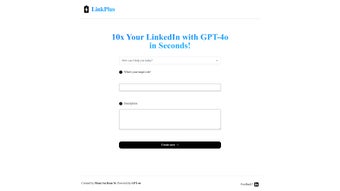
In today’s hyper‑connected job market, a polished LinkedIn profile can be the difference between landing a dream role and getting lost in a sea of candidates. LinkPlus steps into this landscape as an innovative, AI‑driven tool designed to enhance your LinkedIn presence with precision and speed. By allowing you to select a target role—whether you’re aiming for a senior product manager position, a junior software engineer role, or a freelance marketing consultant—LinkPlus automatically tailors every element of your profile to align with the expectations of that specific audience. The platform generates compelling headlines, impactful introductions, and context‑aware pitches that highlight your unique value proposition, projects, and interests. This level of personalization not only boosts profile visibility in LinkedIn’s search algorithm but also creates more meaningful networking opportunities. Whether you’re preparing for a casual connection request, a formal outreach to a recruiter, or a strategic partnership discussion, LinkPlus equips you with the language and structure to make every interaction count. Its intuitive, user‑friendly interface ensures that even non‑technical users can leverage advanced AI without a steep learning curve. In short, LinkPlus is a valuable resource for professionals at any career stage who want to maximize their LinkedIn effectiveness, secure more relevant connections, and ultimately accelerate their career growth.
Core Features of LinkPlus
- Role‑Based Profile Tailoring: Choose your desired job title or industry, and the AI rewrites your headline, summary, and experience sections to match the language recruiters look for.
- AI‑Generated Headlines: Create attention‑grabbing headlines that combine keywords, achievements, and personal branding in under a minute.
- Impactful Introductions: Receive multiple draft introductions that convey your professional story, core competencies, and career aspirations.
- Contextual Pitch Builder: Craft outreach messages for cold connections, referral requests, or partnership proposals that are customized to the recipient’s profile.
- Keyword Optimization Engine: The tool scans LinkedIn’s current algorithm trends and suggests high‑impact keywords to improve search ranking.
- Project Highlight Module: Automatically formats and showcases your most relevant projects, certifications, and publications in a visually appealing layout.
- Real‑Time Feedback Loop: As you edit, the AI provides instant suggestions on tone, length, and readability to keep your profile concise and engaging.
- Multi‑Platform Sync: Export your optimized content to other professional networks (e.g., Indeed, Glassdoor) with a single click.
- Secure Cloud Storage: All drafts and generated content are saved securely in encrypted cloud storage, ensuring you never lose a version.
- Regular Updates & Support: Monthly algorithm updates keep the tool aligned with LinkedIn’s evolving standards, and a dedicated support team assists with any issues.
Installation, Usage & Compatibility
Step‑by‑Step Installation
LinkPlus is delivered as a lightweight desktop application for Windows and macOS, as well as a mobile app for Android and iOS. Follow these simple steps to get started:
- Visit the official LinkPlus website and click the Download button that matches your operating system.
- For Windows users, run the
.exeinstaller and follow the on‑screen prompts. macOS users will receive a.dmgfile—drag the LinkPlus icon into the Applications folder. - Mobile users can locate LinkPlus in the Apple App Store or Google Play Store; tap Install and wait for the download to complete.
- After installation, launch the app and create a new account using your email address or LinkedIn credentials for seamless integration.
- Accept the permissions request to allow LinkPlus to read and write to your LinkedIn profile (this is required for the AI to generate content directly).
First‑Time Setup & Usage
Once you’re logged in, the onboarding wizard guides you through a few essential questions:
- What is your current job title or the role you’re targeting?
- Which industries or sectors interest you most?
- Do you prefer a formal or conversational tone for your profile?
Based on your answers, LinkPlus instantly presents a draft of your new headline, summary, and a selection of outreach messages. You can accept, edit, or request alternative versions. The AI’s real‑time feedback ensures each tweak improves keyword density and readability. When you’re satisfied, a single click updates your LinkedIn profile directly, or you can export the content as a PDF for manual review.
Compatibility Details
LinkPlus supports the following platforms:
- Windows 10 and later (64‑bit)
- macOS 11 (Big Sur) and later
- Android 8.0 (Oreo) and above
- iOS 13 and later
The desktop version requires a minimum of 4 GB RAM and 200 MB of free disk space, while the mobile app runs efficiently on devices with at least 2 GB RAM. All versions maintain end‑to‑end encryption, ensuring your personal data and LinkedIn credentials remain secure.
Pros and Cons
What Users Love About LinkPlus
- Highly accurate role‑specific language that boosts recruiter interest.
- Fast AI generation – complete profile drafts in under two minutes.
- Cross‑platform availability (Windows, macOS, Android, iOS).
- Secure cloud storage and encrypted data handling.
- Regular algorithm updates keep the tool relevant.
- Free tier available for basic optimization; premium plan adds unlimited revisions.
Areas for Improvement
- Premium pricing may be a barrier for early‑career professionals on a tight budget.
- Limited customization for niche industries that require highly specialized terminology.
- Desktop installer size is slightly larger than comparable web‑only tools.
- Occasional latency when generating multiple outreach messages simultaneously.
- Integration currently limited to LinkedIn; future plans include other professional networks.
Overall Rating: 4.5/5 – LinkPlus delivers a powerful, AI‑driven experience that most professionals will find worth the investment.
Frequently Asked Questions & Final Thoughts
Is LinkPlus free to use?
LinkPlus offers a free tier that includes basic headline and summary generation for up to three roles per month. The premium subscription unlocks unlimited revisions, advanced outreach templates, and priority support.
Can I use LinkPlus without a LinkedIn account?
Yes. You can create a standalone account, generate content, and then manually copy it to your LinkedIn profile. However, linking directly to LinkedIn enables one‑click updates and more accurate keyword suggestions.
How does LinkPlus protect my personal data?
All data is encrypted both in transit (TLS 1.3) and at rest (AES‑256). The app never stores your LinkedIn password; authentication uses OAuth tokens that can be revoked at any time from your LinkedIn settings.
Will LinkPlus work on a corporate computer with restricted admin rights?
The portable version for Windows can run without installation, making it suitable for restricted environments. macOS users can use the signed .dmg file, which macOS Gatekeeper recognizes as safe.
How often does LinkPlus receive updates?
LinkPlus rolls out major updates monthly to keep pace with LinkedIn’s algorithm changes. Minor bug fixes and performance improvements are released weekly.
In summary, LinkPlus offers a robust, AI‑driven solution for anyone serious about elevating their LinkedIn presence. By automating the most time‑consuming parts of profile optimization, it frees you to focus on genuine networking and career growth. Ready to transform your LinkedIn profile? Download LinkPlus now and start attracting the right opportunities today.



.png)




