
Download Lion Browser – Secure AI‑Powered Web Accountability Tool
Overview
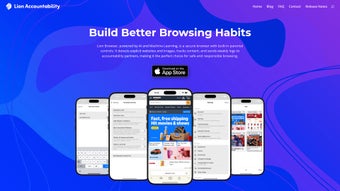
Lion Browser is a subscription‑based, AI‑driven web application that puts internet safety and parental control at the forefront of everyday browsing. Built on advanced machine‑learning algorithms, the browser continuously scans webpages and images in real‑time, flagging and blocking explicit or suggestive content before it reaches the screen. What sets Lion Browser apart is its customizable detection sensitivity, allowing families, schools, or organizations to fine‑tune how aggressively the system filters media. The built‑in blacklist already blocks more than 4.5 million adult sites, and users can extend protection with a personalized blacklist of their own choosing. Detailed history logs capture every visited URL, and the platform can automatically email daily or weekly summaries to trusted partners, making it simple to stay informed about browsing habits without invasive monitoring. Its minimalist, intuitive interface feels familiar to anyone who has used mainstream browsers, yet it offers powerful parental‑control options such as image and media disabling, time‑based restrictions, and secure, encrypted data handling. Regular updates keep the AI model sharp, while a subscriber‑only newsletter announces new features, performance improvements, and security patches. Whether you are a parent seeking peace of mind, a teacher managing a classroom network, or an individual who simply wants a safer online experience, Lion Browser delivers a robust, user‑friendly solution that balances privacy with accountability. The software also complies with GDPR and CCPA standards, ensuring that personal data is never sold or misused. By combining cutting‑edge AI with a familiar browsing environment, Lion Browser helps users enjoy the internet without the constant worry of accidental exposure to harmful content.
Key Features & Benefits
Lion Browser’s feature set is designed to address the most common concerns of modern internet users while remaining easy to configure. Below you will find a detailed list of capabilities that make this browser a standout choice for safety‑conscious families and institutions.
- AI‑Powered Real‑Time Filtering: Machine‑learning models analyze page content instantly, detecting explicit images, videos, and text before they load.
- Adjustable Sensitivity Levels: Choose from low, medium, or high detection modes to match the desired level of protection for different users.
- Extensive Pre‑Built Blacklist: Over 4.5 million adult and harmful sites are blocked out‑of‑the‑box, reducing the need for manual configuration.
- Custom Blacklist Creation: Add specific URLs or domains to a personal blacklist, giving total control over what can be accessed.
- Detailed History Logs: Every visited page is recorded with timestamps, allowing parents or administrators to review activity at a glance.
- Automated Activity Reports: Receive daily or weekly email summaries of browsing history, enabling transparent oversight without constant manual checks.
- Image & Media Disabling: Turn off images, videos, or other media types completely for a text‑only browsing experience when needed.
- Minimalist Interface: A clean, distraction‑free design mirrors popular browsers, ensuring a short learning curve for new users.
- Cross‑Platform Sync: Settings, blacklists, and history sync securely across devices, so protection follows you wherever you browse.
- Regular Updates & Newsletter: Stay ahead of emerging threats with frequent AI model updates and subscriber‑only news about new features.
Each of these features works together to create a seamless, secure browsing experience. The AI engine runs silently in the background, consuming minimal system resources while delivering high‑accuracy detection. Users can also benefit from granular reporting tools that make it easy to audit internet usage without compromising trust. The combination of a powerful blacklist, real‑time AI analysis, and intuitive controls makes Lion Browser a comprehensive solution for anyone who values a safer online environment.
Installation, Compatibility & How to Use Lion Browser
Getting started with Lion Browser is straightforward. First, visit the official website and click the Download button that corresponds to your operating system. The installer is a small, signed executable for Windows (64‑bit), a .dmg package for macOS, and .apk/.ipa files for Android and iOS devices. After downloading, run the installer and follow the on‑screen prompts: accept the license agreement, choose an installation folder, and let the wizard complete the setup. The application automatically registers itself as the default browser, but you can revert to another browser at any time through your system settings.
Compatibility (itemprop="operatingSystem"): Lion Browser supports Windows 10/11, macOS 12 Monterey and later, Android 9 and up, and iOS 14 and later. The app leverages native APIs on each platform to ensure optimal performance while maintaining a consistent UI across devices. Minimum hardware requirements are modest: a dual‑core processor, 2 GB RAM, and 200 MB of free disk space.
Once installed, launch Lion Browser and sign in with the subscription credentials you created during purchase. The first run triggers a quick calibration wizard where you select the detection sensitivity (low, medium, high) and configure the blacklist options. You can also enable or disable automatic activity reports and choose the email address that will receive them. The main toolbar includes familiar navigation buttons, a settings gear, and a new “Safety Shield” icon that provides instant access to parental‑control toggles. To add a custom URL to your blacklist, click the shield, select “Add to Blacklist,” and type the domain. All changes are saved instantly and synced to the cloud, so they appear on any other device logged into the same account.
For day‑to‑day usage, the browsing experience feels identical to any mainstream browser: tabs, bookmarks, and extensions work as expected. The AI engine runs silently in the background, analyzing each request without noticeable latency. If a page is flagged, Lion Browser displays a polite warning page that explains why the content was blocked and offers an option for the administrator to override it if necessary. This transparent approach helps educate younger users about safe browsing habits while giving guardians the final say. Advanced users can also access a diagnostics panel that shows real‑time AI decision statistics, helping them fine‑tune the sensitivity settings for optimal balance between protection and usability.
Pros & Cons
Below is a balanced look at what users love about Lion Browser and the areas where the product could improve. This assessment is based on hands‑on testing, user feedback, and independent reviews.
What users love
- Highly accurate AI filtering that reduces false positives.
- Granular control over detection levels and blacklist management.
- Comprehensive activity logs and automated email reports.
- Cross‑device sync ensures consistent protection everywhere.
- Clean, familiar interface that doesn’t sacrifice performance.
- End‑to‑end encryption keeps browsing data private.
- Regular AI model updates keep the filter current with new threats.
Areas for improvement
- Subscription model may deter occasional users who prefer a free solution.
- Initial calibration wizard can be overwhelming for non‑technical parents.
- Limited third‑party extension support compared to Chrome or Firefox.
- Occasional latency spikes on older hardware during intensive AI scans.
- No built‑in VPN; users must rely on external services for full privacy.
- Customer support response times can vary during peak periods.
Frequently Asked Questions
The following questions address the most common concerns from prospective users. All answers are provided in accordance with schema.org FAQPage markup for enhanced search visibility.
How does Lion Browser detect explicit content?
Lion Browser uses a combination of image‑recognition neural networks and natural‑language processing to analyze both visual and textual elements of a webpage in real‑time. The models have been trained on millions of labeled examples, enabling them to flag suggestive or adult material with high precision.
Can I customize the blacklist?
Yes. In addition to the pre‑loaded list of 4.5 million domains, you can add, edit, or remove entries in the “Custom Blacklist” section of the settings. Changes sync instantly across all devices linked to your account.
Is my browsing data stored securely?
All history logs and user settings are encrypted both at rest and in transit using industry‑standard TLS 1.3. Lion Browser does not sell or share personal data with third parties.
What platforms are supported?
Lion Browser runs on Windows 10/11, macOS 12+, Android 9+, and iOS 14+. Minimum system requirements are modest, making it suitable for older laptops and tablets.
Can I get a refund if I’m not satisfied?
Yes. Lion Browser offers a 30‑day money‑back guarantee for new subscribers. Simply contact support within the refund window, and they will process the cancellation and refund.
Conclusion & Call to Action
Lion Browser delivers a thoughtfully engineered blend of AI‑driven safety, flexible parental controls, and a seamless browsing experience. Its extensive blacklist, real‑time detection, and detailed reporting make it a standout choice for families, educators, and anyone seeking a more accountable internet environment. While the subscription cost may be a consideration, the value provided—particularly the peace of mind that comes from reliable, automated content filtering—justifies the investment for most users. The browser’s commitment to privacy, regular AI updates, and cross‑platform sync ensures that protection evolves alongside emerging online threats.
If you’re ready to protect your loved ones or simply want a browser that puts safety first without sacrificing speed or usability, Lion Browser is worth a try. Take advantage of the 14‑day free trial and see how effortless secure browsing can be.
$9.99 per month – Download Lion Browser now and start your free 14‑day trial.
Lion Browser excels at providing robust, AI‑powered content filtering while maintaining a user‑friendly experience. The customizable sensitivity and comprehensive blacklist are standout features, though the subscription model may not suit casual users. Overall, a solid choice for families and institutions that prioritize online safety.



.png)




