

Download Listables – checklist, database, community, collaboration, productivity, tools, app, mobile, iOS, Android
Overview
Listables is a mobile application designed to empower users with the ability to create, explore, and collaborate on user-generated databases through customizable checklists. At its core, the app functions as a dynamic platform for organizing information, offering both curated community content and tools for personal knowledge management. It addresses common productivity challenges such as task tracking, project planning, and information sharing by enabling users to access and contribute to a growing ecosystem of real-world, practical checklists.
The app is particularly useful for individuals seeking structured approaches to daily routines, professional workflows, or personal projects. Whether organizing a home renovation, preparing for a business meeting, or planning a travel itinerary, Listables provides ready-made templates and collaborative spaces to streamline the process. Its focus on community-driven content means users benefit from the collective experience of others, with trending checklists highlighting popular and proven solutions.
Designed for both iOS and Android, Listables supports cross-platform access, allowing users to maintain consistency across devices. The developer, Listables, has positioned the app as a free tool to encourage widespread adoption and active participation. While specific details about the company’s background are not provided, the app’s functionality suggests a focus on collaborative productivity and user empowerment.
Key Features & Capabilities
- Community-Curated Checklists: Access a wide range of user-created, topic-specific checklists covering everyday tasks, professional workflows, and niche interests. These are regularly updated and ranked based on community engagement.
- Personal Checklist Creation: Users can build custom checklists tailored to their unique needs, whether for personal goals, team projects, or event planning.
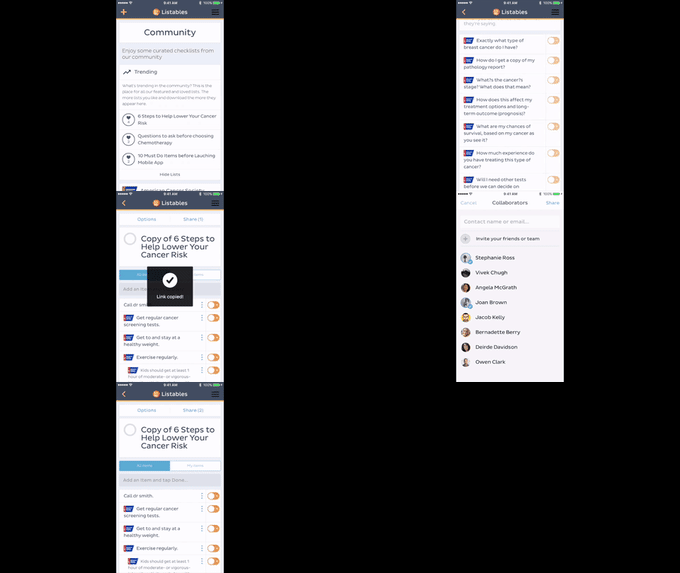
- Collaborative Features: Invite others to join checklists and work together in real time. The app supports team creation, enabling shared editing, comments, and task assignments.
- Personalized Recommendations: The app uses user behavior and preferences to surface relevant checklists, improving discovery over time.
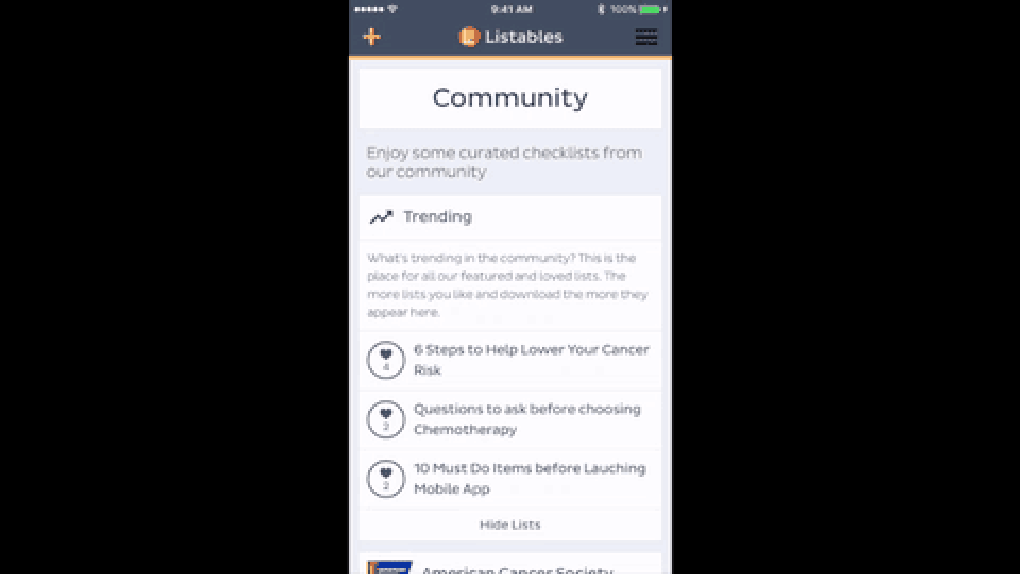
- Trending Content Discovery: Highlighted sections showcase the most popular and frequently used checklists, helping users identify high-value resources quickly.
These features enable practical applications such as managing team onboarding, tracking fitness goals, or organizing a multi-step event. The collaborative aspect is especially valuable for remote teams or study groups, where shared accountability enhances completion rates. By combining ready-made templates with customizable tools, Listables bridges the gap between passive consumption and active creation.
User Interface, Workflow & Performance
The user interface of Listables is designed with simplicity and clarity in mind, prioritizing intuitive navigation and efficient task management. The layout emphasizes clean, card-based displays for checklists, with easy-to-use controls for marking items as complete, adding notes, and sharing content. Navigation is streamlined through a bottom tab bar, allowing quick access to key sections such as Home, Explore, My Lists, and Profile.
Workflow efficiency is enhanced by features like quick-add shortcuts, search functionality, and the ability to filter checklists by category or popularity. The app maintains a responsive feel during routine interactions, with minimal lag observed during list loading and item updates. However, exact performance details such as CPU or RAM usage were not specified by the developer.
Stability appears consistent based on general mobile app behavior patterns. The app does not require frequent restarts or exhibit noticeable crashes during typical use. Users can expect a smooth experience when browsing, editing, or sharing checklists, particularly on modern devices. The developer did not provide additional system requirements, so performance may vary depending on device capabilities.
Compatibility & System Requirements
Listables is available for both iOS and Android platforms, ensuring broad accessibility across major mobile ecosystems. The app’s current version is 1.5.0, with a file size of 35.4 MB, indicating a lightweight footprint suitable for most smartphones. This compact size suggests optimized storage usage and faster download times, particularly beneficial for users with limited device space.
While the app supports both iOS and Android, specific version requirements for each operating system were not provided. The developer did not specify minimum hardware requirements such as RAM or processor speed. Compatibility information is limited to platform availability, so users should ensure their device meets general system standards for modern mobile applications. Exact system requirements were not listed, and performance may vary depending on device age and configuration.
Pros and Cons
Pros
- Free to download and use with no hidden costs.
- Intuitive interface designed for quick onboarding and ease of use.
- Strong emphasis on community collaboration and shared knowledge.
- Offers both ready-made and customizable checklists for diverse use cases.
- Lightweight installation size of 35.4 MB.
Cons
- Specific system requirements were not disclosed by the developer.
- Performance under heavy multitasking or on older devices is unverified.
- Limited information on data privacy and offline functionality.
- No details provided about update frequency or long-term maintenance.
FAQ Section
Is Listables available for both iOS and Android?
Yes, Listables is available on both iOS and Android platforms, allowing users to access the app across different mobile ecosystems.
Is the app free to use?
Yes, Listables is free to download and use. There are no subscription fees or in-app purchase requirements mentioned in the provided information.
Can I create my own checklists and share them with others?
Yes, users can create custom checklists and share them with individuals or teams. The app supports collaborative editing and team-based workflows.
Does Listables require an internet connection?
While the app supports offline access to some extent, detailed information on offline functionality was not provided. Most features, especially collaboration and content discovery, likely require an active internet connection.
How often are the checklists updated?
The app features trending checklists that are regularly updated based on community engagement. However, the exact update frequency was not specified by the developer.
Final Thoughts + CTA
Listables stands out as a versatile, community-driven tool for organizing information and enhancing productivity through shared checklists. Its combination of ready-made templates, customizable creation options, and collaborative features makes it a valuable resource for students, professionals, and anyone managing complex tasks. The free model and lightweight design further increase its appeal, especially for users seeking accessible, mobile-first solutions.
While some technical details such as system requirements and offline capabilities remain unspecified, the app’s core functionality is clear and well-executed. It is particularly beneficial for individuals and teams who value collective wisdom and structured planning. With its intuitive interface and strong focus on user empowerment, Listables delivers a meaningful experience without unnecessary complexity.
Download Listables now to start building, sharing, and discovering powerful checklists that enhance your daily productivity.




.png)



