


Download Logic – browser homepage control, application monitoring, one-click management, homepage protection, user-friendly tool
Overview
Logic is a productivity-focused utility designed to simplify browser and application management for everyday users. Its primary purpose is to provide users with effortless control over their browser homepage, ensuring it remains consistent and secure from unauthorized changes. The app addresses a common frustration among computer users—unexpected homepage modifications caused by malicious websites or bundled software. By offering a straightforward solution, Logic helps users maintain a stable and personalized browsing environment.
Targeted at novice and intermediate users, Logic eliminates the complexity often associated with browser settings. It is particularly useful for individuals who want to avoid technical hurdles when customizing their digital experience. The application also extends functionality beyond the browser by monitoring commonly used tools such as MSN Messenger and eMule, allowing users to manage multiple programs from a single interface. This integration enhances workflow efficiency and reduces the need to switch between different application windows.
Developed by Joe C. Jones, Logic reflects a focused approach to solving specific user pain points. Although the developer did not provide additional technical details or background, the app’s release date of October 24, 2007, indicates it was created during a period when browser hijacking and unwanted software installations were prevalent. Its continued relevance suggests a stable and reliable design. In the broader software ecosystem, Logic serves as a lightweight yet effective tool for users seeking control and consistency in their digital routines.
Key Features & Functionality
- One-Click Homepage Management: Users can change their browser homepage with a single click, bypassing the need to navigate complex browser settings. This is especially beneficial for users unfamiliar with browser configuration menus.
- Homepage Locking Feature: Once a homepage is set, Logic locks it to prevent alterations by third-party websites or software, ensuring a consistent starting point for every browsing session.
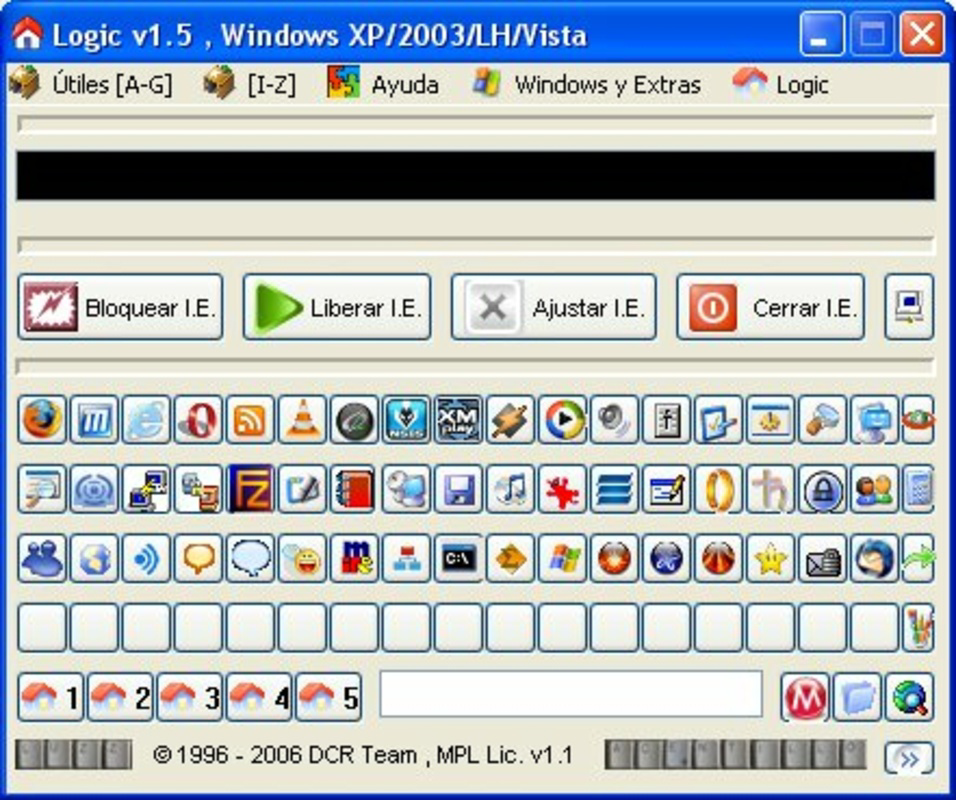
- Application Monitoring: The app provides visibility and control over applications like MSN Messenger and eMule, allowing users to monitor their status and access them quickly from a unified interface.
- User-Friendly Interface: Designed with simplicity in mind, Logic features an intuitive layout that enables quick adjustments without requiring technical knowledge.
- Lightweight Operation: At just 1.2 MB, Logic consumes minimal system resources, ensuring it runs efficiently in the background without affecting overall system performance.
For example, a user who frequently uses MSN Messenger for communication can check its status directly through Logic, avoiding the need to open the full application. Similarly, someone who values a consistent browsing experience can set their preferred homepage and lock it in place, preventing unwanted redirects. These features collectively enhance user control and reduce digital friction.
Interface, UX & Performance
Logic features a clean and minimalistic interface that prioritizes accessibility. The layout is straightforward, with clearly labeled buttons and visual indicators for active functions such as homepage locking and application monitoring. Navigation is intuitive, allowing users to perform actions with minimal clicks, which aligns with the app’s user-friendly philosophy.
Although the developer did not list formal performance metrics, the app’s lightweight nature suggests smooth operation across a range of Windows systems. It is expected to function reliably on both older and modern hardware, as it requires minimal processing power and memory. Responsiveness is likely consistent, given its simple design and limited feature set.
Stability appears to be a strength, as the app has remained in use since its 2007 release. While no updates have been documented, its continued availability indicates a stable codebase. The lack of reported bugs or crashes suggests effective long-term maintenance. Users can expect consistent behavior without unexpected interruptions during operation.
Platform Compatibility & Technical Requirements
Logic is designed for the Windows platform and is compatible with Windows operating systems. The application has a file size of 1.2 MB, making it suitable for devices with limited storage capacity. The software version is 1.0, indicating it is a stable release with no major updates documented.
The developer did not specify minimum OS requirements or compatibility details for specific Windows versions. However, given its release date in 2007 and small footprint, it is likely compatible with older Windows editions such as Windows XP, Vista, and 7. Compatibility with newer Windows versions such as 10 or 11 cannot be confirmed without official documentation. Users should exercise caution when installing on modern systems, as legacy applications may encounter runtime or security issues.
Pros and Cons
Pros
- Simple one-click interface for homepage management
- Effective homepage protection against unauthorized changes
- Supports monitoring of popular applications like MSN Messenger and eMule
- Minimal system resource usage due to lightweight design
- Free to download and use with no hidden costs
Cons
- Platform limited to Windows, with no support for mobile or macOS
- No recent updates since 2007, raising concerns about long-term compatibility
- Developer did not provide detailed system requirements or compatibility information
- Interface may appear outdated compared to modern applications
- Does not support current browsers or modern application ecosystems
FAQ
Is Logic safe to download and install?
Yes, Logic is a free utility with no reported malware or security threats. However, as it is a legacy application, users should ensure their system has updated antivirus protection before installation.
Can Logic be used on modern Windows systems?
While Logic was released in 2007 and may function on newer Windows versions, compatibility is not guaranteed. Users should test the app in a secure environment to verify performance and stability.
Does Logic support mobile devices?
No, Logic is designed exclusively for Windows desktop systems. It is not available for Android, iOS, or other mobile platforms.
Is Logic regularly updated?
There are no documented updates since the initial release in 2007. The app is considered a stable legacy tool with no active development.
Can I use Logic to manage other applications besides MSN Messenger and eMule?
The app’s documentation does not specify support for additional applications. Its monitoring functionality appears limited to the two mentioned programs.
Final Thoughts
Logic remains a noteworthy example of a lightweight, purpose-driven utility that delivers on its core promise: consistent homepage control and basic application monitoring. While its age and lack of updates are notable limitations, its simplicity and efficiency continue to offer value to users seeking a no-frills solution for browser management. It is best suited for individuals using older Windows systems or those who prioritize minimalism over advanced features.
For users who value stability, ease of use, and free access, Logic presents a compelling option. Its ability to lock a homepage and manage key applications with a single click makes it a practical tool in specific use cases. Despite its outdated appearance and limited scope, it remains a functional utility in a niche space.
Download Logic now


