
Download Logomaster – AI‑Powered Professional Logo Design Tool
Introduction & Overview
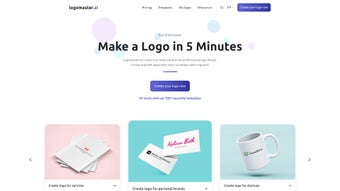
In today’s fast‑moving digital marketplace, a strong visual identity can be the difference between a brand that thrives and one that disappears. Logomaster.ai steps in as a cloud‑based, AI‑driven logo creation platform that promises professional‑grade branding without the need for a seasoned designer or expensive agency fees. Built for startups, small‑business owners, freelance creators, and even large enterprises, Logomaster blends a sleek, user‑friendly interface with sophisticated machine‑learning algorithms that generate custom logo concepts in seconds. The workflow is intentionally simple: you input your industry, preferred colour palette, and style adjectives—such as “minimalist,” “vintage,” or “bold”—and the AI instantly curates a selection of royalty‑free logos ready for download. Over 100 pre‑crafted templates serve as a solid foundation, while the AI tailors each suggestion to the unique parameters you provide, ensuring the final output aligns with your brand narrative. Multilingual support extends its reach to a global audience, making Logomaster a truly inclusive solution for anyone needing a fast, affordable, and high‑quality visual identity. Whether you’re launching a tech startup, rebranding an established firm, or creating a personal side‑project, Logomaster offers a secure, cloud‑based environment where you can experiment, iterate, and finalize a logo that resonates with your target market. The platform also integrates brand‑kit management, collaboration tools, and one‑click updates, positioning it as a comprehensive branding hub rather than a single‑purpose logo generator. By eliminating lengthy design cycles and reducing costs, Logomaster empowers businesses to focus on strategy and growth while still presenting a polished, professional face to the world.
Key Features & Capabilities
- AI‑Generated Designs: Real‑time generation of logo concepts based on industry, style, and colour preferences, delivering 5‑10 unique options within seconds.
- Extensive Template Library: Access more than 100 professionally designed templates that can be used as starting points or fully customized.
- Unlimited Customization: Edit fonts, icons, colour palettes, and layout after AI generation for total creative control.
- Royalty‑Free Assets: All exported logos are royalty‑free, allowing unrestricted commercial use across web, print, merchandise, and advertising.
- Multi‑Format Export: Download logos in PNG, SVG, EPS, and PDF, ensuring compatibility with any design workflow.
- Brand‑Kit Integration: Store colour palettes, typography rules, and brand guidelines directly within the platform for consistent future use.
- Secure Cloud Storage: Projects are saved securely in the cloud, accessible from any device and protected by TLS 1.3 encryption.
- One‑Click Model Updates: Subscription upgrades instantly unlock new AI models, templates, and design trends.
- Collaboration Tools: Invite teammates to review, comment, and approve logo drafts in real time, streamlining the decision‑making process.
- Multi‑Language Interface: Supports English, Spanish, French, German, Mandarin, and several additional languages, making it suitable for global teams.
Installation, Usage & Compatibility
Getting Started – No Installation Required
Logomaster is a fully web‑based application, which means you never need to download or install any software. To start, visit logomaster.ai, click the “Get Started” button, and register using an email address or a social login (Google, Apple, or Microsoft). After confirming your email, you are taken directly to a clean dashboard where new logo projects can be launched with a single click.
Step‑by‑Step Workflow
- Define Your Brand: Choose your industry (e.g., technology, hospitality, health), enter the company name, optional tagline, and select style keywords that describe the visual tone you desire.
- Select Colour Preferences: Pick from preset palettes or enter custom HEX codes to match existing brand colours.
- AI Generation: Press “Generate” and watch the AI produce a curated set of 5‑10 distinct logo concepts in under ten seconds.
- Refine & Edit: Use the built‑in editor to adjust typography, swap icons, reposition elements, or fine‑tune colour balances. All changes are reflected instantly.
- Save & Export: Once satisfied, save the project to your cloud library and download the assets in the required formats (PNG, SVG, EPS, PDF). You can also generate a brand‑kit PDF that includes colour codes, font recommendations, and usage guidelines.
System Requirements & Supported Operating Systems
Because Logomaster runs entirely in the browser, it is compatible with any modern operating system that supports up‑to‑date web browsers. Supported environments include:
- Windows 10 & 11 – Edge, Chrome, Firefox
- macOS Monterey, Ventura, and later – Safari, Chrome, Firefox
- Linux distributions with recent Chromium‑based browsers
- iOS 14+ (Safari, Chrome) and Android 9+ (Chrome, Firefox) for tablet and mobile use
No additional plugins or downloads are required, and the platform is optimized for both desktop and touch devices. All processing occurs on Logomaster’s secure servers, allowing even low‑powered devices to generate high‑resolution logos without lag.
Pros, Cons, Frequently Asked Questions & Conclusion
Pros & Cons
- Pros:
- Fast, AI‑driven logo creation saves time and reduces costs.
- Intuitive UI requires no design experience.
- High‑resolution, royalty‑free exports suitable for any medium.
- Extensive template library, brand‑kit management, and multi‑language support.
- Secure cloud storage and real‑time collaboration streamline teamwork.
- Cons:
- Design style is limited to the icons and templates provided by the platform.
- Advanced vector editing may still require external software such as Illustrator.
- Subscription pricing can be higher than one‑time purchase logo generators.
Frequently Asked Questions
Can I use the logos for commercial purposes?
Yes. All logos generated and exported from Logomaster are royalty‑free, meaning you can use them for websites, merchandise, advertisements, and any other commercial applications without additional fees.
Is there a free version or trial?
Logomaster offers a free tier that allows you to generate up to three logo concepts per month with basic export options. A 14‑day trial of the premium plan is also available, unlocking unlimited generations and high‑resolution downloads.
How secure is my data?
All user data, including uploaded assets and project files, are encrypted both in transit (TLS 1.3) and at rest. Logomaster complies with GDPR and CCPA regulations, ensuring your brand information remains confidential.
Can I edit the SVG files after download?
Absolutely. Exported SVG files are fully editable in vector graphics editors such as Adobe Illustrator, Inkscape, or Affinity Designer, allowing you to fine‑tune any element beyond what the online editor offers.
What payment methods are accepted?
Logomaster accepts major credit cards (Visa, MasterCard, American Express), PayPal, and Apple Pay. Enterprise customers can request invoicing and bulk‑licensing options.
Conclusion & Call to Action
In a market where visual identity can make or break a brand, Logomaster provides a compelling blend of speed, affordability, and professional quality. Its AI engine removes the steep learning curve traditionally associated with logo design, while the extensive template library and multi‑format exports ensure that the final product meets the standards of both digital and print media. Although power users may miss deeper vector editing tools, the platform’s collaborative cloud environment and secure data handling make it an excellent choice for startups, SMEs, and larger enterprises seeking a streamlined branding workflow.
Ready to create a logo that captures your brand’s essence in minutes? Click here to sign up for a free account, explore the AI‑generated concepts, and download your first royalty‑free logo today. Experience the future of branding with Logomaster—where creativity meets technology.



.png)




