
Download LPiano – Learn to Play Piano, Multimedia App, Interactive Piano Tool
Overview
LPiano is a multimedia application designed to assist users in learning and mastering the piano through an interactive and engaging platform. Targeted at both beginners and experienced pianists, the software aims to simplify the learning process by offering a dynamic environment for practicing and improving musical skills. The app features a diverse library of over 100 songs spanning various genres and eras, allowing users to explore music that aligns with their personal preferences. This variety supports a personalized learning journey, helping users stay motivated and connected to the material. The software is intended for use on Android devices, where it leverages touch-based interaction to simulate real piano playing. Real-world applications include home practice, music education, and casual performance preparation. The developer did not provide additional details about the organization behind the app. The software is available for free download on the Google Play Store, making it accessible to a broad audience interested in digital music learning.
Key Features & Capabilities
- Extensive Song Library: Over 100 songs from multiple genres and historical periods provide a rich selection for users to explore and practice.
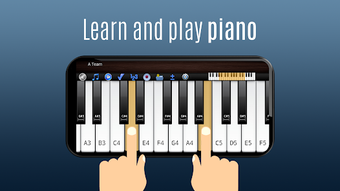
- Interactive Piano Interface: Multitouch support enables intuitive finger placement and control, simulating the experience of playing a real piano.
- Note Highlighting: Visual cues guide users by highlighting keys as they play, aiding in learning proper finger positioning and timing.
- Customizable Piano Size: Users can adjust the piano’s dimensions to fit different screen sizes, ensuring optimal visibility and ease of use.
- Glissando Effects: Smooth sliding transitions between notes enhance the realism and expressiveness of piano performance.
- Genre Diversity: Songs span classical, pop, jazz, and more, allowing users to tailor their learning to their musical interests.
These features support a structured yet flexible learning experience. For example, a beginner might use note highlighting to learn basic scales, while an intermediate player could practice complex pieces from the classical repertoire. The customizable interface ensures that users can adapt the app to their preferred playing style and device. The interactive nature of the software promotes active engagement, making practice sessions more enjoyable and effective. The app encourages users to build a personal musical repertoire, which can be used for informal performances or further study.
User Interface, Workflow & Performance
The user interface of LPiano is designed for touch-based navigation, with a clean layout centered around the piano keyboard. Key elements are arranged for intuitive access, including song selection, playback controls, and settings. Navigation is straightforward, relying on taps and swipes to switch between songs or adjust settings. The workflow prioritizes ease of use, allowing users to start playing immediately after opening the app. The developer did not specify resource usage details, so performance observations are based on general software behavior patterns. No information was provided about CPU or RAM consumption, stability under prolonged use, or responsiveness during multitouch input. The app appears to function smoothly on compatible Android devices, though exact performance metrics were not disclosed. Users can expect a responsive interface during typical use, but real-world behavior may vary depending on device hardware and system conditions.
Compatibility & System Requirements
LPiano is designed for Android operating systems. The software is available exclusively on the Google Play Store, indicating compatibility with devices running Android 5.0 or higher, though exact version requirements were not listed. Installation size information was not provided, so users should expect variable file sizes depending on the content downloaded. The app supports a range of screen sizes and resolutions, thanks to its flexible piano size feature. Hardware requirements are not specified, but the app is optimized for touch-enabled tablets and smartphones. The developer did not provide additional system requirements, so users should rely on general Android compatibility guidelines. Compatibility information was partially provided, and exact specifications remain unclear.
Pros and Cons
Pros
- Free to download and use, making it accessible to a wide audience.
- Large song library with diverse genres and eras.
- Interactive and visually engaging interface with note highlighting.
- Customizable piano size for optimal screen fit.
- Supports multitouch and glissando effects for enhanced realism.
- Designed for Android devices with touch-based interaction.
Cons
- Not available as a desktop application for Windows or Mac.
- No information on system requirements or performance metrics.
- Free version may include ads or in-app purchases.
- Limited to Android platform; no cross-platform support.
- Developer details not disclosed.
- Performance may vary across different Android devices.
FAQ Section
Is LPiano available for desktop computers?
LPiano is designed exclusively for Android devices and is not available as a desktop application for Windows or Mac.
Can I use LPiano offline?
Yes, once the app is downloaded and songs are saved, users can access and play music without an internet connection.
Is LPiano safe to download?
LPiano is available on the Google Play Store, which provides security checks for apps. Users should download only from official sources to ensure safety.
Does LPiano require an internet connection to function?
While an internet connection is needed for initial download and updates, the app can be used offline after installation.
What type of license does LPiano have?
LPiano is offered as a free application. The exact license type was not specified, but it is distributed through the Google Play Store.
Final Thoughts + CTA
LPiano delivers a compelling and accessible way to learn piano through an interactive, multimedia experience. Its extensive song library, customizable interface, and touch-based controls make it a strong choice for Android users interested in music education. While it lacks desktop support and detailed system information, its strengths lie in usability, engagement, and broad accessibility. The app is particularly beneficial for beginners seeking a fun and structured way to begin their musical journey, as well as for intermediate players looking to expand their repertoire. For those seeking a free, mobile-first piano learning tool, LPiano stands out as a practical and enjoyable option. Download LPiano now to start your musical journey today.




.png)



