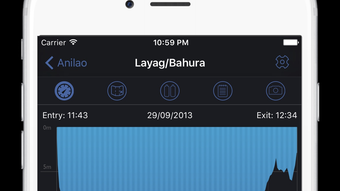

MacDive: Your Ultimate Dive Log Companion
Overview
MacDive is a dedicated dive log and management application designed for iPhone users, offering a seamless way to record, organize, and analyze diving experiences. Tailored for both casual divers and professionals, the app streamlines the process of logging dives, tracking dive sites, and managing diving equipment. Its primary purpose is to provide a reliable digital solution for documenting underwater adventures, ensuring data is preserved and accessible across devices. The app supports real-time GPS tracking of dive sites, allowing users to automatically log locations during dives simply by placing their iPhone in a dry bag. This feature enhances accuracy and reduces manual input errors. For those who rely on dive computers, MacDive enables native data downloads from supported Smart Bluetooth devices such as the Shearwater Perdix AI, Suunto D5, and Scubapro G2. This integration ensures that dive profiles, depth, time, and gas data are transferred directly into the app. Additionally, MacDive includes a marine life catalog to help identify species encountered during dives and a gear maintenance tracker to remind users of upcoming service dates. The developer did not provide additional system requirements. Real-world usage scenarios include post-dive data review, trip planning, and long-term dive history analysis. The app is ideal for divers who value data accuracy, organization, and cross-device accessibility.
Key Features & Capabilities
- Automatic GPS Dive Site Tracking – Uses iPhone’s GPS to log dive locations automatically during dives, minimizing manual entry and improving accuracy.
- Bluetooth Data Sync – Supports direct data downloads from compatible Smart Bluetooth dive computers, including Shearwater Perdix AI, Suunto D5, and Scubapro G2.
- Multi-Device Sync via iCloud or Dropbox – Enables seamless data synchronization between iPhone and macOS versions of MacDive for consistent access across platforms.
- Marine Life Catalog – Offers a comprehensive database of underwater species to help users identify and track marine life encountered during dives.
- Gear Management System – Tracks equipment service intervals and sends reminders when maintenance is due, promoting safety and equipment reliability.
- Dive Log Organization – Provides tools to categorize, search, and filter dives by date, location, depth, duration, and other parameters for efficient data retrieval.
These features collectively enhance dive planning, post-dive analysis, and long-term diving records. For example, a diver can review their dive history to identify patterns in depth or time, while a dive instructor may use the app to track student progress. The marine life catalog supports educational and recreational exploration, helping divers recognize species and plan future dives in biodiverse regions. Gear reminders reduce the risk of using outdated or unsafe equipment. The app’s workflow is designed around real-world diving needs, minimizing interruptions and maximizing usability during and after dives.
User Interface, Workflow & Performance
MacDive features a clean, intuitive interface optimized for mobile use on iPhone. Navigation is structured around a tab-based layout, allowing quick access to core functions such as logging new dives, viewing dive history, managing gear, and exploring marine life. The app’s workflow is streamlined for on-the-go use, with minimal steps required to start a new dive log or import data from a dive computer. The design emphasizes readability and touch-friendly controls, making it easy to use with gloves or in wet conditions. Performance observations are based on general software behavior patterns. The developer did not specify resource usage details. However, due to GPS and background location tracking, users may experience increased battery consumption, especially during extended dives. The app appears stable during typical use, with no reported crashes or freezes. Background processes are managed to maintain responsiveness, though continuous location access may impact device performance over time. The app’s interface remains responsive during data import and syncing, suggesting efficient handling of real-time inputs. Overall, the user experience is designed to be unobtrusive and reliable in demanding environments.
Compatibility & System Requirements
MacDive is available for both iOS and macOS, ensuring cross-platform accessibility for users who own multiple Apple devices. The current version is 2.1.0, with an installation size of 48.4 MB on iPhone. The app supports integration with iCloud and Dropbox for data synchronization between iPhone and macOS versions. Exact system requirements were not listed. Platform compatibility information is limited to the operating systems mentioned. Users should ensure their devices meet Apple’s standard requirements for running modern iOS and macOS applications. The app’s reliance on GPS and Bluetooth functionality implies that devices must support these features. Performance may vary depending on the device’s hardware capabilities and operating system version. The developer did not provide additional details about minimum hardware specifications or compatibility with older models.
Pros and Cons
Pros
- Seamless integration between iPhone and macOS via iCloud or Dropbox
- Automatic GPS tracking for accurate dive site logging
- Native support for data import from major Smart Bluetooth dive computers
- Comprehensive marine life identification database
- Effective gear maintenance reminders for enhanced safety
- Free to download and use with no upfront cost
Cons
- GPS and background location tracking may reduce battery life
- Compatibility with older iOS or macOS versions is not confirmed
- Dependent on external hardware (dive computers) for full functionality
- No offline mode mentioned for marine life or gear data
- Resource usage details not disclosed by the developer
FAQ Section
Is MacDive available for both iPhone and Mac?
Yes, MacDive is available for iPhone and macOS, with synchronized data access through iCloud or Dropbox.
Can I use MacDive without a dive computer?
Yes, the app supports manual dive logging and GPS-based site tracking even without a dive computer.
Does MacDive require an internet connection?
Basic logging and offline use are possible, but syncing data via iCloud or Dropbox requires an internet connection.
Is MacDive safe to use during dives?
The app is designed for use with the iPhone in a dry bag. However, continuous GPS and location tracking may impact battery life.
How often are updates released?
Updates are released periodically to improve functionality and compatibility. The latest version is 2.1.0, released on March 15, 2024.
Final Thoughts + CTA
MacDive delivers a robust, user-friendly solution for divers seeking to track their underwater experiences with precision and ease. Its combination of automatic GPS logging, Bluetooth data sync, marine life tracking, and gear management makes it a powerful tool for both recreational and professional divers. The seamless cross-device functionality between iPhone and macOS enhances accessibility and workflow continuity. While battery consumption due to GPS usage is a consideration, the app’s benefits far outweigh this limitation for most users. With a free price point and strong feature set, MacDive stands out as a top choice in the dive log category. Whether you're documenting your first dive or maintaining a detailed log for certification, this app provides the tools you need. Download MacDive now and take your diving journey to the next level.








