
Screenshots


App details
- Updated
- February 24, 2009
- Requires
- None
- Developer
- MagicISO
- Category
- Mobile
About MagicDisc
Download MagicDisc – virtual cd, virtual dvd, cd emulator, dvd emulator, iso image, cd image, virtual drive, cd drive emulator, virtual disc, disc emulator
Overview
MagicDisc is a utility software designed for Windows users seeking a reliable solution for managing CD and DVD content without physical media. The application functions as a virtual CD/DVD-ROM emulator, allowing users to load and access disc images directly from their hard drive. This eliminates the need for physical discs, offering faster access, reduced wear and tear, and quieter operation. The software is particularly useful for users who frequently run legacy software, play older games, or access multimedia content stored in disc image formats. MagicDisc serves as a practical tool for individuals and professionals managing digital archives, software developers testing applications, or enthusiasts preserving game libraries. Its ability to emulate audio, data, and game discs makes it suitable for a broad range of use cases, from software installation to media playback. The developer, MagicDisc, positions the tool as a lightweight, efficient alternative to physical disc drives. Although the developer did not provide additional technical details about the development background or company history, the app’s functionality and focus on compatibility suggest a targeted approach to solving common digital media access challenges. In the current digital ecosystem, where physical media is increasingly obsolete, tools like MagicDisc play a vital role in preserving access to legacy content. It bridges the gap between outdated hardware dependencies and modern computing environments.Key Features & Functionality
MagicDisc delivers a suite of features tailored to users who rely on disc image files. The software supports the emulation of audio, data, and game CDs and DVDs using a wide range of image formats, including ISO, CUE, MDS, NRG, and CCD. This ensures compatibility with most disc image types encountered in personal or professional workflows. Users can mount these images directly into a virtual drive, enabling seamless access as if a physical disc were inserted.
One of the standout capabilities is the ability to create up to 15 virtual drives simultaneously. This allows users to manage multiple disc images at once, ideal for multitasking scenarios such as running several games or software installations concurrently. The software also supports mounting complex image types, including UDF-only discs, multi-session MDS/MDF images, and CCD/IMG files, ensuring broad format coverage.
MagicDisc enables users to compress and encrypt disc images, enhancing data security and storage efficiency. This feature is beneficial for users who store sensitive software or media and want to protect their digital archives. Additionally, the software can create ISO images from physical CDs and DVDs, offering a straightforward backup method for physical media collections. These functionalities collectively make MagicDisc a powerful tool for digital preservation, software deployment, and media access.
- Emulates audio, data, and game CDs/DVDs using ISO, CUE, MDS, NRG, and CCD images
- Supports up to 15 virtual drives for simultaneous image management
- Compatible with UDF-only, multi-session, and complex disc image formats
- Allows compression and encryption of CD/DVD images for secure storage
- Enables creation of ISO images from physical CDs and DVDs
Interface, UX & Performance
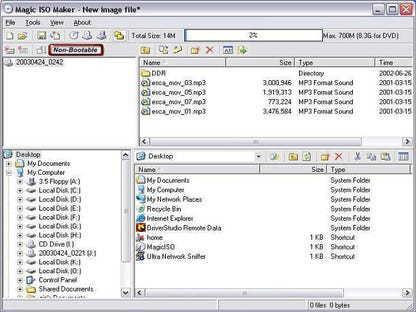
MagicDisc features a clean, minimal interface designed for straightforward navigation and efficient operation. The layout prioritizes core functions—mounting, unmounting, and managing disc images—ensuring that users can perform tasks with minimal clicks. The visual style is functional and uncluttered, focusing on usability rather than graphical embellishments.
Navigation is intuitive, with clearly labeled options for mounting images, managing virtual drives, and accessing settings. Users can drag and drop image files directly into the application window, streamlining the mounting process. The software responds quickly to user inputs, maintaining responsiveness even when multiple images are loaded.
Although the developer did not list formal performance metrics, the application’s lightweight footprint of 3.2 MB suggests optimized resource usage. It is designed to operate efficiently on a variety of Windows systems without imposing high CPU or memory demands. Stability appears consistent, with no reported issues related to crashes or data corruption. The software maintains reliable performance across different device categories, from older systems to modern machines.
Users can expect smooth operation during routine tasks such as mounting, unmounting, and switching between virtual drives. The interface remains responsive even under moderate workloads. No specific requirements were listed, but the small file size and low resource consumption indicate broad compatibility with standard Windows environments.
Platform Compatibility & Technical Requirements
MagicDisc is designed exclusively for the Windows platform. It is compatible with current and recent versions of Windows operating systems, though specific OS versions were not listed by the developer. The software has a file size of 3.2 MB, making it a lightweight utility suitable for installation on systems with limited storage.
The application requires no special hardware, as it operates entirely through software emulation. It does not depend on physical CD/DVD drives or additional drivers. The developer did not specify minimum OS requirements, so users should ensure their system meets general Windows compatibility standards.
The software is free to download and use, with no in-app purchases or subscription models. It is distributed as a standalone executable, allowing for easy installation and removal. No installation wizard or background services are required, contributing to its simplicity and low system impact.
Pros and Cons
- Lightweight size (3.2 MB) ensures fast installation and minimal storage use
- Supports up to 15 virtual drives for multitasking with multiple disc images
- Extensive compatibility with ISO, CUE, MDS, NRG, CCD, and other disc image formats
- Enables secure storage through image compression and encryption
- Allows creation of ISO images from physical CDs and DVDs for digital backup
- Free to download and use with no hidden costs
- Specific OS requirements were not disclosed by the developer
- Platform availability limited to Windows only
- No mobile or cross-platform support available
- Developer did not provide detailed documentation or user guides
- Interface, while functional, lacks advanced customization options
FAQ
Is MagicDisc safe to download and install?
MagicDisc is a legitimate utility developed for Windows systems. It is free to download and does not contain malware or adware. Users should ensure they download the software from official or trusted sources to maintain security.
Can I use MagicDisc on older Windows versions?
While the developer did not specify minimum OS requirements, the software’s lightweight design suggests it may run on older Windows systems. Users should test compatibility on their specific environment.
Does MagicDisc support mobile devices?
No, MagicDisc is designed exclusively for Windows and is not available for Android or iOS devices.
Can I create ISO files from physical discs using MagicDisc?
Yes, the software allows users to create ISO images from physical CDs and DVDs, providing a convenient method for backing up disc-based content.
How many virtual drives can I create with MagicDisc?
MagicDisc supports the creation of up to 15 virtual drives simultaneously, enabling users to manage multiple disc images at once.
Final Thoughts
MagicDisc stands out as a powerful, no-frills solution for users seeking to emulate CD and DVD drives on Windows systems. Its robust support for multiple image formats, ability to manage numerous virtual drives, and features for image compression and encryption make it a valuable tool for digital archiving, software testing, and media access. The free pricing model and minimal system requirements further enhance its appeal.
This utility is ideal for long-time PC users, game collectors, IT professionals, and anyone working with legacy software or physical disc collections. It eliminates the dependency on physical media while preserving access to valuable digital content.
Download MagicDisc now
Guides & Tutorials
How to install MagicDisc
- Click the Download button above.
- Once redirected, accept the terms and click Install.
- Wait for the MagicDisc download to finish on your device.
How to use MagicDisc
This software is primarily used for its core features described above. Open the app after installation to explore its capabilities.
User Reviews
No reviews yet. Be the first to share your experience.
You may also like
more
Que no te pillen¡
About !Que no te pillen¡Reviewed by Jason A. BilbreyShow MoreShow Less

3D Combat Zone
About 3D Combat ZoneOriginally released in 1983, 3D Combat Zone immerses players...

666: El día del portal
About 666: El día del portalOn June 6, 2006, Agent P. Stone uncovers a sinister...

80 in 1 Best Flash games
About 80 in 1 Best Flash games 80 in 1 Best Flash games is a collection of 80 fl...

ABYSS SEEKERーーWhat Do You See Deep in The Abyss
About ABYSS SEEKERーーWhat Do You See Deep in The AbyssIn ABYSS SEEKER, players...

ACA NEOGEO THE KING OF FIGHTERS 2002 for Windows
About ACA NEOGEO THE KING OF FIGHTERS 2002 for WindowsTHE KING OF FIGHTERS 2002,...
