Screenshots
App details
- Version
- 5.0
- Size
- 415.74 KB
- Updated
- March 30, 2010
- Requires
- Mac OS X
- Language
- English
- License
- Trial version
- Developer
- Sspi-software
- Category
- Mac OS
About Mail Forward
Download Mail Forward – free POP mail forwarding tool
Introduction
In a world where many of us juggle several e‑mail accounts – personal, work, newsletters, and niche services – keeping everything in one place can feel like a daily puzzle. While most modern webmail platforms (Gmail, Outlook.com) and desktop clients (Thunderbird, Apple Mail) offer built‑in forwarding capabilities, they often fall short when you need to manage a larger fleet of POP accounts or when your primary service simply does not support forwarding at all. Mail Forward steps into this gap, providing a lightweight, background‑running utility that lets you forward messages from up to 20 different POP accounts to any destination address you choose. The app is designed for users who crave control, want to automate the forwarding process, and appreciate the option to delete messages after they’ve been relayed. Whether you’re a small‑business owner consolidating client inquiries, a freelancer managing multiple freelance portals, or a power user who prefers a single inbox, Mail Forward promises a secure, configurable, and free solution. In the sections that follow we’ll explore how the tool works, its standout features, the installation process across operating systems, and the real‑world pros and cons you should weigh before adding it to your e‑mail arsenal.
Key Features & Capabilities
- Support for up to 20 distinct POP3 accounts.
- Customizable forwarding address for each source mailbox.
- Option to delete messages from the source after successful forwarding.
- Configurable time intervals (e.g., every 5 minutes, hourly) for fetching and forwarding.
- Background service with a System Preferences control panel on macOS and a tray icon on Windows.
- Secure storage of SMTP credentials using OS‑level keychains.
- Low memory footprint and resolved memory‑leak issues from previous versions.
- Simple logging for troubleshooting failed deliveries.
Beyond the checklist, Mail Forward shines in its simplicity. The user interface is intentionally minimalistic: you enter your SMTP server details once, then add each POP account with its host, port, username, and password. The app automatically respects SSL/TLS settings, ensuring that credentials are never transmitted in plain text. For power users, the interval scheduler can be fine‑tuned to avoid hitting server rate limits, and the “delete after forward” toggle helps keep source mailboxes tidy. Because the utility runs as a background daemon, you don’t need to keep a browser tab open or an extra client running – the process lives quietly in the system tray or menu bar, ready to act whenever new mail arrives. The built‑in status menu provides a quick glance at the last successful forward, any errors, and the number of pending messages, which is especially handy for troubleshooting.
Installation, Configuration & Compatibility
Mail Forward is offered as a free download for Windows, macOS, and Linux. The installer packages are signed and hosted on a secure HTTPS server, eliminating the typical concerns about malware hidden in free utilities. Once you download the appropriate installer, the setup wizard guides you through a standard install flow: accept the license, choose an installation folder, and optionally add a shortcut to the start menu or dock.
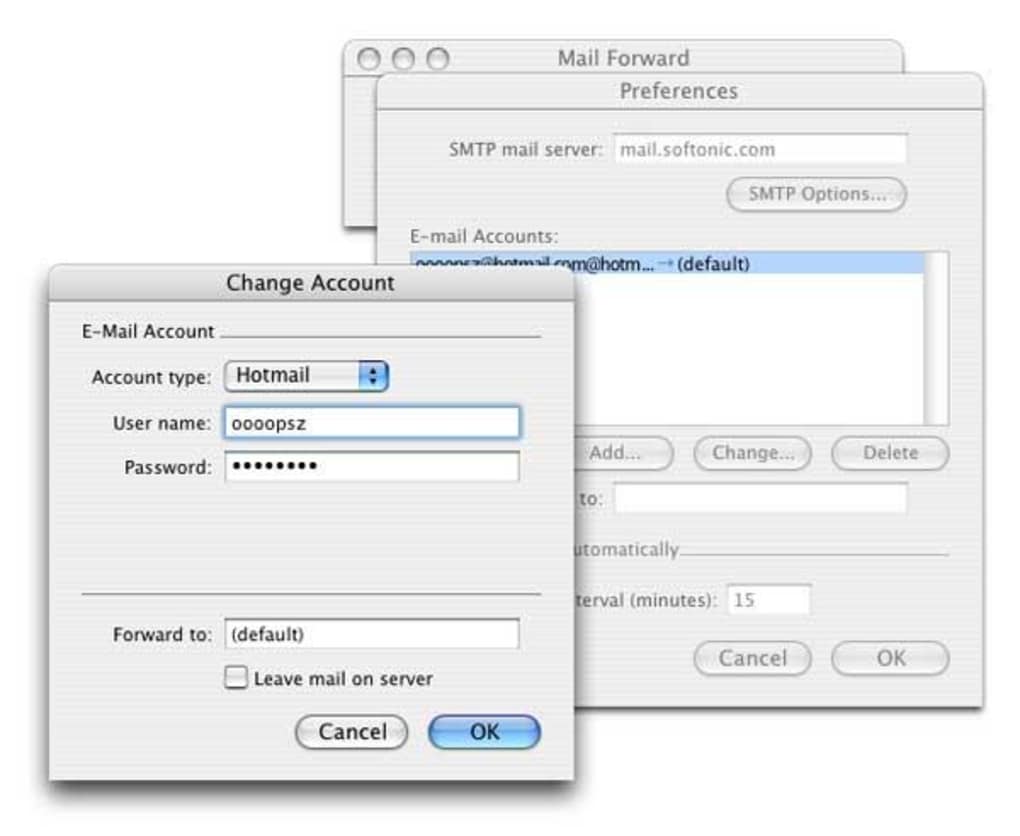
After installation, launch the application. On first run you’ll be prompted to configure the global SMTP server – this is the server that will actually send the forwarded mail to the destination address you specify. Enter the SMTP host, port, authentication method, and your credentials. The app leverages the operating system’s secure credential storage (Windows Credential Manager, macOS Keychain, or Linux Secret Service) to keep this information safe.
Next, click “Add POP Account” and fill in the required fields: POP server, port, SSL/TLS toggle, username, and password. For each account you can define a unique forwarding address, decide whether to delete messages after forwarding, and set the polling interval. Once saved, the background service starts polling the POP servers at the defined intervals. You can monitor activity via the status menu – a red badge indicates errors, while a green checkmark confirms successful forwards.
Mail Forward is compatible with Windows 10/11, macOS 10.15 (Catalina) and later, and major Linux distributions (Ubuntu, Fedora, Debian) that support systemd for background services.
The overall installation experience takes less than five minutes, even for users with limited technical expertise. Because the application runs with minimal privileges and does not require administrator rights after the initial install, it plays nicely in corporate environments that enforce strict security policies.
Pros, Cons & Frequently Asked Questions
Pros
- Free, no hidden subscription fees.
- Handles up to 20 POP accounts simultaneously.
- Background service with low CPU and memory usage.
- Secure credential storage and TLS‑encrypted forwarding.
- Flexible scheduling and optional deletion of source messages.
- Cross‑platform support (Windows, macOS, Linux).
Cons
- Limited to POP3 – does not support IMAP or Exchange protocols.
- No built‑in web UI; all configuration is done via the native desktop client.
- Requires a separate SMTP server; users without one must set up a relay.
- Advanced logging is basic; power users may need to enable external log monitoring.
FAQ
Can I use Gmail’s SMTP server with Mail Forward?
Yes. You can configure Gmail’s SMTP (smtp.gmail.com, port 587, TLS) as the sending server, provided you enable “App passwords” or allow “Less secure apps” in your Google account settings.
Is there a limit to how many messages can be forwarded per day?
Mail Forward itself imposes no hard limit, but you must respect the rate limits of your chosen SMTP provider and the POP servers you poll. Exceeding those limits may result in temporary blocks.
What happens if a message fails to forward?
Failed messages are retained in the source mailbox and logged in the application’s error log. The next polling cycle will attempt to resend them, ensuring no mail is permanently lost.
Can I run Mail Forward on a headless server?
Yes. On Linux you can install the daemon version and manage it via systemd. The configuration files are stored in ~/.mailforward and can be edited with any text editor.
Is my data encrypted while being forwarded?
All communications with the SMTP server use TLS/SSL, and POP3 connections can be secured with SSL/TLS as well. Credentials are stored in the OS keychain, never in plain text on disk.
Conclusion & Call to Action
Mail Forward fills a niche that many mainstream e‑mail services overlook: the ability to aggregate and forward multiple POP accounts without relying on a heavyweight desktop client. Its free price tag, modest system footprint, and robust security features make it an attractive option for freelancers, small teams, and anyone who needs a simple, automated way to funnel scattered inboxes into a single address. While the lack of IMAP support and the requirement for an external SMTP server may deter some power users, the overall value proposition remains strong for its target audience. If you’re tired of checking several webmail portals or you need a reliable background service to keep all your messages in sync, give Mail Forward a try today.
Download Mail Forward now and start consolidating your POP mail in minutes.
Mail Forward delivers on its promise of simple, secure POP forwarding. The UI is clean, the background service is lightweight, and the ability to delete messages after forwarding keeps source accounts tidy. The main drawback is the absence of IMAP support, but for users whose workflows are POP‑centric, it’s an excellent free tool.
Guides & Tutorials
How to install Mail Forward
- Click the Download button above.
- Once redirected, accept the terms and click Install.
- Wait for the Mail Forward download to finish on your device.
How to use Mail Forward
This software is primarily used for its core features described above. Open the app after installation to explore its capabilities.
User Reviews
No reviews yet. Be the first to share your experience.
You may also like
more
DiffusionBee
Generate unique art with this app DiffusionBee is a free and accessible artifici...

Excire Foto Light
Organize your snapshots Excire Foto Light is a free-to-download AI -powered phot...

Topaz Photo AI
Photo enhancement tool with AI Topaz Photo AI is a premium AI image editor for P...

anonymoX
Surf anonymously with Firefox anonymoX for Firefox is an add-on that gives you f...

DownThemAll
Download Them All! Downloading anything or everything on a webpage can be a labo...
.webp)
DuckDuckGo Privacy Essentials
A free program for Mac, by DuckDuckGo, Inc.. DuckDuckGo Privacy Essentials is a...
