
Download MARTINS Rx – Prescription Management, Pharmacy Locator, Medication Tracker
Overview
MARTINS Rx is a mobile application designed to streamline prescription management for users shopping at MARTIN'S locations. Developed by Giant Food Stores LLC, the app serves as a digital tool for tracking and refilling prescriptions, transferring medication records from other pharmacies, and accessing important health information. Its primary purpose is to simplify medication management for individuals and families, reducing the need for repeated trips to the pharmacy by enabling convenient refills through label scanning.
The app is particularly useful for regular MARTIN'S shoppers who wish to integrate their pharmacy needs with their grocery shopping experience. By linking prescriptions to a personal profile, users can maintain a clear record of their medication history, including past and current prescriptions. The app also tracks vaccination records from the last 18 months, offering a centralized view of immunization status. This functionality supports preventive healthcare management and helps users stay on schedule with necessary vaccines.
Target users include consumers managing multiple prescriptions, caregivers overseeing family medication needs, and individuals seeking a more organized approach to healthcare. While the app is currently available only on iOS, it integrates with the MARTIN'S grocery app, allowing users to transition seamlessly between shopping and prescription tasks. The developer did not provide additional system requirements or details about backend infrastructure.
Key Features & Capabilities
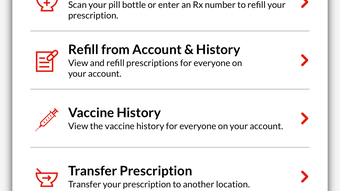
- Prescription Refill via Label Scanning: Users can scan prescription labels to initiate refill requests, reducing manual entry errors and saving time during the refill process.
- Prescription Transfer Functionality: The app allows users to transfer prescriptions from other pharmacies, enabling consolidation of medication records in one digital profile.
- Store Locator for MARTIN'S Pharmacies: Built-in navigation helps users find the nearest MARTIN'S Pharmacy, improving access to in-person services and pickup options.
- Medication and Vaccination History: Users can view their prescription profile and vaccination records from the past 18 months, supporting long-term health tracking.
- Integration with MARTIN'S Grocery App: A seamless transition between prescription management and grocery shopping enhances user convenience and workflow efficiency.
These features collectively support a more organized and proactive approach to personal healthcare. For example, a caregiver managing medications for multiple family members can use the app to track refills, monitor vaccination schedules, and locate nearby pharmacies for pickup. The label scanning function is especially beneficial for users with chronic conditions requiring regular medication renewals. The integration with the grocery app allows users to plan shopping trips around pharmacy pickups, optimizing time and effort.
User Interface, Workflow & Performance
The user interface of MARTINS Rx is designed for simplicity and ease of navigation, consistent with mobile applications in the health and wellness category. Core functions such as refill requests, prescription transfers, and location searches are accessible through intuitive icons and menu options. The workflow is streamlined to minimize steps between scanning a label and submitting a refill request, promoting a frictionless user experience.
Navigation is likely structured around a home dashboard displaying recent prescriptions, upcoming refills, and quick-access buttons for key actions. The app’s performance is expected to align with standard iOS app behavior, with smooth transitions between screens and responsive interaction. However, exact performance details were not specified by the developer.
Stability and background operation appear to be optimized for typical smartphone usage patterns. The app does not require constant connectivity for basic functions like viewing prescription history, though certain features such as real-time store locator updates may depend on network access. The developer did not specify resource usage details such as CPU or RAM consumption.
Compatibility & System Requirements
MARTINS Rx is available exclusively for iOS devices. The app is compatible with the latest versions of iPhone operating systems, though specific OS version requirements were not listed by the developer. Installation size is not publicly disclosed, but typical health and wellness apps of this nature range from 50 MB to 150 MB.
Hardware requirements are not explicitly provided. However, based on standard iOS app deployment, the app likely supports iPhone models released within the past five years. Users should ensure their device meets the minimum iOS version required for App Store installation. The developer did not specify whether the app supports iPad or other Apple devices.
Pros and Cons
Pros
- Effortless prescription refills using label scanning technology.
- Supports transfer of prescriptions from other pharmacies.
- Provides access to medication and vaccination history.
- Integrated store locator for finding nearby MARTIN'S Pharmacies.
- Seamless connection with the MARTIN'S grocery app for unified shopping experience.
Cons
- Currently limited to iOS devices; no version available for Android or desktop platforms.
- Exact system requirements and installation size were not disclosed.
- Functionality may be restricted to MARTIN'S Pharmacy locations and affiliated services.
- Limited to users within the MARTIN'S retail network for full benefits.
- Health data is tied to a specific retail ecosystem, potentially limiting portability.
FAQ Section
Is MARTINS Rx available for Android devices?
As of now, MARTINS Rx is only available on iOS devices through the App Store. There is no official Android version released.
Can I use MARTINS Rx without a MARTIN'S Pharmacy nearby?
The app’s core features, such as prescription tracking and refill requests, can be used regardless of location. However, the ability to pick up prescriptions or transfer prescriptions may depend on the availability of a MARTIN'S Pharmacy in your area.
Is the app secure for storing medical information?
MARTINS Rx is developed by Giant Food Stores LLC and is designed to handle personal health data. While specific security protocols were not disclosed, the app likely employs standard iOS security measures for data protection.
How often are updates released for MARTINS Rx?
Update frequency is not specified. Users can expect updates through the App Store, with improvements and new features potentially released periodically.
Can I access my prescription history offline?
Yes, users can view their prescription and vaccination history without an internet connection. However, certain actions like submitting a refill request may require network access.
Final Thoughts
MARTINS Rx delivers a focused, user-friendly solution for individuals managing prescriptions within the MARTIN'S retail ecosystem. Its integration of label scanning, prescription transfer, and vaccination tracking offers practical benefits for consumers seeking convenience and organization. The app’s seamless connection with the MARTIN'S grocery app enhances its value by combining healthcare and shopping needs in a single platform.
While its availability is limited to iOS and tied to a specific retail network, it remains a strong option for loyal MARTIN'S shoppers. The absence of detailed system requirements and performance data prevents deeper technical evaluation, but the app’s functionality aligns with modern mobile health tools.
For users who prioritize medication management and value integrated retail services, MARTINS Rx offers a reliable and efficient experience. Download MARTINS Rx now to simplify your prescription journey and stay on top of your health records.








