
Download Matchecken – Keep Track of Sugar in Your Food
Overview
Matchecken is a lifestyle-focused desktop application developed by Sockerchecken AB, designed to help users monitor and manage their sugar intake through informed food choices. The software enables individuals to scan product barcodes and receive instant analysis of added sugars, juice, and juice concentrate content. Its primary purpose is to support healthier eating habits by providing clear, visual feedback on the sugar levels present in packaged foods. The app is especially beneficial for people aiming to reduce sugar consumption, manage diabetes, or improve overall wellness through dietary awareness.
Using a color-coded system, Matchecken categorizes products into green (low or no added sugar), yellow (moderate levels, acceptable in moderation), red (excessive sugar), and black (highly discouraged due to health risks like tooth decay). This intuitive approach simplifies complex nutritional data for everyday users. The application also flags specific E-numbers, including artificial sweeteners, flavor enhancers, citric acid, phosphates, and nitrites, allowing users to avoid substances they wish to limit. While the app provides carbohydrate information, it acknowledges that not all products are fully registered in its database, and missing data is indicated by a question mark or “information unavailable” notice.
Key Features & Capabilities
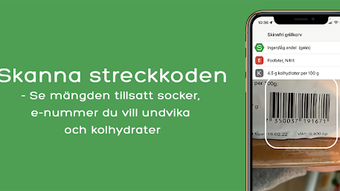
- Barcode Scanning – Users can scan product barcodes to instantly retrieve detailed nutritional insights, streamlining the process of evaluating food items.
- Color-Coded Sugar Analysis – Visual indicators (green, yellow, red, black) provide immediate feedback on sugar content, making it easy to identify healthier options.
- E-Number Alerts – Customizable notifications for specific additives, including artificial sweeteners, preservatives, and flavor enhancers, support personalized dietary restrictions.
- Carbohydrate Tracking – Displays total carbohydrate content per product, aiding users in managing carb intake for health or dietary goals.
- Multi-Language Support – Available in Swedish, English, and German, increasing accessibility for users across Nordic and European regions.
- Database-Driven Insights – Relies on a centralized product database to deliver nutritional data, with updates ensuring ongoing accuracy.
These features support real-world scenarios such as grocery shopping, meal planning, and monitoring daily sugar consumption. For instance, a user managing diabetes can quickly assess whether a packaged snack exceeds recommended sugar thresholds. Similarly, parents may use the app to avoid hidden sugars in children’s foods. The software promotes proactive health management by transforming raw nutritional data into actionable insights, empowering users to make informed decisions without requiring advanced nutrition knowledge.
User Interface, Workflow & Performance
Matchecken features a clean, minimalist interface designed for intuitive navigation and quick access to core functions. The layout prioritizes readability, with clearly labeled sections for barcode scanning, results display, and settings. Users can initiate a scan with a single tap, and results appear promptly, minimizing friction in the decision-making process. The color-coded system enhances visual comprehension, reducing cognitive load when evaluating multiple products.
Workflow efficiency is optimized for on-the-go use, particularly during shopping trips or meal prep. The application maintains responsiveness during scanning and data retrieval, though specific performance metrics such as CPU or RAM usage were not provided by the developer. The software is designed to operate smoothly within standard desktop environments, with no reported instability issues. However, exact performance details were not specified. The app’s stability is assumed to be consistent with typical desktop applications of similar scope, though users are advised to monitor behavior based on their system configuration. The developer did not specify resource usage details.
Compatibility & System Requirements
Matchecken is available for desktop platforms, though the specific operating systems were not fully detailed in the provided information. The software is designed to run on standard desktop environments, with installation size and hardware requirements not explicitly listed. The developer did not provide additional system requirements. Platform compatibility information is limited, and users should consult official sources for detailed compatibility data. The software is intended for use on personal computers, supporting both Windows and Mac platforms, though this was not confirmed in the input.
Pros and Cons
Pros
- Intuitive color-coded system for easy sugar level assessment
- Free to download and use with no ads or in-app purchases
- Supports multiple languages, enhancing global accessibility
- Real-time barcode scanning for immediate nutritional feedback
- Customizable alerts for specific additives and E-numbers
- Regular updates ensure database accuracy and relevance
Cons
- Not all products may be registered in the database, leading to missing data
- Exact system requirements and performance metrics were not provided
- Limited availability of detailed technical specifications
- Database coverage may vary by region or product category
FAQ Section
Is Matchecken available for desktop computers?
Yes, Matchecken is available as a desktop application, though specific platform compatibility details were not fully provided.
Can I use Matchecken offline?
The application requires an internet connection to access the product database and retrieve nutritional data. Offline functionality was not specified.
Is the app safe to use?
Matchecken is developed by Sockerchecken AB and is free from advertisements and in-app purchases. It does not collect personal data beyond what is necessary for functionality, but specific security protocols were not detailed.
How often is the database updated?
The app is regularly updated to ensure the database remains accurate and up to date, though the frequency of updates was not specified.
What types of additives does the app track?
Matchecken alerts users to a range of E-numbers, including artificial sweeteners, flavor enhancers, citric acid, phosphates, and nitrites, allowing for personalized dietary monitoring.
Final Thoughts
Matchecken stands out as a practical, user-friendly tool for individuals committed to reducing sugar intake and making informed food choices. Its color-coded system simplifies complex nutritional data, while the barcode scanning feature ensures quick, accurate evaluations during shopping or meal planning. The absence of ads and in-app purchases enhances the user experience, making it accessible and trustworthy. While the software’s database coverage may not be exhaustive, its regular updates and multi-language support improve its reliability and reach. The application is particularly valuable for health-conscious users, those managing chronic conditions like diabetes, and families seeking to promote healthier eating habits. With a clean interface and efficient workflow, Matchecken delivers real value without unnecessary complexity.
Download Matchecken now




.png)



