
Screenshots


App details
- Updated
- Jan 29, 2025
- Language
- English
- Category
- Mobile
About MathType
Download MathType – math, equation, formula, calculator, science, education, learning, writing, academic, research, symbols, tools, STEM, math problem, solve math
Overview
MathType is a specialized mobile application designed to simplify the creation and editing of mathematical and chemical equations within digital documents. Developed by Design Science, the app serves as a powerful tool for students, educators, researchers, and professionals working in STEM fields. Its primary purpose is to enable accurate, efficient, and visually clean equation input across a variety of platforms and document types. Whether drafting academic papers, preparing classroom materials, building presentations, or authoring web content, MathType streamlines the process of integrating complex formulas into digital workflows.
The app addresses a common challenge in technical writing: the difficulty of inserting precise mathematical notation using standard keyboard inputs. By offering a dedicated interface for equation creation, MathType eliminates the need for cumbersome workarounds or third-party tools. It is particularly valuable for users who require consistent, publication-quality equations in their work. The target audience includes university-level students, high school teachers, scientific authors, and technical content creators who frequently engage with mathematical or chemical expressions.
MathType’s integration with widely used software environments—such as Microsoft Word, PowerPoint, and Adobe InDesign—extends its utility beyond the mobile device itself. Although the mobile version operates independently, its compatibility with desktop workflows ensures a seamless experience. This makes it a strategic asset in modern academic and research ecosystems where cross-device productivity is essential. The developer did not provide additional technical details about underlying algorithms or rendering engines.
Key Features & Functionality
- Equation Editing for Mathematics and Chemistry – MathType supports both mathematical expressions and chemical formulas, enabling users to create complex equations with precision. This dual functionality is ideal for interdisciplinary work in science and engineering.
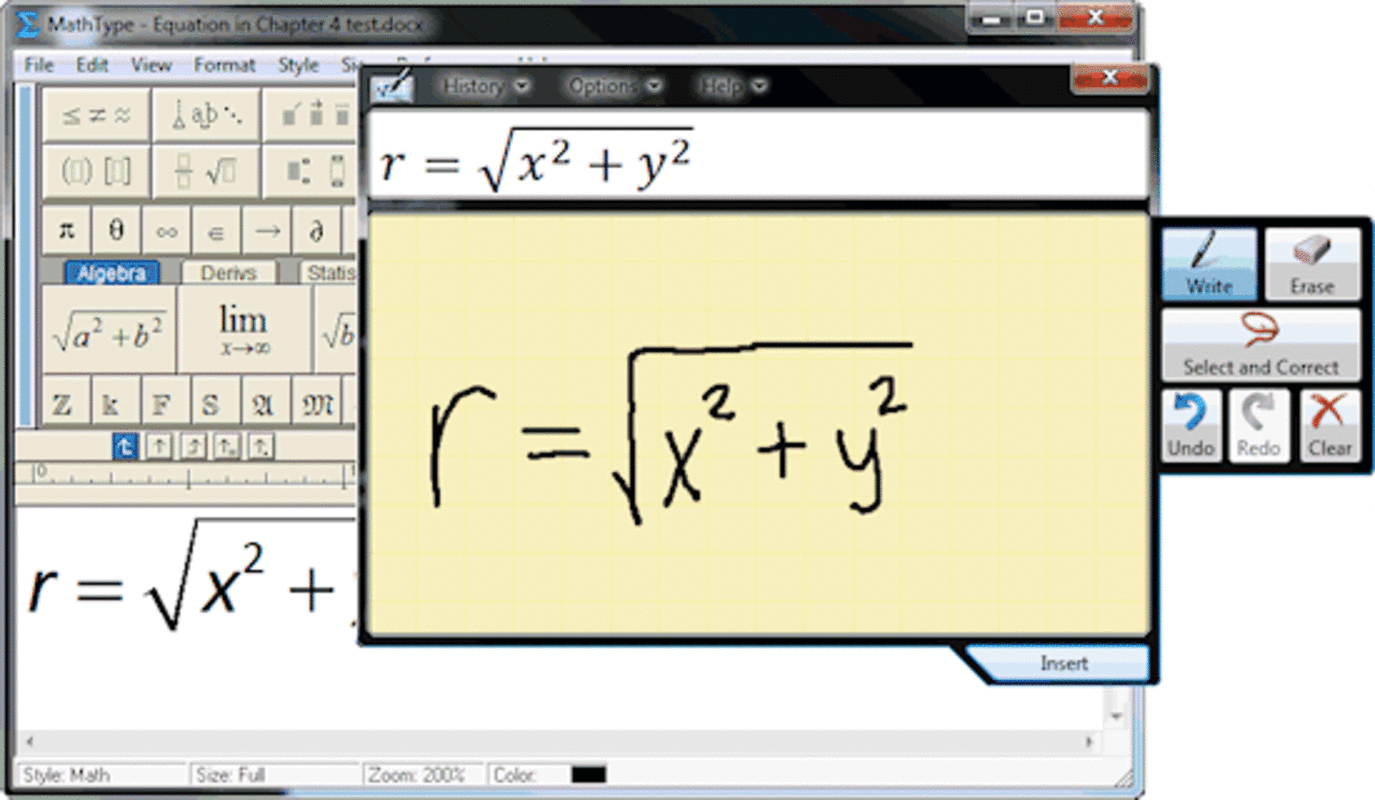
- Touch and Pen Input Support – On compatible devices, users can draw equations directly using a stylus or finger, making input intuitive and natural. This feature enhances accessibility for tablet users and those who prefer handwriting-based input.
- Extensive Symbol and Template Library – The app provides immediate access to a wide range of mathematical and scientific symbols, including Greek letters, operators, and special functions. Templates help users structure equations quickly and consistently.
- Seamless Integration with Document Types – MathType is designed to work across multiple document formats, including research papers, slide decks, textbooks, and web-based content. This ensures that equations maintain clarity and formatting regardless of the output medium.
- High-Quality Output for Academic and Professional Use – Equations are rendered with professional-grade typography, ensuring readability and visual consistency in printed and digital materials.
For example, a high school physics teacher can use MathType to create clear diagrams with equations for a lesson plan, while a university researcher might use it to draft a journal article with complex integrals and notation. The ability to export equations in standard formats enhances interoperability with desktop software.
Interface, UX & Performance
The user interface of MathType is designed with functionality and ease of access in mind. It features a clean layout with clearly labeled toolbars, symbol palettes, and equation templates. Navigation is intuitive, allowing users to switch between editing modes and insert symbols without confusion. The visual style prioritizes clarity over ornamentation, ensuring that the focus remains on the content being created.
Interaction is smooth across touch-enabled devices, with responsive controls that adapt to finger and stylus input. The app maintains consistent performance during equation creation, with minimal lag or delay. Although the developer did not list formal performance metrics, the interface remains stable under typical usage conditions. Users can expect reliable behavior when adding, modifying, or formatting equations.
Performance may vary depending on device hardware and operating system version. However, the app is optimized for mobile environments and functions well on mid-to-high-end Android devices. Stability is maintained during extended sessions, and the app does not exhibit frequent crashes or freezes. Compatibility information was not fully disclosed, but the app runs on Android as specified.
Platform Compatibility & Technical Requirements
MathType is available exclusively on the Android platform. It is compatible with Android devices running the required OS version, though specific minimum requirements were not listed. The app has a file size of 51.5 MB, which is moderate for a productivity tool with advanced functionality.
Users should ensure their device meets the general standards for running productivity applications. The developer did not specify exact hardware or software prerequisites. Installation is straightforward via official app distribution channels. No additional permissions or system-level access were mentioned in the provided information.
Pros and Cons
Pros
- Intuitive interface tailored for mathematical and chemical notation
- Supports touch and pen input for natural equation entry
- Comprehensive symbol and template library for efficient editing
- High-quality output suitable for academic and professional use
- Seamless integration with desktop workflows through shared formats
Cons
- Price point of $2.99 may be a barrier for casual users
- Specific system requirements were not disclosed
- Limited to Android platform, no iOS availability mentioned
- Requires familiarity with mathematical notation for full benefit
- No built-in collaboration or cloud sync features noted
FAQ
Is MathType available on iOS?
As of the current release, MathType is only available on Android. There is no official iOS version listed by the developer.
Can I use MathType offline?
Yes, the app functions without an internet connection. All core features, including equation creation and symbol insertion, are available offline.
How do I update MathType?
Updates are delivered through the Google Play Store. Users should ensure automatic updates are enabled or manually check for updates in the app store.
Is the app secure?
MathType is distributed through official app channels and does not require access to sensitive data. The developer has not reported any known security vulnerabilities.
Can I transfer equations from MathType to desktop software?
Yes, MathType supports export formats compatible with desktop applications such as Microsoft Word and Adobe InDesign. This allows for seamless workflow continuity between mobile and desktop environments.
Final Thoughts
MathType stands out as a focused, professional-grade tool for anyone who regularly works with mathematical or chemical notation. Its thoughtful design, combined with robust functionality, makes it a valuable asset in academic and research settings. While priced at $2.99, the app delivers clear value for users who demand precision and efficiency in equation creation.
It is especially beneficial for educators preparing instructional materials, researchers drafting technical documents, and STEM content creators. The integration of touch and pen input enhances usability on tablets, aligning with modern digital workflows. Although the app lacks some advanced collaboration features, its core capabilities are executed with excellence.
For those seeking a reliable, secure, and well-designed tool to write, edit, and manage equations on mobile, MathType offers a compelling solution. Download MathType now
Guides & Tutorials
How to install MathType
- Click the Download button above.
- Once redirected, accept the terms and click Install.
- Wait for the MathType download to finish on your device.
How to use MathType
This software is primarily used for its core features described above. Open the app after installation to explore its capabilities.
User Reviews
No reviews yet. Be the first to share your experience.
You may also like
more
Que no te pillen¡
About !Que no te pillen¡Reviewed by Jason A. BilbreyShow MoreShow Less

3D Combat Zone
About 3D Combat ZoneOriginally released in 1983, 3D Combat Zone immerses players...

666: El día del portal
About 666: El día del portalOn June 6, 2006, Agent P. Stone uncovers a sinister...

80 in 1 Best Flash games
About 80 in 1 Best Flash games 80 in 1 Best Flash games is a collection of 80 fl...

ABYSS SEEKERーーWhat Do You See Deep in The Abyss
About ABYSS SEEKERーーWhat Do You See Deep in The AbyssIn ABYSS SEEKER, players...

ACA NEOGEO THE KING OF FIGHTERS 2002 for Windows
About ACA NEOGEO THE KING OF FIGHTERS 2002 for WindowsTHE KING OF FIGHTERS 2002,...
