MIDAS Software Features
Some of the powerful features of our MIDAS Room Booking software include...
Alerts & Reminders

Set personal reminders for upcoming bookings, send internal messages to other users, and configure watches that alert you when specific activity occurs - such as when a resource is booked or stock runs low.. Read More...
Send Bookings To Your External Calendar

Send any booking from MIDAS to Outlook or Thunderbird's calendar with a single click, adding it as a calendar event alongside your other commitments.
Versatile Printouts

Print booking schedules for any date range, filtered by room or booking type. In an emergency, print an instant site occupancy report showing who is where and how many people are on your premises.. Read More...
Bookable Time "Slots"

Replace free-format time entry with a drop-down list of predefined time slots - useful for schools, clinics, or any organisation with a fixed session structure. Different slot lists can be assigned to different users.. Read More...
Send Booking Confirmations

MIDAS can send a branded email confirmation to clients as soon as a booking is saved. The confirmation uses a customisable template and includes the full booking details automatically.. Read More...
Great for Appointments!

Replace the finish time selector with a list of predefined durations on a per-user basis. If every appointment is 30, 45, or 60 minutes, your staff pick the length rather than calculating an end time.
Client Credit

Maintain a credit balance for each client in MIDAS. Any credit on account is automatically deducted from their next invoice, simplifying the billing process for clients who pay in advance or receive refunds.
Sync to Google & Outlook Calendars

The optional Data Feeds addon generates a live iCal subscription URL for your bookings. Subscribe from Google Calendar, Outlook, or any iCal-compatible app and bookings appear automatically as they are made.. Read More...
Microsoft Teams Integration

The optional Microsoft Teams addon posts automatically to your Teams channel when activity occurs in MIDAS. Learn More...
Stop Double Bookings

Prevent scheduling conflicts with real-time availability checks. MIDAS alerts you the moment a clash is detected, so every booking lands in the right room at the right time.. Read More...
RSS Booking Feeds

The optional Data Feeds addon generates live RSS 2.0/Atom feeds from your booking data, suitable for website display or integration with other tools. Learn More...
Integrated Invoicing

Generate invoices automatically from bookings, send them by email, and track payment - all without leaving MIDAS. Exports to QuickBooks, Xero, Sage, and other accounting packages are included.. Read More...
FREE 30-Day Trial

Try MIDAS free for 30 days, hosted on our servers with no obligation. Explore the full feature set with your own data before deciding whether to continue. Start your FREE trial today!
Manage Equipment & Staffing
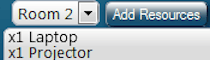
Allocate equipment, consumables, and staff to every booking. MIDAS tracks availability and stock across all three resource types so the right people and kit are always in the right place.. Read More...
Hotels, Guest Houses, and B&Bs

Configure MIDAS for overnight accommodation: book by number of nights rather than specific times, set check-in and check-out times, and limit maximum stay length to match your property's policies.. Read More...
Multi-User Support

Add team members with custom permissions to manage bookings at the right level of access. From a single administrator to an unlimited number of concurrent users, MIDAS scales with your team.. Read More...
Don't Exceed Maximum Occupancy!

Set safe capacity limits for each space and for your site as a whole. MIDAS checks occupancy numbers at booking time and stops any booking that would take a room - or your entire facility - over its limit.. Read More...
Two-Factor Authentication

Add an extra layer of security to MIDAS logins with optional two-factor authentication. Users confirm their identity via a one-time code sent by email or generated by an authenticator app.. Read More...
"Tentative" Bookings

Create provisional bookings that hold a space while a client decides. Set an expiry - a number of hours after creation, or a cutoff before the booking date - and MIDAS releases the space automatically if the booking isn't confirmed in time.. Read More...
Keep Track of User Activity

MIDAS keeps a timestamped audit log of everything that happens in the system - logins, booking changes, settings modifications, failed login attempts. Filter by user or action type and export the log when needed.. Read More...
Accessed Through Your Web Browser
MIDAS runs entirely in your web browser - nothing to install on end-user devices. Access it from any computer, tablet, or phone, whether you're in the office or working remotely.. Read More...
Powerful Client Database
Every booking is linked to a client record. Search, view booking history, send emails, and manage invoices - all without leaving MIDAS. Import existing client lists from a spreadsheet to get started quickly.. Read More...
Multi Database Support

Run multiple independent booking databases from a single MIDAS installation. Each database has its own rooms, clients, and users - ideal for organisations managing several sites from one system.. Read More...
Powerful Search Capabilities

MIDAS has a built-in search engine for bookings and clients. Filter by date range, booking type, or owner, and act on results directly - modify, invoice, delete, or set reminders without navigating away.. Read More...
Stripe Integration

Connect MIDAS to Stripe and accept credit and debit card payments for room hire invoices directly through the MIDAS payment portal. Learn More...
Desktop Notifications

Grant browser notification permission and MIDAS will send desktop alerts for new booking requests, messages from other users, reminders, and watch notifications - even when the MIDAS tab isn't in focus.
Clear & Crisp Web Interface

MIDAS has a clean, uncluttered scheduling grid that puts the information you need front and centre. Choose from a range of visual themes, or create your own in the self-hosted edition.. Read More...
Venue "Blocking"

Define rules that prevent bookings in certain spaces when related spaces are already in use - essential for facilities with rooms that can be used as one large space or divided into smaller ones.. Read More...
Slack Integration

The optional Slack addon posts automatically to your team's Slack channel when specified activity occurs in MIDAS. Learn More...
Export Invoices To Popular Accounting Packages

Export invoices from MIDAS in formats compatible with QuickBooks, Sage, Xero, Clear Books, KashFlow, Zoho, and QuickFile.
Schedule Recurring Bookings

Quickly create recurring room bookings across multiple dates and spaces. Set it once and let MIDAS handle the rest, whether that's every Tuesday or the third Wednesday of each month.. Read More...
Embeddable Web Calendars

The optional Web Calendars addon lets you embed a live availability calendar in your website, showing current bookings in real time. Learn More...
API Access

The optional API Access addon lets developers query and update MIDAS programmatically. Explore the full API documentation.
Digital Signage

The optional Digital Signage addon displays live booking information on screens around your facility - ideal for reception areas or outside individual rooms. Learn More...
Color-coded Bookings

Assign a distinct color to each booking type so your scheduling grid tells the whole story at a glance. Color coding also lets you apply type-specific discounts to your room hire rates.. Read More...
Group & Filter Rooms

Organise rooms into groups and filter the scheduling grid to show only the spaces you need. User access can also be restricted to specific groups, keeping the view relevant for every member of staff.. Read More...
Flexible Room Hire Rates

Set dynamic pricing by time of day, day of week, duration, number of attendees, or booking type. Apply discounts to specific booking categories and assign independent tax rates to each venue.. Read More...
Easy To Deploy
Because MIDAS is a web application, there's nothing to install on individual computers. Add a new user, and they can log in immediately from wherever they are.Export Data & Reports

Export bookings, clients, resources, and invoice data in Excel, CSV, XML, or iCal format. Connect booking data to accounting packages, calendar apps, or your own reporting tools.. Read More...
Multi Browser Support

MIDAS works with all current major web browsers - Chrome, Firefox, Safari, Edge, Opera, and their mobile equivalents. No plugins, no compatibility workarounds.. Read More...
Day, Multi-Day, Week & Monthly Calendar Views

Switch between single-day, multi-day, and monthly views of your bookings. Each view answers a different question: what's happening right now, what's coming up this week, or how full is the diary this month.. Read More...
Cross-Platform Multi-Device Support

MIDAS works on any modern device. All your staff need is a web browser - whether they're on Windows, Mac, Linux, a tablet, or a phone.
Online Invoice Payments

Clients pay invoices online via credit/debit card through Stripe or PayPal. The invoice marks itself as paid automatically the moment payment clears.. Read More...
Click & Drag Bookings

Click and drag across the scheduling grid to set a booking's time and venue in one movement. Drag existing bookings to reschedule or copy them - no forms, no extra steps.. Read More...
Email Notifications

MIDAS can email relevant staff automatically when resources are added to a booking, when consumable stock drops low, or when a booking request arrives. Configure notifications for any event using the Watches system.. Read More...
Graphical Reports & Statistics

Generate charts and reports on bookings, clients, venue usage, invoices, and more at the click of a button. Export to Excel for further analysis, or print directly for sharing with stakeholders.. Read More...
Active Directory Integration

Provide seamless "Single Sign-On" for your MIDAS system by authenticating against your Windows Active Directory. Learn More...
Quickly Reschedule Bookings

Drag and drop bookings directly in the scheduling grid to move or copy them to a new time, date, or room. Availability is checked automatically before the change is confirmed.. Read More...
Reduce Costs
MIDAS cuts the administrative overhead of managing bookings - less time spent on scheduling, less paper, and fewer errors that need fixing. The time savings add up quickly across a busy facility.Easy To Install
The self-hosted edition installs on your web server in minutes using a straightforward install script. Or choose cloud hosting and we handle everything - your system is ready to use immediately.Easily Import Data
Import bookings from Google Calendar, Yahoo Calendar, MRBS, spreadsheets, CSV, and iCal files. Clients and users can be imported in bulk too. Learn More...Attach Documents To Bookings

Add a custom file upload field to your booking form so staff can attach contracts, briefs, or other documents directly to a booking record. * Available in "self hosted" editions of MIDAS only
Accept Public Booking Requests
Embed a booking request form in your website so visitors can check availability and submit requests without a MIDAS account. You review and approve each request before it becomes a confirmed booking.. Read More...Access From Anywhere
"Remote working" and "hybrid working" are part of everyday life. MIDAS runs in a browser, so staff can view and manage bookings from anywhere with an internet connection - no VPN required.Maps & Floor Plans

Upload a floor plan of your facility and link your bookable spaces to locations on it. Users can select a room by clicking its location on the map - useful in large or complex facilities where room names alone aren't enough.. Read More...
Automated Booking Reminders
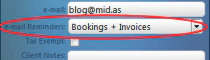
Send automatic email reminders to clients ahead of their bookings. Configure the timing, customise the template, and let MIDAS handle the follow-up without any manual effort.. Read More...
Live Timeline

A real-time line in the scheduling grid shows the current time of day, so you can see at a glance which bookings are happening right now and what's coming up next.
Complete History For Each Booking

Every modification to every booking is recorded - what changed, when, and which user made the change. The full booking history is visible from within the booking record at any time.. Read More...
Set Operating Hours

Define the hours each room is available for booking, day by day. Close individual rooms or the whole facility on specific dates or over date ranges, and grant selected administrators the ability to book outside normal hours.. Read More...
Customizable Templates

Customise email confirmations, reminders, invoices, and print layouts with your own branding, wording, and dynamic booking data. Edit in a visual editor or directly in HTML - over a dozen templates are available.. Read More...
Intelligent Booking Alternatives

When a room is unavailable, MIDAS automatically suggests alternative venues and time slots based on the alternatives you've configured - turning a booking conflict into a quick resolution.. Read More...
Co-Brand MIDAS
Upload your organisation's logo and it appears throughout MIDAS - on the login screen, in the interface, on printouts, invoices, and emails - keeping everything consistent with your own branding.Multi Language Support

MIDAS ships with language packs for English, Dutch, French, German, Italian, Spanish, Norwegian, and Greek. Users choose their preferred language at login, and the interface updates immediately.. Read More...
Automated Database Backups
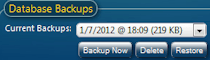
MIDAS backs up your database every day automatically. Take an on-demand backup at any time, and optionally have copies emailed to you for off-server storage. Cloud-hosted systems include additional disaster recovery.. Read More...
Custom Booking & Client Fields

Add your own fields to booking forms and client records. Text, number, checkbox, drop-down, URL, and file upload fields are all supported. Control which fields appear in search results, on printouts, and in public-facing forms.. Read More...
Invoice Reminders & Overdue Notifications

MIDAS sends automatic payment reminders as invoice due dates approach and overdue notifications when payment is late - reducing the need to chase clients manually.. Read More...
Make Clients Tax Exempt

Mark individual clients as tax exempt and MIDAS will automatically omit the tax element from all invoices generated for them, regardless of the venue's configured tax rate.
Integration with popular services

MIDAS integrates with dozens of popular services and platforms. See the full integrations list.
Setup & Breakdown Periods
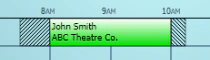
Add setup and breakdown time to bookings to account for preparation and clearing. Control whether these buffer periods can overlap with adjacent bookings or must remain exclusive.. Read More...
SAML 2.0 Integration

Add "Single Sign-On" (SSO) to your MIDAS system by authenticating via any SAML 2.0 identity provider, including Azure AD, Okta, and Google Workspace. Learn More...
PayPal Integration

MIDAS integrates natively with PayPal so clients can pay invoices online using their PayPal account or a card. Learn More...
