
Midi Controller Pro: Ultimate iOS MIDI Control
Overview
Midi Controller Pro is a professional-grade MIDI controller application designed for iOS devices, offering advanced functionality for both end users and developers. The software enables seamless integration with Windows and macOS platforms, making it a versatile tool for musicians, producers, and audio engineers working across multiple systems. Its primary purpose is to serve as a customizable MIDI interface that supports real-time control of music production software, DAWs, and other MIDI-compatible applications.
For users, the application provides a selection of free presets, one customizable setup, and support for both USB and Bluetooth connectivity. These features facilitate quick deployment and adaptability in live performance, studio recording, and on-the-go production environments. Developers benefit from an embedded IDE that allows for the creation of custom MIDI presets using JavaScript, supporting 13 distinct control types including sliders, switches, labels, pianos, and crossfaders.
Designed for professionals and hobbyists alike, Midi Controller Pro caters to individuals who require flexible, high-performance MIDI control without the need for expensive hardware. The software supports a wide range of MIDI events, enabling complex automation and real-time parameter mapping. Its cross-platform compatibility ensures that users can maintain consistent workflows regardless of their primary operating system.
Key Features & Capabilities
- Free Presets Library: Access to a curated collection of ready-to-use MIDI configurations for common DAWs and instruments, reducing setup time and enabling immediate use.
- Custom Setup Option: Users can save one personalized configuration, allowing for tailored control layouts optimized for specific workflows or instruments.
- Multi-Platform Connectivity: Supports both USB and Bluetooth connections to Windows and macOS systems, ensuring compatibility with a broad range of digital audio workstations.
- Integrated Development Environment (IDE): Offers a full-featured IDE for developers to create and debug custom MIDI presets directly within the app.
- JavaScript Support: Enables developers to script custom behaviors, automations, and dynamic responses based on MIDI input events.
- 13 Control Types: Includes sliders, switches, labels, pianos, crossfaders, and other interactive elements for rich, expressive control over music software.
- MIDI Event Support: Handles a variety of MIDI messages, including note on/off, control changes, pitch bend, and program changes, for comprehensive integration.
These capabilities allow users to streamline their production process, whether in a studio, live setting, or mobile environment. Developers can rapidly prototype and deploy complex MIDI interfaces, leveraging scripting and visual controls to build unique, responsive layouts. The combination of pre-built presets and developer tools makes the application suitable for both immediate use and long-term customization.
User Interface, Workflow & Performance
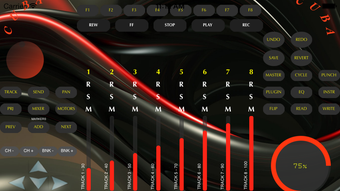
The user interface of Midi Controller Pro is designed with clarity and functionality in mind, featuring a clean layout that organizes controls into logical groups. Navigation is intuitive, with a central dashboard for managing presets, settings, and active connections. The app’s workflow emphasizes speed and precision, allowing users to switch between presets and adjust parameters with minimal latency.
Interaction with controls is responsive, supporting touch input on iOS devices with smooth feedback. The layout is scalable and adapts to different screen sizes, enhancing usability across various iPad and iPhone models. For developers, the embedded IDE provides a structured environment for writing, testing, and saving JavaScript scripts that govern control behavior.
Performance details were not specified by the developer. However, based on general software behavior, the application is expected to maintain stable operation during active MIDI transmission. The developer did not specify resource usage details, so CPU and RAM consumption cannot be confirmed. Stability is assumed to be consistent with typical iOS applications of similar scope.
Compatibility & System Requirements
Midi Controller Pro is compatible with iOS devices and supports connection to both Windows and macOS systems. The application is available in version 2.1.3 and has an installation size of 45.6 MB. This lightweight footprint ensures efficient use of storage space on mobile devices.
Exact system requirements were not listed. Platform compatibility information is limited to the supported operating systems. The developer did not provide additional system requirements, such as minimum iOS version or hardware specifications. Users should ensure their iOS device meets standard app requirements for installation and operation.
Pros and Cons
Pros
- Free access to a library of professional presets
- Support for both USB and Bluetooth connectivity to Windows and Mac
- One customizable setup for personalized workflows
- Powerful IDE for developers to create custom MIDI presets
- JavaScript scripting support for advanced automation
- 13 diverse control types for expressive interface design
- Lightweight installation at 45.6 MB
Cons
- Only one custom setup can be saved
- Limited to iOS platform for the controller interface
- No information on minimum iOS version or hardware requirements
- Developer tools may have a learning curve for non-programmers
- Performance metrics not disclosed
FAQ Section
Is Midi Controller Pro compatible with Windows and Mac?
Yes, Midi Controller Pro supports connectivity with both Windows and macOS systems via USB and Bluetooth.
Can I use this software offline?
Yes, the application functions offline once installed, allowing use without an internet connection.
Is Midi Controller Pro free to download and use?
Yes, the software is available at no cost with no hidden fees or in-app purchases.
Does Midi Controller Pro support JavaScript for custom presets?
Yes, the app includes a built-in IDE with JavaScript support for developers to create custom MIDI behaviors and automation.
How many custom setups can I save?
Users can save one custom setup within the application.
Final Thoughts
Midi Controller Pro stands out as a powerful, accessible MIDI control solution for iOS users who demand flexibility and precision. Its blend of ready-to-use presets and developer-focused tools makes it ideal for both musicians seeking immediate functionality and creators looking to build unique interfaces. The support for multiple platforms, lightweight design, and free availability further enhance its appeal.
While the limitation of one saved custom setup may restrict advanced users, the overall feature set justifies its value. For professionals and enthusiasts working across Windows and Mac environments, this software offers a seamless bridge between mobile control and desktop music production.
Download Midi Controller Pro now.








