
MixSense: Master Audio Mixing on iPhone
Overview
MixSense is a free multimedia application tailored for iPhone users seeking to refine their audio ear training skills. Designed specifically for music producers, sound engineers, and audio enthusiasts, the app provides a structured approach to mastering critical mixing techniques through interactive exercises. Its primary purpose is to enhance auditory precision by training users to identify and differentiate EQ filters, compressors, reverb effects, and other essential audio processing tools. The app supports both beginners and experienced users, offering scalable challenges that adapt to varying skill levels. Real-world usage scenarios include on-the-go practice during commutes, studio warm-ups, or daily skill maintenance. By transforming complex audio recognition tasks into engaging, game-like sessions, MixSense encourages consistent user engagement and measurable progress over time. The application runs entirely on iOS devices, requiring only a smartphone and headphones, making it a highly accessible tool for audio professionals and hobbyists alike. The developer, MixSense, has focused on creating a focused, mobile-first experience centered around auditory development in music production.
Key Features & Capabilities
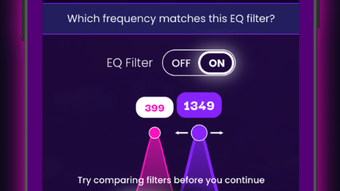
- Structured EQ Exercises – Interactive training modules designed to improve the ability to identify frequency changes and EQ adjustments in real-time audio samples.
- Customizable Training Sessions – Users can select specific music genres and instruments to tailor exercises to their preferred audio profiles and workflow needs.
- Daily Training Integration – Built-in scheduling encourages consistent practice, helping users develop long-term auditory memory and recognition accuracy.
- Progress Tracking & Mastery Stats – Visual feedback and performance metrics allow users to monitor skill development across different audio parameters and training categories.
- Mobile-First Design – Fully optimized for iPhone, enabling high-quality audio training without the need for external hardware or desktop software.
These features support practical applications such as preparing for studio sessions, refining mixing decisions during production, or validating personal listening accuracy. By simulating real-world audio environments, MixSense helps users build confidence in their auditory judgment. The app’s modular design allows for focused training on specific tools like compressors or reverb, which are critical in professional mixing workflows. Each session is self-contained, making it easy to integrate into a daily routine without requiring extended time commitments.
User Interface, Workflow & Performance
The user interface of MixSense is designed for intuitive navigation on iPhone screens, prioritizing clarity and responsiveness. Core functions are accessible through a streamlined menu system, allowing users to quickly start training sessions, adjust settings, or review performance data. The workflow follows a logical sequence: select training type, configure parameters, begin exercise, and view results. This structure minimizes cognitive load and supports efficient learning. The app’s performance is optimized for iOS, ensuring smooth playback and minimal lag during audio comparisons. The developer did not specify resource usage details, but based on the app’s size and mobile-first nature, it is expected to operate efficiently on supported devices. Stability appears consistent with standard iOS app behavior, though no public crash reports or performance benchmarks were provided. Audio fidelity is preserved through high-quality playback, essential for accurate ear training. The app operates entirely offline once installed, enabling uninterrupted use without internet dependency.
Compatibility & System Requirements
MixSense is designed exclusively for iPhone devices, with no information provided on specific iOS versions or hardware requirements. The application size is 45.7 MB, indicating a lightweight footprint suitable for most modern iPhones. The developer did not list exact system requirements, so compatibility with older or newer models cannot be confirmed. Users should ensure their device supports the latest iOS updates to maintain optimal functionality. Installation is straightforward through the App Store, and no additional dependencies are required. Platform compatibility information is limited to iPhone, with no indication of support for iPad, Mac, or other operating systems. The app is available as a free download, with no in-app purchases or subscription models mentioned in the provided data.
Pros and Cons
Pros
- Free access with no in-app purchases or subscriptions
- Specialized focus on audio ear training for music production
- Customizable sessions based on genre and instrument preferences
- Progress tracking with visual mastery statistics
- Offline functionality for uninterrupted training
Cons
- Exclusive to iPhone; no support for other platforms
- No public information on system requirements or iOS version compatibility
- Limited to audio recognition tasks; does not include full mixing tools
- App size is modest, which may limit future feature expansion
FAQ Section
Is MixSense available for devices other than iPhone?
The app is currently designed exclusively for iPhone users. No information is available regarding support for iPad, Mac, or other operating systems.
Is MixSense safe to download and use?
As a free app available through the official App Store, MixSense is distributed under Apple’s security review process. It does not require sensitive permissions and operates within standard iOS app restrictions.
How often should I use MixSense for effective training?
The app supports daily training sessions, and consistent use is recommended to build and retain auditory recognition skills over time.
Does MixSense require an internet connection?
No, the app functions entirely offline after installation. All training content and features are stored locally on the device.
What type of license does MixSense use?
MixSense is distributed as a free application with no licensing restrictions. It is intended for personal and educational use.
Final Thoughts + CTA
MixSense delivers a focused, high-value solution for anyone serious about improving their audio perception skills. Its structured, gamified approach to ear training makes it ideal for music producers, sound engineers, and audio learners who want to sharpen their listening abilities on the go. While limited to iPhone and lacking detailed system specifications, the app excels in its niche by combining practical exercises with real-time feedback and progress tracking. The absence of in-app purchases enhances its appeal as a pure learning tool. For users seeking a reliable, accessible way to refine their mixing precision, MixSense stands out as a standout choice in mobile audio education. Download MixSense now.








