
Download MKTwitter – Free Twitter Backup Tool, Secure Tweet Archive, Easy Export
Overview
MKTwitter is a lightweight, portable utility designed specifically for Twitter enthusiasts, researchers, and social‑media managers who need a reliable way to back up tweets. Whether you want to preserve your own timeline for personal records, create a searchable archive of a public figure’s posts, or simply safeguard content that might disappear after the standard 3,200‑tweet limit, MKTwitter offers a straightforward solution. The program works by connecting to the Twitter API, pulling the requested tweet history, and saving it locally in an Access database file (MDB). This format enables quick keyword searches, filtering by date, and export to other tools if needed. Because MKTwitter does not require installation, you can run it from a USB stick on any Windows PC, making it ideal for on‑the‑go archiving. While the interface is minimalistic and the search function still shows signs of early‑stage development, the core capability—downloading a full tweet archive with a few clicks—works reliably. MKTwitter fills a niche that many larger social‑media managers overlook: a free, no‑frills method to create a permanent copy of Twitter content without paying for premium services or manually copying each tweet.
Key Features
- Simple username entry – just type the @handle and start the backup.
- Automatic download of up to Twitter’s 3,200‑tweet archive limit per account.
- Exports tweets to a Microsoft Access (.mdb) database for easy local storage.
- Keyword search inside the database to locate specific tweets quickly.
- Portable executable – no installation required, runs on any Windows PC.
- Free to use with no hidden fees or subscription model.
- Supports backup of both your own timeline and public timelines of other users.
- Secure local storage – tweets never leave your computer unless you choose to share the file.
How MKTwitter Handles Twitter’s API Limits
Twitter restricts the number of retrievable tweets per user to the most recent 3,200 posts. MKTwitter respects this limit and automatically stops the download once the cap is reached, informing the user with a clear status message. While this means older tweets beyond the 3,200‑tweet window cannot be fetched directly, the tool still provides a valuable snapshot of recent activity, which is often sufficient for most research, compliance, or personal archiving needs.
Search Function – Current State and Future Roadmap
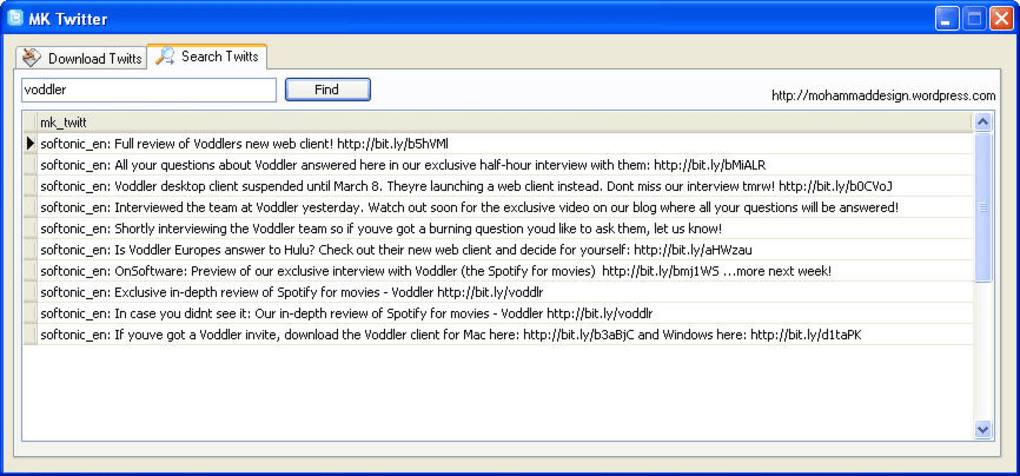
The built‑in search capability allows you to type a keyword and scan the downloaded database for matching tweets. At present, the function works best with exact matches and may miss variations due to case sensitivity or special characters. The developer has indicated plans to enhance the search algorithm in upcoming releases, adding fuzzy matching, date range filters, and hashtag recognition. Even in its current form, the search feature saves considerable time compared with manually scrolling through a web timeline.
Installation, Usage & Compatibility
Installation – Zero‑Setup Process
MKTwitter is delivered as a single executable file (MKTwitter.exe). Because it is a portable application, there is no installer, no registry entries, and no background services. To get started, simply download the .exe file, place it on your desktop or a USB drive, and double‑click to launch. The program runs on Windows 7, 8, 8.1, and 10, and it also functions on Windows 11 with full compatibility. No additional libraries or runtime environments are required, making it an ideal choice for users who lack administrative privileges on a corporate machine.
Step‑by‑Step Usage Guide
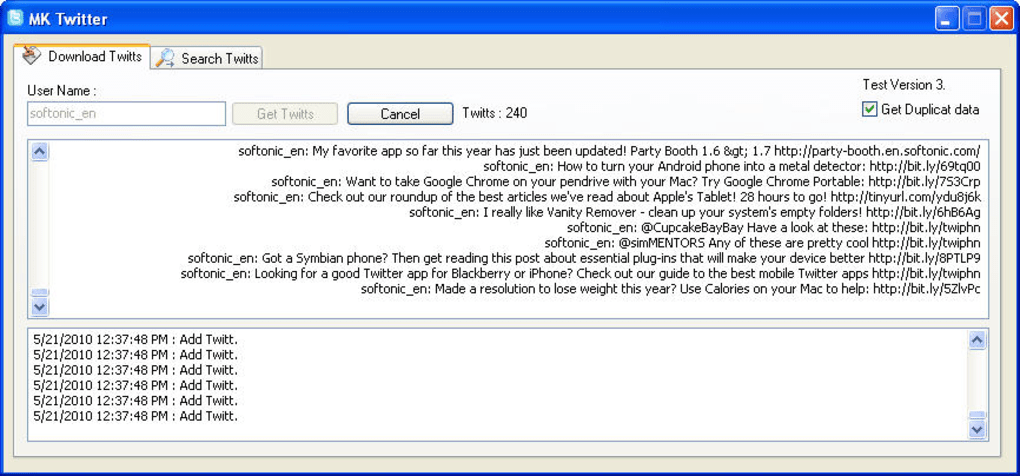
- Launch MKTwitter. The main window displays a single input field labeled “Twitter Username.”
- Enter the target handle. Type the @username without the “@” symbol (e.g.,
jack) and press the “Start Backup” button. - Wait for the retrieval process. MKTwitter connects to Twitter’s API, fetches tweets in batches, and shows a progress bar indicating how many tweets have been saved.
- Completion notification. Once the download finishes, a dialog confirms the location of the Access database file (by default, in the same folder as the executable).
- Open the database. Use Microsoft Access or any compatible MDB viewer to open the file. You’ll see a table named “Tweets” with columns for tweet ID, text, creation date, and other metadata.
- Search your archive. In the Access interface, use the built‑in search box or run a simple SQL query to locate tweets containing specific keywords.
Operating System Compatibility
Windows 7, Windows 8, Windows 8.1, Windows 10, Windows 11 (64‑bit and 32‑bit). The application is not natively built for macOS, Linux, Android, or iOS, but advanced users can run it through compatibility layers such as Wine on macOS/Linux. However, official support is limited to Windows platforms.
Pros, Cons & Frequently Asked Questions
Pros
- Free and portable – no installation or subscription required.
- Simple UI that anyone can understand within seconds.
- Creates a searchable local database for quick reference.
- Supports backup of any public Twitter account, not just your own.
- Secure, offline storage ensures privacy of archived tweets.
Cons
- Limited to the 3,200‑tweet API cap; older tweets cannot be retrieved.
- Search function is basic and may miss case‑insensitive matches.
- Only compatible with Windows; no native macOS or mobile version.
- Lacks advanced export options (e.g., CSV, JSON) out of the box.
- User interface feels dated and could benefit from a modern redesign.
FAQ
Is MKTwitter safe to use with my personal Twitter account?
Yes. MKTwitter only reads publicly available tweets via Twitter’s official API and stores them locally on your device. No credentials or passwords are required, and the tool does not transmit any data to third‑party servers.
Can I back up private or protected tweets?
No. The tool respects Twitter’s privacy settings and can only access tweets that are publicly visible. Protected accounts require authentication, which MKTwitter does not currently support.
What format is the backup file, and can I open it without Access?
The backup is saved as a Microsoft Access (.mdb) database. While Access provides the best experience, many free MDB viewers and database tools (e.g., LibreOffice Base, MDB Viewer Plus) can open and query the file.
Does MKTwitter work on macOS or Linux?
Officially, MKTwitter is built for Windows only. macOS or Linux users can attempt to run it via Wine, but functionality is not guaranteed and no official support is provided.
Will MKTwitter continue to receive updates?
The developer has announced a roadmap that includes improved search capabilities, export to CSV/JSON, and a refreshed UI. Users can follow the official project page for release notes and download the latest version when it becomes available.
Conclusion & Call to Action
MKTwitter fills a clear gap in the social‑media toolkit landscape: a free, portable, and easy‑to‑use solution for creating a local, searchable archive of Twitter content. While it is not without its quirks—most notably the 3,200‑tweet limit and a rudimentary search function—its core promise delivers on what many users need most: a quick, secure backup without the hassle of manual copy‑pasting or expensive subscription services. If you regularly reference tweets for research, content creation, or personal record‑keeping, MKTwitter is a worthwhile addition to your workflow. Download the latest version today, run a test backup of a favorite account, and experience the convenience of having your tweets at your fingertips, offline and safe.
Pros: Free, portable, simple UI, local secure storage.
Cons: 3,200‑tweet cap, Windows‑only, basic search.
Click here to download MKTwitter now and start building your tweet archive instantly.








