
Screenshots
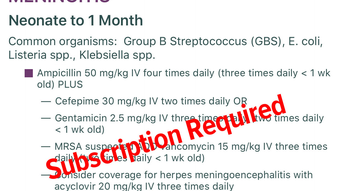
App details
- Version
- 1.0.11
- Updated
- November 28, 2023
- Requires
- iOS 16.4
- Language
- English
- License
- Free
- Developer
- Emergency Medicine Residents Association
- Category
- iPhone OS
About MobilEM
Download MobilEM – medical reference, clinical tools, emergency medicine, ekg, antibiotics, toxicology, airway management, pediatric emergencies, critical care, medical education, mobile health, healthcare professionals, evidence-based medicine, medical app, clinical guidelines
Overview
MobilEM is a specialized mobile application developed by the Emergency Medicine Residents Association, designed to serve as a comprehensive medical reference and educational tool for healthcare professionals using iPhone devices. The software targets individuals working in emergency medicine, including residents, clinicians, and other medical practitioners who require immediate access to up-to-date, evidence-based clinical guidance during their shifts. Its primary purpose is to support rapid decision-making by delivering concise, reliable information on critical topics such as antibiotics, toxicology, EKG interpretation, airway management, pediatric emergencies, orthopedic injuries, splinting techniques, and critical care medications.
The app is intended for personal use on individual devices and is tailored specifically for the U.S. healthcare market. It is not designed for shared or institutional use, ensuring data privacy and personalized access. Real-world usage scenarios include quick consultations during patient evaluations, on-the-go learning during clinical rotations, and reference during high-pressure emergency situations. The developer has emphasized continuous updates to maintain relevance, ensuring users receive the latest clinical recommendations without manual intervention. While the core functionality is available at no cost, additional content may be accessible through in-app purchases or subscription models, offering users flexibility in accessing premium resources.
Key Features & Capabilities
- Evidence-Based Clinical Guidance – MobilEM provides peer-reviewed, up-to-date recommendations across a broad spectrum of emergency medicine topics, enabling users to make informed clinical decisions based on current best practices.
- Universal Search Functionality – A powerful search engine allows users to quickly locate specific topics, keywords, or conditions, improving efficiency during time-sensitive clinical scenarios.
- Bookmarking System – Users can save frequently referenced content for instant access, streamlining workflows and reducing time spent navigating through multiple sections.
- On-Device Note-Taking – The app includes a built-in note feature, allowing healthcare professionals to record personal insights, reminders, or patient-specific observations directly within the application.
- Automatic Updates – Content is regularly refreshed by the developer to reflect the latest medical guidelines and research, ensuring users always have access to current information without manual intervention.
- Mobile-Optimized Design – The interface is tailored for iPhone use, with intuitive navigation and responsive layout, enabling efficient access to resources even in fast-paced clinical environments.
These features are particularly valuable during clinical shifts when rapid access to accurate information is essential. For example, a resident managing a toxicology case can quickly search for antidotes, review dosing protocols, and save the information for future reference. Similarly, a clinician evaluating a pediatric emergency can access age-specific treatment algorithms and bookmark them for later review.
User Interface, Workflow & Performance
MobilEM features a clean, mobile-first interface optimized for iPhone devices, prioritizing usability and quick access to critical information. Navigation is structured around clearly labeled sections, allowing users to browse topics by category or use the universal search to locate specific content. The design emphasizes readability with well-organized text, visual cues, and minimal distractions, supporting efficient information retrieval in high-stress clinical settings.
Workflow efficiency is enhanced through features like bookmarking and note-taking, which allow users to personalize their experience and retain important data. The app appears to be designed for offline use, enabling access to previously loaded content without an internet connection—a crucial advantage in environments with unreliable connectivity. However, the developer did not specify resource usage details, including CPU or RAM consumption, and exact performance behavior remains unverified. Stability during prolonged use or under high load was not disclosed. General software behavior patterns suggest smooth operation, but users should monitor performance based on their device’s capabilities.
Compatibility & System Requirements
MobilEM is designed exclusively for iPhone devices, ensuring compatibility with the iOS ecosystem. The current version is 1.0.1, with an installation size of 100.0 MB. The developer did not provide additional system requirements, including minimum iOS version or hardware specifications. As such, compatibility with specific iPhone models or operating system versions is not confirmed. Users are advised to check their device’s app store listing for the most accurate information. The app is available as a free download, with optional in-app purchases or subscriptions for expanded content access. Platform compatibility information is limited to the iPhone platform.
Pros and Cons
Pros
- Free access to essential clinical reference materials
- Comprehensive coverage of emergency medicine topics
- Fast and intuitive navigation with universal search
- Supports offline use for critical access during emergencies
- Automatic updates ensure content remains current
- Personalized features like bookmarking and note-taking
Cons
- Compatibility with specific iPhone models not specified
- No public information on system resource usage
- Not suitable for shared or institutional device use
- Content availability may vary based on in-app purchase or subscription
- Limited to the U.S. healthcare market
FAQ Section
Is MobilEM available for devices other than iPhone?
MobilEM is currently designed exclusively for iPhone devices. The developer has not announced plans for other platforms such as Android or iPad.
Is the app safe to use on personal medical devices?
Yes, MobilEM is intended for individual use on personal devices and includes a privacy policy to protect user data. It is not designed for shared or organizational use.
How often are updates released?
The app promises continual updates to ensure content remains aligned with the latest clinical guidelines. Updates are delivered automatically, requiring no action from the user.
Does MobilEM require an internet connection to function?
The app supports offline access to previously loaded content, making it usable without an internet connection. However, some features may require connectivity for updates or additional content retrieval.
What is the licensing model for MobilEM?
MobilEM is free to download and use. Additional content or full access may be available through in-app purchases or a subscription-based model, though specific licensing terms are outlined in the developer’s end-user license agreement.
Final Thoughts + CTA
MobilEM stands out as a well-structured, purpose-built tool for healthcare professionals in emergency medicine. Its focus on evidence-based content, rapid access to clinical guidance, and user-centric features like bookmarking and note-taking make it a valuable companion during clinical shifts. While system requirements and performance data are not publicly detailed, the app’s design and functionality suggest reliable performance on compatible iPhone devices. It is particularly suited for individual practitioners seeking a trustworthy, up-to-date reference tool that integrates seamlessly into their workflow. For those in the U.S. healthcare system who rely on mobile access to clinical resources, MobilEM delivers strong utility and practical value. Download MobilEM now.
Guides & Tutorials
How to install MobilEM
- Click the Download button above.
- Once redirected, accept the terms and click Install.
- Wait for the MobilEM download to finish on your device.
How to use MobilEM
This software is primarily used for its core features described above. Open the app after installation to explore its capabilities.
User Reviews
No reviews yet. Be the first to share your experience.
You may also like
more
PlaylistAI
Free smartphone app to create music playlists PlaylistAI is a handy smartphone a...

Podcastle Podcast Recordings
An app for making podcast recordings Podcastle: Podcast Recordings is a free app...

harpy chat
Immersive role-play with AI characters harpy.chat is a free AI chat platform whe...

Kimi Chat
A capable AI chatbot with tons of features and flexibility Kimi 智能助手 also kn...

Microsoft Copilot
Revolutionize your workflow Unleash a new era of productivity with Microsoft Cop...

Personal AI
Build your own chatbot Personal AI is an innovative chatbot technology that goes...
