
Download MockThis – AI‑Powered Mock Data Generator, Free & Secure
Overview
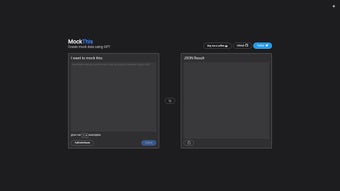
MockThis is a modern, browser‑based mock data generator that harnesses the power of large language models to create realistic, structured datasets in seconds. Designed for front‑end developers, QA engineers, data scientists, and anyone who needs synthetic data for testing, MockThis eliminates the tedious manual work of writing CSV files or building custom scripts. The user interface is intentionally minimal: a single input field for the number of records, a dropdown menu to choose a predefined schema (such as user profiles, e‑commerce orders, IoT sensor readings, or financial transactions), and a “Generate” button that instantly produces a clean JSON payload. Because all processing occurs client‑side, the tool does not require any installation, server resources, or external API keys, making it a completely free and privacy‑first solution. The open‑source nature of MockThis, released under the permissive MIT license, encourages developers to audit the code, contribute new schemas, or even host a private fork for internal use. While the platform currently focuses on JSON output and does not yet provide a native REST API, its core promise—fast, secure, AI‑enhanced data creation without hidden costs—makes it a compelling addition to any development toolbox. Whether you are prototyping a new UI, stress‑testing an API, or generating synthetic data for machine‑learning experiments, MockThis delivers high‑quality, context‑aware records with just a few clicks, helping you accelerate release cycles and reduce the time spent on repetitive data‑preparation tasks.
Key Features, Benefits & How They Solve Real‑World Problems
- AI‑Driven Generation: Leverages GPT‑4‑class models to produce data that respects realistic relationships, such as matching first‑ and last‑name patterns, plausible address formats, and logical timestamps.
- One‑Click JSON Export: Instantly returns formatted JSON that can be copied, downloaded, or piped directly into databases, mock servers, or test harnesses.
- Scalable Record Count: Generates anywhere from a single record up to 100,000 rows without noticeable latency, thanks to efficient client‑side processing.
- Multiple Built‑In Schemas: Includes ready‑made templates for user profiles, e‑commerce orders, IoT sensor readings, financial transactions, and more.
- Open‑Source & Free: MIT‑licensed code is publicly available on GitHub, ensuring transparency and eliminating licensing fees.
- Privacy‑First Architecture: All data generation occurs locally in the browser; nothing is transmitted to external servers, meeting GDPR and other privacy regulations.
- Responsive UI: The interface adapts to desktops, tablets, and smartphones, allowing you to generate mock data on any device.
- Community‑Driven Extensibility: Developers can add new schemas via JSON schema files and submit pull requests to grow the ecosystem.
Why These Features Matter for Developers and Testers
In fast‑moving development environments, the ability to spin up realistic test data quickly can be the difference between a smooth release and a bottleneck that stalls the pipeline. Traditional approaches—hand‑crafting CSV files, writing ad‑hoc scripts, or purchasing costly commercial generators—consume valuable engineering hours and often produce data that lacks the nuance needed for thorough UI and API testing. MockThis’s AI‑driven engine understands the contextual relationships between fields, so generated usernames, email addresses, and timestamps follow natural patterns, reducing false‑positive test failures caused by unrealistic data. The one‑click JSON export means teams can immediately feed the output into tools like Postman, Cypress, or custom mock servers, eliminating the need for format conversion. Because the tool runs entirely in the browser, there is no server‑side cost, no latency, and no risk of accidental data leakage, which is especially important for organizations handling sensitive information. The open‑source model also gives security‑focused teams the ability to audit the code, customize generation rules, or host a private instance behind a corporate firewall. Altogether, these features translate into faster prototyping, more reliable testing, and a measurable reduction in the time developers spend on mundane data‑creation tasks.
Installation, Usage, and Compatibility Across Platforms
MockThis works in any modern web browser, making it compatible with Windows 10/11, macOS Ventura and later, major Linux distributions, as well as mobile operating systems such as Android 9+ and iOS 13+. Since the application is purely client‑side, there are no additional system requirements—just a recent version of Chrome, Firefox, Edge, or Safari. This universal compatibility ensures that developers can generate mock data on a workstation in the office, on a laptop while traveling, or even on a tablet during a quick demo.
Step‑by‑Step Guide to Generate Your First Dataset
- Open the Web App: Navigate to https://mockthis.io using any supported browser.
- Select a Schema: Choose a predefined template from the “Data Schema” dropdown that matches your testing scenario. For custom needs, click “Upload Schema” and provide a JSON Schema file that describes the desired fields.
- Define Record Count: Enter the number of records you wish to generate. For very large datasets (above 10,000 rows), keep the browser tab active to avoid memory cleanup by the browser.
- Generate: Press the “Generate” button. A progress indicator appears for larger jobs, and the generation happens locally without any network traffic.
- Export the Result: Once complete, you can copy the JSON to the clipboard, download it as a .json file, or use the built‑in “Copy to Clipboard” button for immediate pasting into your code or test suite.
- Integrate: Import the JSON into your development database, feed it to a mock API server, or use it directly in unit and integration tests. Because the output adheres to standard JSON conventions, it works seamlessly with most programming languages and frameworks.
Advanced Tips for Power Users
While the hosted version satisfies most day‑to‑day needs, power users can clone the GitHub repository (github.com/mockthis/mockthis) and run a local development server. This approach enables you to modify the generation algorithm, add domain‑specific validation rules, or expose a lightweight REST endpoint for CI/CD integration. To get started, ensure you have Node.js 18+ installed, then execute npm install && npm start. The application will be reachable at http://localhost:3000. When running locally, you retain the same privacy guarantees because all processing still occurs client‑side, but you gain the flexibility to tailor the tool to internal workflows, such as automatically generating data as part of a build pipeline or integrating with other internal services. Remember to push any enhancements back to the community via pull requests, helping the ecosystem grow and stay up‑to‑date with emerging data‑generation needs.
Pros, Cons, and Frequently Asked Questions
Pros
- Completely free and open‑source – no hidden licensing fees.
- AI‑enhanced data that mimics real‑world patterns for higher test fidelity.
- No installation required; works directly in any modern browser.
- Privacy‑first design ensures generated data never leaves the user’s device.
- Scalable generation up to 100 k records without external services.
- Responsive UI works on desktops, tablets, and smartphones.
- Active GitHub community provides new schemas and quick issue resolution.
Cons
- No native REST API for fully automated CI/CD pipelines.
- Customization beyond built‑in schemas requires manual JSON‑schema editing.
- Very large datasets (>200 k rows) may strain browser memory on older hardware.
- Only JSON output is provided natively; CSV or XML require external conversion.
- Lacks built‑in data validation or cleansing utilities.
Is MockThis completely free to use?
Yes. MockThis is released under the MIT license, allowing unlimited use, modification, and distribution without any cost.
Can I generate data in formats other than JSON?
The native output is JSON, but you can easily convert it to CSV, XML, or YAML using online converters or simple scripts in your preferred language.
Does MockThis store my generated data on its servers?
No. All generation happens locally in your browser, so nothing is transmitted to external servers, ensuring full data privacy.
How can I add a custom data schema?
Click the “Upload Schema” button in the UI and provide a JSON Schema file that defines the fields and data types you need. Detailed guidelines are available in the GitHub repository’s documentation.
Is there a way to integrate MockThis into CI/CD pipelines?
While the hosted version does not expose an API, you can fork the project, add a lightweight Node.js endpoint, and call it from your pipeline scripts. Several community forks already provide this capability.
Overall Rating: 4.5 / 5 – MockThis offers a compelling blend of AI accuracy, zero cost, and ease of use, making it an excellent choice for developers who need quick mock data without compromising privacy.
Conclusion & Call to Action
MockThis fills a crucial niche in the software development lifecycle by delivering high‑quality, AI‑generated mock data instantly, securely, and at no cost. Its browser‑based, open‑source nature removes installation hurdles and eliminates any risk of data leakage, while the rich set of built‑in schemas and scalable generation capabilities accelerate prototyping, testing, and data‑science experimentation. Although the lack of a native REST API and limited export formats may require workarounds for highly automated environments, the core strengths—speed, realism, privacy, and community support—far outweigh these minor drawbacks for most everyday use cases. By adopting MockThis, teams can reduce the time spent on manual data creation, improve test reliability, and maintain full control over their synthetic datasets.
Ready to supercharge your testing workflow? Download MockThis now, generate your first dataset in seconds, and join the growing community of developers who have already streamlined their mock data pipelines with this free, secure, AI‑powered tool.



.png)




