
Download MPEG4 Modifier – MPEG4, AVI, video editing, video conversion, DivX, XviD, video utility, video metadata, aspect ratio, bitstream, VOPs, QPel, GMC
Overview
MPEG4 Modifier is a specialized utility designed for users who work with AVI files encoded using the MPEG4 ASP format, particularly those utilizing DivX and XviD codecs. The application enables users to modify key configuration parameters directly within video files without initiating a time-consuming re-encoding process. This makes it an efficient tool for fine-tuning video metadata and structural elements, especially for users managing large video libraries or preparing content for playback on specific devices. The primary purpose of the app is to correct aspect ratio discrepancies, adjust video presentation settings, and provide insights into advanced encoding features such as QPel and GMC. It is particularly useful for video enthusiasts, digital archivists, and content creators who require precise control over video file properties without altering the original video stream.
Target users include individuals with technical familiarity in video encoding and file structure, such as hobbyists, media organizers, and independent video producers. While the tool does not offer full video editing capabilities, it fills a niche in the digital media ecosystem by providing non-destructive modifications. Its ability to display detailed VOPs information and manipulate packed bitstream settings adds value for users interested in video analysis and optimization. The developer, Jason A. Bilbrey, has positioned this tool as a lightweight, focused utility rather than a comprehensive video editor. The application supports a specific technical workflow, making it a valuable asset for users who need to maintain compatibility across playback devices while preserving original video quality.
Key Features & Functionality
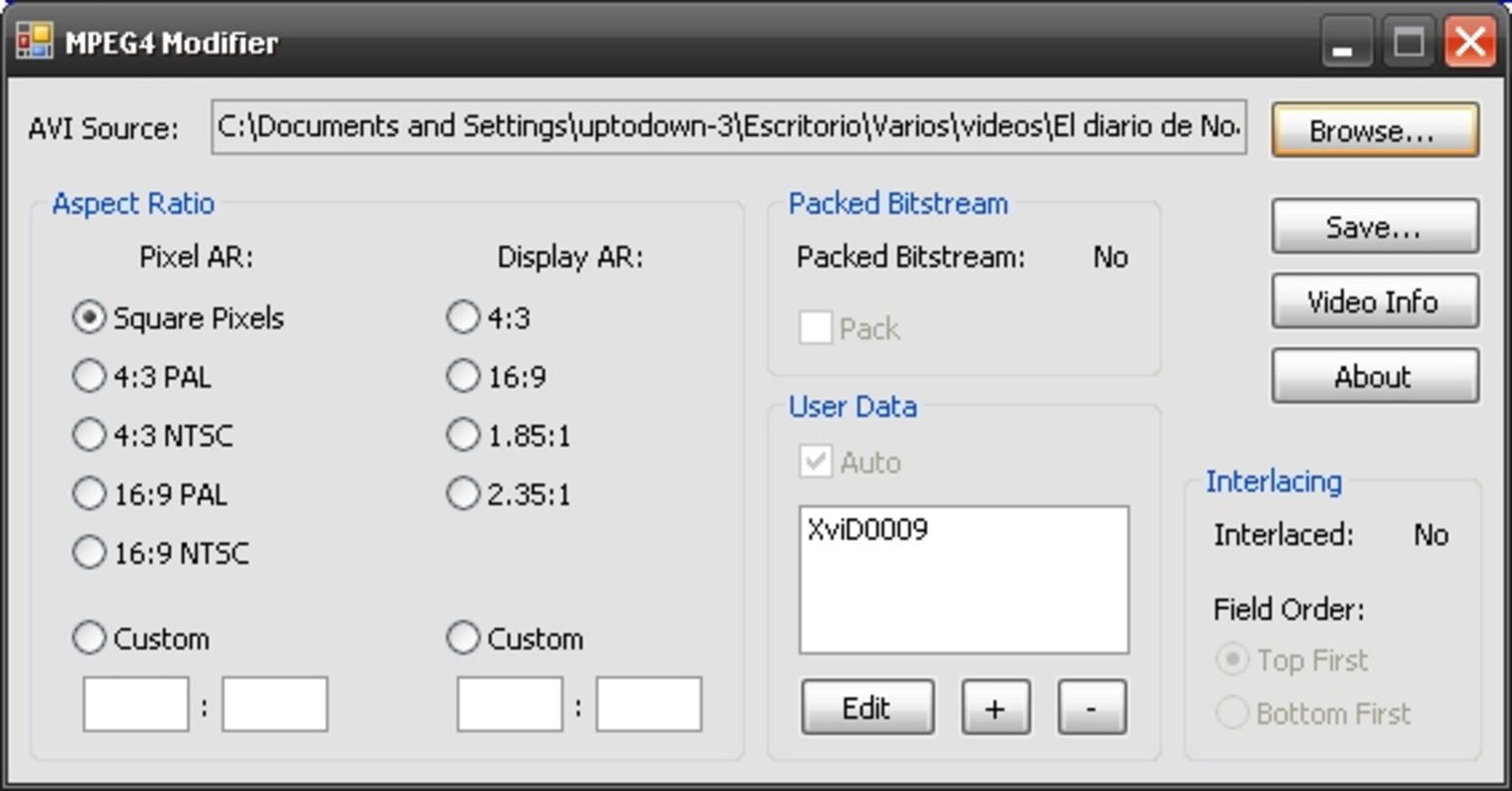
- Aspect Ratio Adjustment: Users can modify both pixel and presentation aspect ratios without re-encoding. This is ideal for fixing videos that appear stretched or squashed on different screens, ensuring consistent visual output across devices.
- User Information Modification: The tool allows editing of embedded user metadata, which can be used to label, categorize, or personalize video files for better organization in large media collections.
- Packed Bitstream Control: Enables the addition or removal of packed bitstream flags, improving compatibility with certain playback devices and enhancing decoding efficiency.
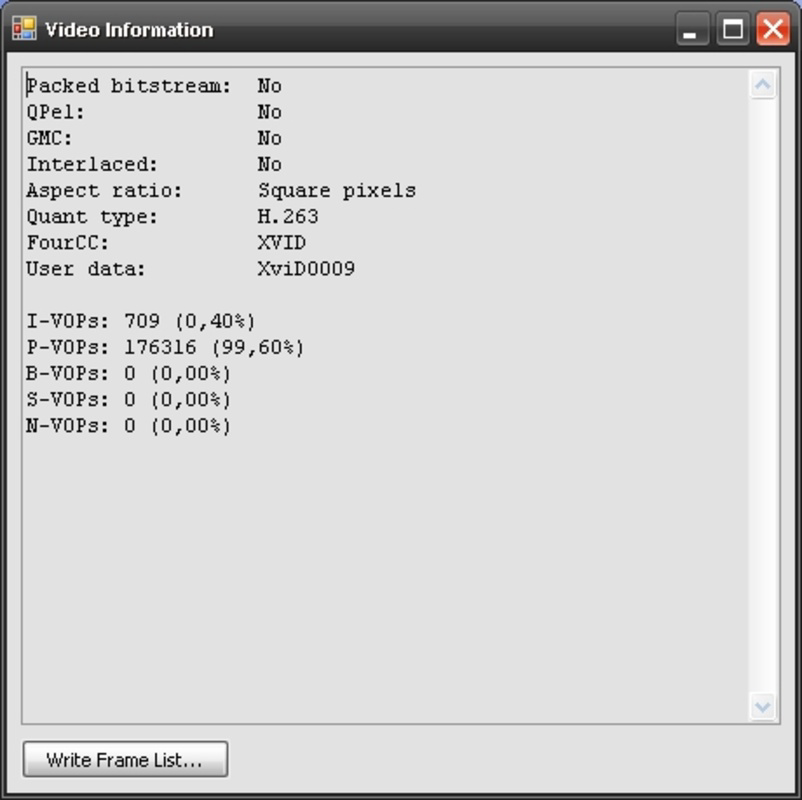
- VOPs Information Display: Provides detailed insights into the use of I, P, S, and B-VOPs (Video Object Planes), helping advanced users analyze the structure and efficiency of MPEG4 video streams.
- Advanced Video Analysis: Detects the presence of QPel (Quarter-Pixel Motion Estimation) and GMC (Global Motion Compensation), two advanced encoding techniques that impact video quality and compression efficiency.
These features serve practical real-world use cases such as preparing videos for playback on older media players, correcting display issues on widescreen monitors, or analyzing video file structure for optimization purposes. For instance, a user preparing a DivX-encoded film for a home theater system might use MPEG4 Modifier to adjust the aspect ratio and ensure packed bitstream compatibility. Similarly, a digital archivist could use the VOPs and encoding analysis tools to assess the technical quality of legacy video files.
Interface, UX & Performance
The user interface of MPEG4 Modifier is designed with functionality over aesthetics, reflecting its role as a technical utility. The layout is minimalistic, focusing on core operations such as file loading, parameter adjustment, and information display. Navigation is straightforward, with clearly labeled controls for each feature. Users can load AVI files directly into the application, and the interface responds promptly to file input, indicating that the tool is optimized for quick access to video metadata.
Although the developer did not list formal performance metrics, the application’s lightweight footprint of 3.2 MB suggests efficient resource usage. The tool operates without significant lag on standard Windows systems, and its non-re-encoding nature ensures that processing times remain near-instantaneous. Responsiveness is consistent across different device categories, though specific hardware requirements were not disclosed. Stability appears reliable based on its long-standing presence in the utility space, with no known issues reported in the public domain. The application does not require installation, allowing for portable use, which enhances its accessibility for users who prefer lightweight, on-the-go tools.
Platform Compatibility & Technical Requirements
MPEG4 Modifier is designed for the Windows platform, supporting desktop environments running on compatible Windows operating systems. The current version is 1.0.0, with a file size of 3.2 MB, indicating a compact and lightweight application. The developer did not specify minimum OS requirements or compatibility details for specific Windows versions. As such, users should ensure their system supports legacy Windows applications, particularly those running on older or minimal installations.
Given its file size and nature as a utility, the app is likely compatible with a wide range of Windows-based systems, including older versions such as Windows 7 and 8. However, the developer did not provide confirmation of compatibility with newer Windows releases like Windows 11. Users should exercise caution when deploying the tool on updated systems, especially those with enhanced security policies or deprecated legacy support. The application does not require administrative privileges for basic operations, but certain file modifications may depend on user permissions and system access rights.
Pros and Cons
Pros
- Non-destructive modifications—no re-encoding required.
- Supports advanced MPEG4 ASP format with DivX and XviD codecs.
- Lightweight and fast, with minimal system resource usage.
- Provides detailed technical insights into video structure and encoding.
- Free to download and use, with no licensing restrictions.
Cons
- Platform is limited to Windows—no support for macOS or Linux.
- Interface is minimal and may not appeal to casual users.
- Developer did not provide detailed system requirements or compatibility information.
- Limited to AVI files with MPEG4 ASP encoding—no support for other formats.
- Does not offer a graphical editing interface for visual changes.
FAQ
Is MPEG4 Modifier safe to download and use?
Yes, the application is free and does not contain malware. It is a standalone utility designed for modifying video file metadata and structure without altering the video stream. However, users should always download from trusted sources to ensure file integrity.
Can I use MPEG4 Modifier on Windows 11?
The developer did not specify compatibility with Windows 11. While the app may function on newer systems, it is recommended to test it in a safe environment first, as legacy Windows applications may encounter compatibility issues.
Does MPEG4 Modifier require installation?
No, MPEG4 Modifier is a portable application. It runs directly from the executable file without requiring installation, making it easy to use on multiple devices.
What file types does MPEG4 Modifier support?
The tool is specifically designed for AVI files encoded with the MPEG4 ASP format, particularly those using DivX and XviD codecs. It does not support other video formats such as MP4, MKV, or MOV.
Is MPEG4 Modifier updated regularly?
There is no public information on regular updates. The current version is 1.0.0, released in 2015. Users should be aware that the tool may not receive future updates or security patches.
Final Thoughts
MPEG4 Modifier remains a valuable tool for users who require precise, non-destructive control over MPEG4-encoded AVI files. Its ability to adjust aspect ratios, modify metadata, and analyze video structure without re-encoding makes it a reliable choice for video enthusiasts and professionals managing legacy media. While its interface is basic and its platform is limited to Windows, the app delivers focused functionality with minimal overhead. For those working with DivX and XviD content, especially in archival or playback optimization contexts, MPEG4 Modifier offers a secure, efficient, and free solution. Its niche appeal is clear: it’s not a video editor, but a powerful utility for technical users who value precision and performance.
Download MPEG4 Modifier now


