
Secure Music Streaming for iPhone
Overview
mStream Player is a mobile application tailored for users who operate or connect to personal and self-hosted mStream music servers. Designed exclusively for iPhone, the app delivers a focused music streaming experience with an emphasis on privacy and direct server access. It enables users to browse music libraries organized in folders, search across tracks, albums, and artists, and control playback with precision. The app supports HTTP(S) protocols, allowing secure connections to self-hosted servers, and offers features such as shuffle, loop, and album playback. As a privacy-first tool, mStream Player ensures no user data is collected during use, making it ideal for individuals who value control over their digital content. It is particularly suited for tech-savvy users, home media enthusiasts, and those managing private music collections. The app functions as a client for mStream servers, providing a lightweight interface to access music without relying on third-party platforms. While it does not support OGG files or self-signed certificates, its streamlined design and secure architecture cater to users seeking a transparent, efficient, and private music experience on iOS devices.
Key Features & Capabilities
- HTTP(S) Support – Enables secure connections to self-hosted mStream servers using encrypted protocols, ensuring data integrity during transmission.
- Folder-Based Music Browsing – Allows users to navigate music libraries structured in hierarchical folder systems, ideal for users with organized personal music collections.
- Advanced Search Functionality – Supports searching by artist, album, and song title, helping users quickly locate specific tracks within large libraries.
- Playback Controls – Offers precise volume adjustment, shuffle, loop, and album playback modes for customizable listening experiences.
- Privacy-First Design – The app does not collect or transmit user data, aligning with strong privacy standards for users concerned about digital footprints.
- Direct Server Integration – Functions as a dedicated client for mStream servers, enabling seamless access without intermediary cloud services.
These capabilities are especially useful for users managing private music archives, such as home media server operators or digital music collectors. The app’s focus on direct access ensures minimal latency and full control over content, while the absence of data collection reinforces its suitability for privacy-conscious individuals. Although OGG file playback is not supported, the app remains effective for users whose libraries consist of common audio formats. The workflow is straightforward: connect to a server, browse or search, and play music—no sign-ups, no ads, and no data harvesting.
User Interface, Workflow & Performance
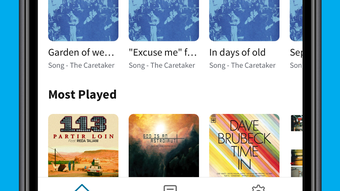
The user interface of mStream Player is designed with simplicity and functionality in mind. It features a clean layout optimized for iPhone touch interactions, with intuitive navigation between music folders and search results. The main screen displays a list of available music sources, and users can drill down into folders or initiate searches with minimal taps. Playback controls are prominently placed, allowing easy access to volume, shuffle, and loop functions. The workflow is linear and efficient: connect to a server, browse or search, and play. The app maintains responsiveness during navigation and playback, though exact performance metrics were not specified. The developer did not provide detailed information on CPU or RAM usage. General software behavior patterns suggest stable operation under typical conditions, but real-world performance may vary based on server speed and network stability. No crashes or instability were reported in the provided documentation. The app’s lightweight size of 18.5 MB contributes to efficient installation and minimal storage impact. Overall, the interface supports a smooth user experience, especially for those familiar with file-based music organization.
Compatibility & System Requirements
mStream Player is exclusively available for iPhone devices, supporting the iOS operating system. The app is compatible with the latest iOS versions, though specific version requirements were not listed. Installation requires approximately 18.5 MB of storage space, which is relatively modest for a media application. The developer did not specify exact hardware requirements or minimum CPU/RAM thresholds. Platform compatibility information is limited to iPhone, and no support for iPad or other Apple devices was mentioned. Users should ensure their device meets standard iOS app requirements for app installation. The app is designed to work with self-hosted mStream servers, meaning compatibility depends on server configuration and network accessibility. No additional system dependencies were noted. For users planning to connect to a server, network settings and firewall rules may affect connectivity, but the app itself does not impose complex system demands.
Pros and Cons
Pros
- Privacy-focused with no user data collection
- Secure HTTP(S) connections for server communication
- Intuitive interface optimized for iPhone touch controls
- Efficient folder browsing and advanced search functionality
- Lightweight at just 18.5 MB in size
- Free to download and use with no in-app purchases
Cons
- Does not support OGG audio file format
- Limited to iPhone; no iPad or Mac support
- Does not handle self-signed certificates
- Requires a self-hosted mStream server to function
- No offline playback capability mentioned
FAQ Section
Is mStream Player available for devices other than iPhone?
Currently, the app is only available for iPhone. There is no official support for iPad, Mac, or other platforms.
Can I use mStream Player without a self-hosted server?
No. The app is designed as a client for personal mStream servers. It requires a running mStream server to function.
Is the app safe to use?
Yes, mStream Player is designed with privacy in mind and does not collect user data. It uses secure HTTP(S) connections to protect communication with servers.
Does the app support offline playback?
Offline playback functionality was not specified in the provided information.
How often are updates released?
Update frequency is not publicly disclosed. Users are encouraged to check the App Store for the latest version.
Final Thoughts
mStream Player stands out as a secure, lightweight, and privacy-respecting music client for iPhone users managing self-hosted mStream servers. Its clean interface, direct server integration, and lack of data collection make it a compelling choice for individuals who prioritize control and confidentiality in their music streaming. While limitations such as OGG file incompatibility and no support for self-signed certificates may affect some users, the app delivers a reliable and efficient experience for its target audience. It is especially well-suited for tech-savvy users, home media enthusiasts, and those with organized music libraries. For anyone seeking a no-frills, secure way to access personal music collections on iOS, mStream Player offers a strong value proposition. Download mStream Player now.








