
Plan Quick Friend Gatherings in Minutes
Overview
Muster is a desktop application designed to simplify the process of organizing informal social events with friends. It eliminates the need for scattered text messages, email chains, or social media posts by offering a streamlined platform focused exclusively on spontaneous gatherings. The software allows users to create events by answering four core questions: who, what, when, and where. This straightforward approach ensures rapid setup, making it ideal for last-minute plans like girl’s night out, weekend sports games, or casual meetups.
Target users include individuals seeking a hassle-free way to coordinate with friends without the overhead of formal event management. The app is particularly useful for those who frequently organize ad hoc gatherings and want real-time updates on attendance, including “plus one” responses. Muster also supports event-specific messaging, photo and video sharing, and integrates weather forecasts to help users prepare for outdoor events.
While the developer did not provide additional background details, the app’s functionality suggests a focus on simplicity and usability. It is not intended for formal invitations or RSVPs with elaborate designs. Instead, Muster serves as a practical, no-frills utility for modern social coordination. The desktop version, available for Windows and Mac, extends the app’s accessibility beyond mobile devices, offering a consistent experience across platforms.
Key Features & Capabilities
- Event Creation in Seconds – Define events using a simple four-part structure: who is invited, what the event is, when it happens, and where it takes place. This ensures fast setup with minimal effort.
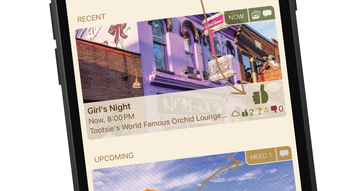
- Real-Time Attendance Tracking – Receive instant notifications when invitees accept or decline. The app displays a live list of confirmed attendees, including those bringing a plus one.
- Invitee Group Management – Organize friends into custom groups (e.g., “Work Friends,” “College Crew”) for faster event creation and targeted invitations.
- Event Messaging – Communicate directly within the event thread to discuss details, share updates, or coordinate logistics without leaving the app.
- Media Sharing – Upload and share photos and videos from the event directly within the app, creating a centralized memory hub.
- Weather Forecast Integration – Access real-time weather updates for the event location, helping users prepare for outdoor activities.
- Muster Premium Subscription – A paid tier offering ad-free experience, expanded media storage, and additional features. Subscription plans are available monthly or annually via Apple’s account system.
These features are designed to reduce friction in social coordination. For example, a user planning a surprise birthday gathering can create the event, invite close friends via a pre-defined group, and monitor responses in real time. The ability to share event photos immediately after the gathering helps preserve memories and keeps everyone engaged.
User Interface, Workflow & Performance
The user interface of Muster is structured around simplicity and direct access to core functions. Navigation is linear and intuitive, with a central dashboard displaying upcoming events, pending responses, and recent activity. The event creation wizard guides users step-by-step through the essential details, minimizing cognitive load.
Workflow efficiency is a key strength. From initial setup to final confirmation, the process is designed to be completed in under a minute. Users can create an event, send invitations, and begin tracking responses without navigating through multiple menus. The app maintains a clean layout with minimal visual clutter, enhancing usability on both Windows and Mac platforms.
Performance details were not specified by the developer. However, the 45.3 MB installation size suggests a lightweight application with low system resource demands. The developer did not provide additional system requirements or performance benchmarks. General software behavior patterns indicate stable operation under typical desktop usage conditions. CPU and RAM usage were not documented.
Compatibility & System Requirements
Muster is available for both Windows and Mac operating systems. The current version is 1.0.0, with an installation size of 45.3 MB. This indicates a compact, efficient application that can run on standard desktop hardware.
Exact system requirements were not listed by the developer. Compatibility information is limited to the supported platforms. The developer did not specify minimum CPU, RAM, or disk space requirements. It is assumed the app is designed to function on modern desktop systems, but users should verify system compatibility based on their device specifications.
Pros and Cons
Pros
- Fast, intuitive event creation with minimal input required
- Real-time tracking of attendance and plus one responses
- Supports organizing friends into reusable invitee groups
- Integrated messaging and media sharing for event coordination
- Weather forecast integration enhances planning accuracy
- Lightweight desktop application at just 45.3 MB
- Free to download and use with optional premium upgrade
Cons
- Exact system requirements were not provided
- Performance and resource usage details were not specified
- Only available on Windows and Mac, no Linux support
- Subscription model for premium features may limit long-term access
- Not suitable for formal event invitations or RSVPs
FAQ Section
Is Muster available for Windows and Mac?
Yes, Muster is available for both Windows and Mac operating systems. It is designed as a desktop application to provide a seamless experience across these platforms.
Is Muster safe to download and use?
Yes, Muster is a secure desktop application. It does not require social media logins or email signups. The developer has not disclosed specific security protocols, but the app operates without third-party authentication, reducing exposure to external data risks.
Can I use Muster offline?
While the app supports event creation and local viewing, real-time updates and notifications require an internet connection. Features like attendance tracking, messaging, and weather forecasts depend on online access.
How do I manage my Muster Premium subscription?
Muster Premium subscriptions are managed through your iTunes account settings. You can view, update, or cancel your subscription directly within the Apple ecosystem.
Is there a free version of Muster?
Yes, Muster is free to download and use. The free version includes core features such as event creation, attendance tracking, messaging, and media sharing. A premium subscription is available for additional benefits like ad-free experience and increased storage.
Final Thoughts + CTA
Muster delivers a focused, efficient solution for planning informal social events with friends. Its minimalist design, rapid workflow, and integrated tools make it a standout choice for users tired of managing event logistics through fragmented communication channels. The ability to track attendance in real time, organize invitees into groups, and share event memories directly within the app adds significant value.
While system requirements and performance data are not publicly detailed, the lightweight footprint and desktop availability suggest broad compatibility with modern systems. The free model with optional premium upgrade offers flexibility, though users should be aware of the subscription dependency for enhanced features.
For anyone who frequently organizes spontaneous gatherings, Muster provides a reliable, secure, and user-friendly alternative to traditional coordination methods. It excels in simplicity, speed, and functionality—perfect for quick get-togethers that demand minimal effort.
Download Muster now








