
Download Notesnook – Secure, Free, Open‑Source Note‑Taking App for Mac
Overview
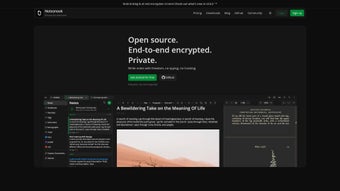
Notesnook is a free, open‑source note‑taking application built specifically for Mac users who value privacy as much as productivity. At its core, Notesnook offers end‑to‑end encryption, meaning every note you write is locked with a key that only you possess. The encryption is performed locally on your device, so even the developers cannot read your data. In addition to airtight security, the app delivers a full‑featured word‑processing experience that rivals Microsoft Word and Google Docs, allowing you to format text, insert links, embed code blocks, and organize content with notebooks and tags. Whether you are a student drafting research notes, a developer keeping code snippets, or a professional managing meeting minutes, Notesnook provides a clean, intuitive interface that keeps your workflow smooth while protecting your information. The app supports seamless synchronization across multiple platforms—including Android, Windows, iOS, and Linux—through a secure cloud service that respects the same encryption standards. While a premium tier unlocks advanced collaboration and backup options, the free version already includes everything most users need: robust security, rich formatting, and cross‑device sync. By marrying strong cryptography with a familiar editing environment, Notesnook positions itself as the go‑to solution for anyone who wants a secure, versatile, and completely free note‑taking tool on macOS.
Key Features
- End‑to‑End Encryption: AES‑256 encryption applied locally before any data leaves your Mac.
- Two‑Step Authentication: Optional 2FA during login to protect your account from unauthorized access.
- Rich Text Editing: Full suite of formatting tools—fonts, headings, lists, tables, and code blocks.
- Notebook & Tag Organization: Create hierarchical notebooks and apply unlimited tags for instant retrieval.
- Cross‑Platform Sync: Securely sync notes to Android, Windows, iOS, and Linux without compromising encryption.
- Open‑Source Transparency: Source code available on GitHub for community audits and contributions.
- Offline Access: All notes are stored locally and remain fully functional without an internet connection.
- Premium Add‑Ons: Optional paid plan adds collaborative editing, unlimited cloud backup, and priority support.
- Search & Filters: Instant full‑text search with tag‑based filters to locate notes in seconds.
- Export Options: Export notes as PDF, Markdown, or plain text for external use.
Installation & Usage Guide
Getting started with Notesnook on macOS is straightforward. First, visit the official website and click the “Download for macOS” button. The installer is a signed .dmg file, ensuring a secure download free from malware. After the download completes, open the .dmg and drag the Notesnook icon into your Applications folder. macOS will prompt you to confirm that you want to open an app from an identified developer; click “Open” to proceed.
Upon launching Notesnook for the first time, you’ll be greeted by a brief onboarding wizard. The wizard guides you through account creation—simply choose a strong master password, which will serve as the encryption key for all your notes. For added security, enable two‑step authentication by linking the app to an authenticator app such as Google Authenticator or Authy. After setting up your account, you can start creating notebooks by clicking the “+ Notebook” button on the left sidebar. Inside each notebook, add notes with the “+ New Note” button; the rich‑text editor appears, offering a familiar toolbar similar to other word processors.
To organize notes, assign tags by typing them into the “Tags” field at the bottom of each note. Tags appear as clickable chips, enabling instant filtering across all notebooks. The search bar at the top of the window supports natural language queries—type “meeting notes March” to locate relevant entries instantly. For synchronization, navigate to Settings > Sync, sign in with your Notesnook account, and toggle the devices you wish to sync. The app will automatically encrypt your data before uploading it to the cloud, then decrypt it on each authorized device using your master password.
Exporting is equally simple: open a note, click the three‑dot menu, and choose “Export.” Select your preferred format (PDF, Markdown, or TXT), and the file will be saved to your Downloads folder. For users who prefer local backups, the Settings panel also offers an “Export All” option that creates a compressed archive of your entire vault.
Throughout the usage experience, Notesnook’s interface remains lightweight and responsive, even when handling large documents. Keyboard shortcuts such as ⌘ B for bold, ⌘ I for italics, and ⌘ K for inserting links speed up the editing process, while the dark mode toggle in Preferences helps reduce eye strain during late‑night sessions.
Compatibility, Pros & Cons, and Frequently Asked Questions
Operating System Compatibility
Notesnook is natively built for macOS (10.13 and later) and offers companion apps for Windows 10/11, Android 6.0+, iOS 13+, and Linux distributions via Snap or AppImage. The cross‑platform design ensures that a note created on a Mac will appear identical on an Android phone, with the same encryption guarantees.
Pros
- Military‑grade encryption keeps data private.
- Fully free core features; no hidden ads or data mining.
- Rich text editor rivals premium word processors.
- Open‑source code fosters community trust.
- Seamless sync across all major platforms.
Cons
- Premium subscription required for real‑time collaboration.
- No built‑in PDF annotation tools.
- Initial setup can be intimidating for non‑technical users.
- Limited third‑party integrations compared to Evernote or Notion.
FAQ
Is Notesnook truly free?
Yes, the core application—including encryption, syncing, and rich‑text editing—is completely free. A paid “Premium” tier is optional and adds collaboration, advanced backup, and priority support.
How does end‑to‑end encryption work in Notesnook?
All notes are encrypted locally on your device using AES‑256 before they leave your computer. The encryption key is derived from your master password, which never leaves your device, ensuring that only you can decrypt the data.
Can I use Notesnook offline?
Absolutely. All notes are stored locally, so you can create, edit, and view them without an internet connection. Sync resumes automatically when you reconnect.
Does Notesnook support Markdown?
Yes. While the primary editor is WYSIWYG, you can insert code blocks and switch to a Markdown view for notes that require plain‑text formatting or export to .md files.
How do I recover a lost master password?
For security reasons, the master password cannot be recovered or reset by the service. If you forget it, you will need to create a new account and import any unencrypted backups you may have exported previously.
Review Summary
Overall Rating: 4.6/5
Pros: Robust encryption, free core features, powerful editor, cross‑platform sync.
Cons: Premium needed for collaboration, limited third‑party integrations.
Conclusion & Call to Action
In a market saturated with note‑taking apps that trade convenience for data collection, Notesnook stands out as a privacy‑first, feature‑rich alternative that doesn’t ask you to compromise on usability. Its open‑source nature, end‑to‑end encryption, and seamless cross‑device sync make it an ideal choice for professionals, students, and developers who demand both security and a polished writing experience. While the premium tier offers useful extras, the free version already equips you with everything needed to capture ideas, draft documents, and keep sensitive information safe.
Ready to protect your thoughts without sacrificing functionality? Download Notesnook for Mac today, create your encrypted vault, and experience a note‑taking app that truly respects your privacy.








