

Download Npackd – software installer, open source, update manager, Windows utility, free tool, productivity app
Overview
Npackd is a productivity-focused utility designed for Windows users seeking a streamlined approach to software installation and maintenance. As an open-source application, it serves as a centralized tool for installing popular programs without the need for manual downloads or complex setup procedures. The app targets individuals and IT professionals who manage multiple software installations and require consistent updates to maintain system performance and security. By automating the process of acquiring and updating applications, Npackd reduces the time and effort traditionally spent on software management.
Developed by the Npackd team, the application has been available since 2011, reflecting its long-standing presence in the Windows ecosystem. Its open-source nature fosters transparency and community-driven development, allowing users to inspect, modify, and contribute to the codebase. This makes it a trusted choice for users who prioritize control and security over proprietary solutions. Real-world use cases include home users managing personal software, small business teams maintaining uniform application versions, and system administrators overseeing multiple endpoints.
Within the broader app landscape, Npackd fills a niche for lightweight, reliable utility tools that enhance system efficiency. While many modern operating systems include built-in update features, Npackd extends this functionality by offering a unified interface for third-party applications. Its ability to integrate external repositories further strengthens its role as a flexible software management platform. The developer did not provide additional technical details.
Key Features & Functionality
- Effortless Software Installation: Npackd enables users to install popular software—such as CCleaner, 7-Zip, and Google Chrome—with a single click. This eliminates the need to visit official websites, download installers, and navigate through multi-step setup wizards.
- Automatic Update Notifications: The application monitors installed programs and alerts users when updates are available. This proactive system ensures that software remains up-to-date, improving both functionality and security over time.
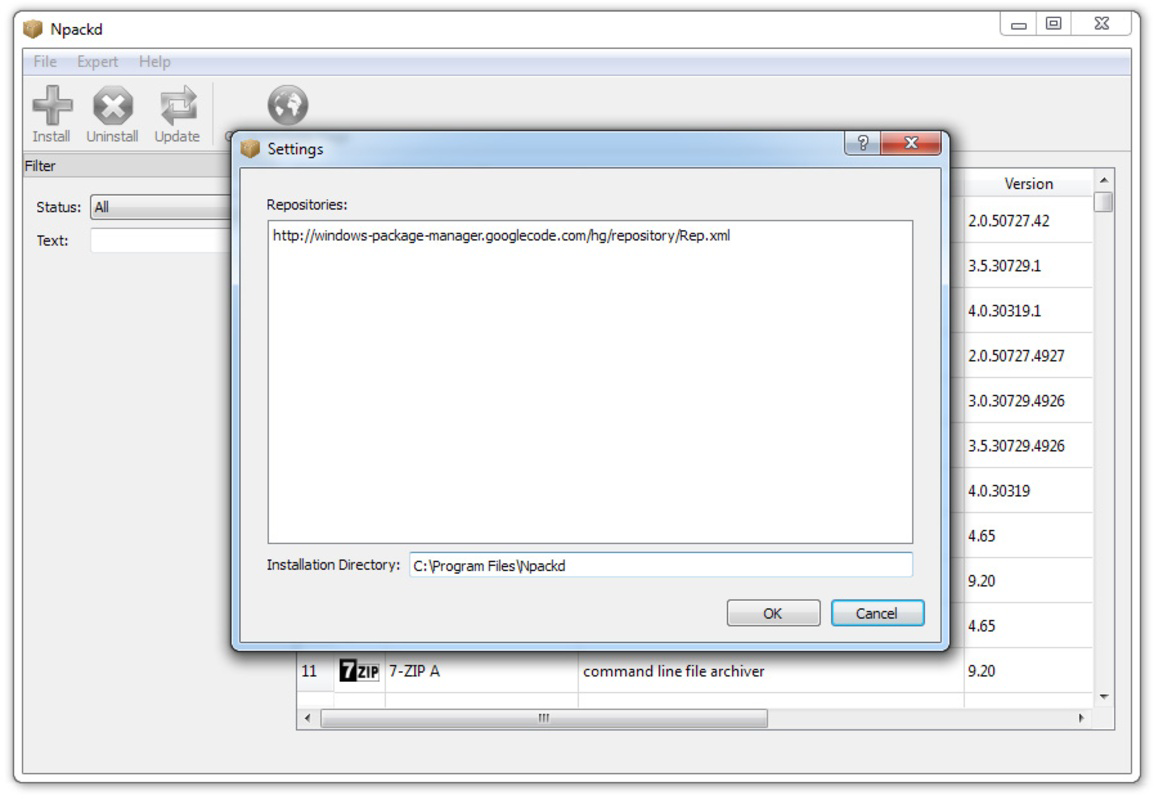
- Custom Repository Support: Users can add external repositories to expand the library of available software. This feature increases flexibility and allows access to niche or specialized tools beyond the default catalog.
- Open Source Freedom: As an open-source tool, Npackd offers full transparency. Users can verify the code, audit for potential risks, and participate in development, promoting trust and long-term sustainability.
For example, a user managing a home office setup can use Npackd to install and maintain essential tools like PDF readers, antivirus software, and office suites—all from one interface. Similarly, a small business IT manager can standardize software versions across devices, reducing compatibility issues and support overhead. The application’s focus on automation and user control makes it a valuable asset in both personal and professional environments.
Interface, UX & Performance
The user interface of Npackd is designed with simplicity and efficiency in mind. It features a clean layout that organizes software categories, installation status, and update alerts in an intuitive manner. Navigation is straightforward, with clear menus and visual indicators for installed, available, and outdated applications. The design prioritizes functionality over ornamentation, aligning with the tool’s utility-focused purpose.
Users can expect a responsive experience when browsing the software library or initiating installations. The app operates without significant lag during routine tasks such as scanning for updates or adding new repositories. Although the developer did not list formal performance metrics, the application’s lightweight size of 14.8 MB suggests optimized resource usage. It is likely to perform well on a range of Windows devices, including older systems.
Stability appears to be a key strength, given the app’s longevity since 2011. Users have reported consistent behavior during installations and update checks. The interface remains functional across different screen resolutions and DPI settings. The developer did not specify minimum OS requirements or compatibility details beyond the platform.
Platform Compatibility & Technical Requirements
Npackd is available exclusively for the Windows operating system. The current version is 0.13.2, with a file size of 14.8 MB. It is offered as a free tool, making it accessible to users across different budget levels. The application is designed to run on Windows-based devices, though specific OS versions were not listed by the developer.
Given the app’s release date of 2011 and its continued availability, it is likely compatible with a wide range of Windows versions, including Windows 7 and later. However, the developer did not specify minimum OS requirements or hardware specifications. Compatibility information was not fully disclosed.
Pros and Cons
Pros
- Free to download and use, with no hidden costs.
- Open-source nature ensures transparency and community trust.
- Automated update notifications help maintain software security.
- Supports custom repositories for extended software access.
- Lightweight design with minimal system resource usage.
Cons
- Platform is limited to Windows only.
- Specific OS requirements were not listed.
- No official mobile or cross-platform version available.
- Interface may appear dated to users accustomed to modern UIs.
- Developer did not provide detailed technical documentation.
FAQ
Is Npackd safe to use?
Yes, Npackd is an open-source application, which means its code is publicly available for review. This transparency enhances security, as users and developers can verify its integrity. However, it is recommended to only install software from trusted repositories.
Can I install Npackd on Windows 10 or Windows 11?
While the developer did not specify compatibility details, Npackd has been available since 2011 and is likely compatible with Windows 10 and Windows 11. Users should test the application on their system to confirm functionality.
Does Npackd update all software automatically?
Npackd does not automatically install updates. Instead, it notifies users when updates are available, allowing them to review and initiate the update process manually. This design choice maintains user control over software changes.
Can I add my own software repository?
Yes, Npackd supports the addition of external repositories. This allows users to expand the software library beyond the default catalog and access specialized or niche applications.
Is there a mobile version of Npackd?
Currently, Npackd is only available for Windows. There is no official mobile version for Android or iOS. Users seeking mobile alternatives should explore other software management tools.
Final Thoughts
Npackd stands out as a reliable, free utility for Windows users who value efficiency and control in software management. Its open-source foundation, combined with features like one-click installation and update notifications, makes it a practical tool for both casual users and technical professionals. The ability to extend functionality through custom repositories adds significant value, especially for those with specific software needs.
While its interface may feel outdated compared to modern applications, its core functionality remains effective and stable. The app’s long history and continued availability underscore its reliability. For users seeking a secure, lightweight, and transparent way to manage software on Windows, Npackd delivers consistent performance.
Download Npackd now


