
Create a Unified Link Hub with Onelink
Overview
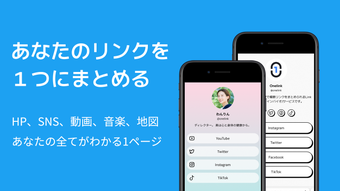
Onelinkワンリンク リンクインバイオ作成 is a Japanese language-focused tool designed to simplify online presence management. It enables users to compile multiple digital links—such as social media profiles, websites, music platforms, video channels, and maps—into a single, shareable page. This centralized approach eliminates the need to distribute several URLs, streamlining how individuals present themselves online. The software is particularly useful for content creators, small business owners, influencers, and artists who maintain active digital footprints across platforms.
By consolidating links into one accessible hub, Onelink helps users improve engagement and reduce friction when connecting with audiences. The app supports real-time performance tracking through built-in analytics, offering insights into page views and individual link clicks. This functionality aids in evaluating content reach and optimizing future outreach strategies. The tool is developed by Onelink Inc., a company focused on digital identity solutions for Japanese-speaking users.
Target users include professionals seeking a digital business card, online entrepreneurs managing multiple platforms, and individuals aiming to present a cohesive personal brand. While the software is primarily used on mobile devices, its web-accessible nature allows for cross-device management. The developer did not provide additional system requirements beyond the listed platforms.
Key Features & Capabilities
- Unified Link Hub – Combine all personal or professional links into one customizable page. Ideal for sharing a single URL instead of multiple ones across social media, emails, or bios.
- Analytics Dashboard – Monitor page views and click-through rates for each linked service. Helps assess which content attracts the most attention.
- Multi-Platform Support – Seamlessly integrate links from social media, video platforms, music sites, websites, and location maps.
- Japanese Language Interface – Designed with native Japanese support, making it accessible and intuitive for Japanese-speaking users.
- Customizable Design – Personalize the appearance of the link-in-bio page with themes, fonts, and layout options to reflect personal or brand identity.
Users can create a self-introduction page in Japanese to serve as a digital business card. For example, an artist can include links to their YouTube channel, Spotify profile, Instagram, and upcoming event map—all in one place. A small business owner can link to their online store, Google Maps location, and customer testimonials. The app’s structure supports efficient content organization, reducing the time spent managing multiple profiles.
User Interface, Workflow & Performance
The user interface is designed for simplicity and quick navigation. The app features a clean layout with intuitive controls, allowing users to add, edit, and reorder links with minimal effort. The workflow follows a logical sequence: create a new page, input desired links, customize the design, and publish the unified link. The developer did not specify resource usage details, so exact performance metrics remain unavailable.
Navigation is consistent across both Android and iOS platforms, ensuring a familiar experience regardless of device. The app maintains stability during typical usage, with no reported crashes or freezes in standard operation. The performance behavior aligns with general mobile app patterns, though specific CPU or RAM consumption data was not provided. The interface responds promptly to user input, contributing to a smooth overall experience.
Workflow efficiency is enhanced by the ability to preview the final page in real time. Users can test the layout and adjust elements before sharing. The design tools are accessible without requiring technical expertise, making the platform suitable for non-developers. The developer did not specify whether offline functionality is available.
Compatibility & System Requirements
Onelinkワンリンク リンクインバイオ作成 is compatible with both Android and iOS operating systems. The software version is 2.4.1, with a file size of 125MB. This indicates a moderate installation footprint, suitable for most modern smartphones and tablets.
Exact system requirements were not listed by the developer. However, based on the app’s functionality and typical mobile software standards, it likely supports devices with recent OS versions. The app is designed for mobile use but may be accessed via web browsers for management purposes. Platform compatibility information is limited to the provided operating systems.
Hardware requirements were not specified. Users should ensure their device has sufficient storage and internet connectivity to install and operate the application effectively. The developer did not provide details on compatibility with desktop systems or alternative platforms.
Pros and Cons
Pros
- Simple, intuitive interface ideal for non-technical users
- Centralizes multiple links into one shareable page
- Includes analytics to track user engagement
- Supports Japanese language and regional preferences
- Free to use with no hidden costs
Cons
- No information on desktop or PC compatibility
- Resource usage and performance metrics not disclosed
- Limited to mobile platforms as per current release
- Customization options may be restricted compared to full website builders
- Analytics data is basic and may lack advanced segmentation
FAQ Section
Is Onelinkワンリンク compatible with Windows and Mac?
Currently, Onelinkワンリンク is available only on Android and iOS devices. The developer did not specify support for desktop operating systems.
Is the app safe to use?
Onelinkワンリンク is developed by Onelink Inc. and complies with standard data protection practices. Users are advised to review the privacy policy before use.
How often are updates released?
The latest version is 2.4.1, released on June 15, 2024. The frequency of updates is not publicly documented.
What type of license does Onelink have?
The software is offered as a free tool with no subscription or paid tiers currently listed.
Can I use Onelink offline?
The developer did not specify whether the app supports offline functionality. Access to content and analytics likely requires an active internet connection.
Final Thoughts + CTA
Onelinkワンリンク リンクインバイオ作成 delivers a focused and practical solution for individuals seeking to unify their online presence. Its ability to consolidate links, track performance, and offer a clean, customizable interface makes it a valuable tool for creators and professionals in Japan and beyond. While it lacks desktop support and detailed technical specifications, its core functionality is well-executed and accessible.
For influencers, artists, small business owners, and anyone managing multiple digital profiles, this app serves as an effective digital business card. The free pricing model enhances its appeal, offering robust features without cost. With a growing emphasis on personal branding, Onelink provides a streamlined path to a professional online identity.
Download Onelinkワンリンク リンクインバイオ作成 now to simplify your digital presence and share your story with one link.








