
Download Only Coms – AI‑powered .com domain finder, free and secure
Introduction & Overview
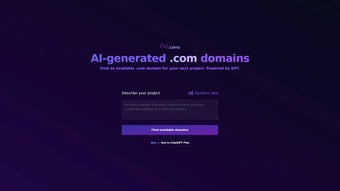
Only Coms is an innovative, AI‑driven web tool that helps entrepreneurs, marketers, and developers discover available .com domain names in seconds. By entering a short description of a project—whether it’s an e‑commerce store, a SaaS platform, a personal blog, or a niche community—the engine, powered by the latest GPT‑4 model, generates a curated list of relevant, brand‑ready .com domains that are instantly checked for registration availability. The focus on .com extensions is intentional: .com remains the most trusted, commercially valuable top‑level domain, giving users a competitive edge in search‑engine rankings and customer perception. The interface is clean, mobile‑responsive, and designed for speed; results appear within a few seconds, eliminating the endless manual brainstorming and domain‑checking loops that can stall a launch. While Only Coms does not currently support alternative extensions like .net or .io, its specialized approach reduces noise, ensuring that every suggestion is both creative and immediately usable. Whether you’re a startup founder looking for a memorable brand name, a digital agency needing multiple client domains, or an SEO specialist hunting for high‑impact URLs, Only Coms streamlines the discovery process, saving time, money, and the frustration of dead‑end domain ideas. The tool also respects user privacy, employing GDPR‑compliant data handling and a secure HTTPS connection, which reassures businesses that their project descriptions are never exposed to third parties. In short, Only Coms transforms a traditionally tedious part of the branding workflow into a fast, enjoyable experience that lets you focus on building your product instead of hunting for a name.
Key Features & Benefits
- AI‑generated suggestions based on natural‑language project descriptions.
- Real‑time .com availability check powered by leading registrar APIs.
- Instant results within seconds, no page reloads required.
- Mobile‑friendly design for on‑the‑go brainstorming.
- Exportable list (CSV/JSON) for easy hand‑off to developers or marketing teams.
- Secure HTTPS connection and GDPR‑compliant data handling.
- Free tier with unlimited searches; premium plan adds bulk export and priority support.
- RESTful API for developers who want to integrate domain generation into custom workflows.
- Multi‑language support for global teams (English, Spanish, French, German).
- Saved‑search history for quick reference to previously generated ideas.
The AI engine behind Only Coms leverages GPT‑4, allowing it to understand context, industry jargon, and subtle branding nuances. For example, a user typing “organic skincare line for millennials” will receive suggestions like GlowMild.com, PureBloom.com, or EcoRadiance.com—all of which are checked for availability instantly. This reduces the mental load of combining keywords, checking spelling variations, and verifying registrar data manually. Because the tool focuses exclusively on .com, each recommendation carries the highest commercial credibility, a factor that is especially valuable for businesses seeking investor confidence or higher click‑through rates in paid campaigns. The export feature lets you download the full list in CSV or JSON format, making it simple to share with design teams, copywriters, or legal advisors. Additionally, the API key provided in the user dashboard enables automated domain generation during product scaffolding, CI/CD pipelines, or even chat‑bot integrations. By automating the ideation phase, Only Coms accelerates time‑to‑market, allowing founders to secure their digital identity before competitors do, while the free tier ensures that even solo freelancers can benefit without a financial barrier.
Installation, Compatibility & Usage Guide
Getting Started – No Download Required
Only Coms is a web‑based SaaS application, so there is nothing to install on a local machine. Users simply visit onlycoms.com from any modern browser. The platform is built with responsive HTML5, CSS3, and JavaScript, ensuring smooth performance on desktop and mobile devices. Because it runs entirely in the browser, updates are deployed instantly, meaning you always have access to the latest AI model and registrar API integrations without needing to refresh a client‑side application.
System Requirements
Compatible with Windows 10/11, macOS Monterey and later, Linux distributions, Android 8.0+, and iOS 13+. Any browser that supports ES6 JavaScript (Chrome, Edge, Firefox, Safari, or Opera) will render the interface correctly. The site also works on low‑end devices because the heavy AI processing occurs on the server side, keeping client‑side resource usage minimal.
Step‑by‑Step Usage
- Open the website and locate the central input box labeled “Describe your project”.
- Enter a concise description (2‑5 sentences) highlighting the core concept, target audience, and any key adjectives.
- Click the “Generate Domains” button. The AI processes the text, combines relevant keywords, and queries registrar APIs for real‑time .com availability.
- Review the list of suggestions. Each entry shows the domain name, availability status, and a “Copy” button for quick clipboard access.
- If you need a structured list, click “Export Results” and choose CSV or JSON format.
- Proceed to your preferred registrar to complete the purchase, or use the built‑in “Register Now” link if the service is integrated with a partner registrar.
- For power users, navigate to the “API” tab in your dashboard, generate an API key, and follow the documentation to call the endpoint from scripts, CI pipelines, or third‑party branding tools.
All actions are logged in a secure session that expires after 30 minutes of inactivity, protecting your project description from accidental exposure. If you ever need to clear your search history, a single “Clear History” button removes all stored queries from the client side. The combination of a zero‑install approach, broad operating‑system compatibility, and straightforward step‑by‑step guidance makes Only Coms accessible to both tech‑savvy developers and non‑technical founders alike.
Pros, Cons, FAQ & Conclusion
Pros & Cons
- Pros:
- Fast, AI‑driven suggestions save hours of manual brainstorming.
- Real‑time .com availability eliminates dead‑end ideas.
- No installation; works on any device with a modern browser.
- Free tier provides unlimited searches for individuals and small teams.
- Export options streamline hand‑off to developers or branding agencies.
- Developer‑friendly API enables automation and integration.
- GDPR‑compliant data handling and HTTPS security reassure privacy‑concerned users.
- Cons:
- Limited to .com extensions; users needing .net, .io, or country‑code TLDs must look elsewhere.
- Premium features (bulk export, priority support, API rate limits) require a paid subscription.
- AI suggestions depend on the quality of the input description; vague prompts may yield generic names.
- Search history is stored temporarily, which may concern extremely privacy‑sensitive organizations.
Frequently Asked Questions
Is Only Coms really free to use?
Yes, the core domain‑search functionality is completely free and offers unlimited queries. Premium features such as bulk export, priority support, and higher API limits are available under a paid plan.
Can I use Only Coms on my mobile phone?
Absolutely. The web app is fully responsive and works on Android and iOS browsers, allowing you to generate domain ideas while on the go.
Does Only Coms store the domain names I search for?
Only Coms retains search queries temporarily to improve AI performance, but it does not store personal data permanently. All data handling complies with GDPR and is encrypted via HTTPS.
What happens if the suggested .com becomes unavailable before I register it?
The availability check is performed in real time. If a domain is shown as available but is taken before you complete registration, you will need to generate a new suggestion. The tool updates instantly, so you can quickly try an alternative.
Is there an API for developers?
Yes, Only Coms provides a RESTful API with an API key available in the user dashboard. The endpoint returns JSON with domain suggestions and availability status, perfect for integrating into CI pipelines or custom branding tools.
Conclusion & Call to Action
If you’re tired of endless domain‑name brainstorming and want a trustworthy .com that aligns with your brand vision, Only Coms offers a fast, secure, and free solution. Its AI engine produces relevant, market‑ready suggestions while instantly confirming availability, meaning you can secure the perfect web address before competitors do. Even though it focuses solely on .com extensions, that specialization is a strength for businesses that value credibility and SEO impact. Ready to claim your next digital identity? Visit Only Coms now, type your project description, and download your ideal .com domain in seconds.



.png)




