
Download OpenHashTab – File Integrity Checking, Hash Verification, VirusTotal Integration
Overview
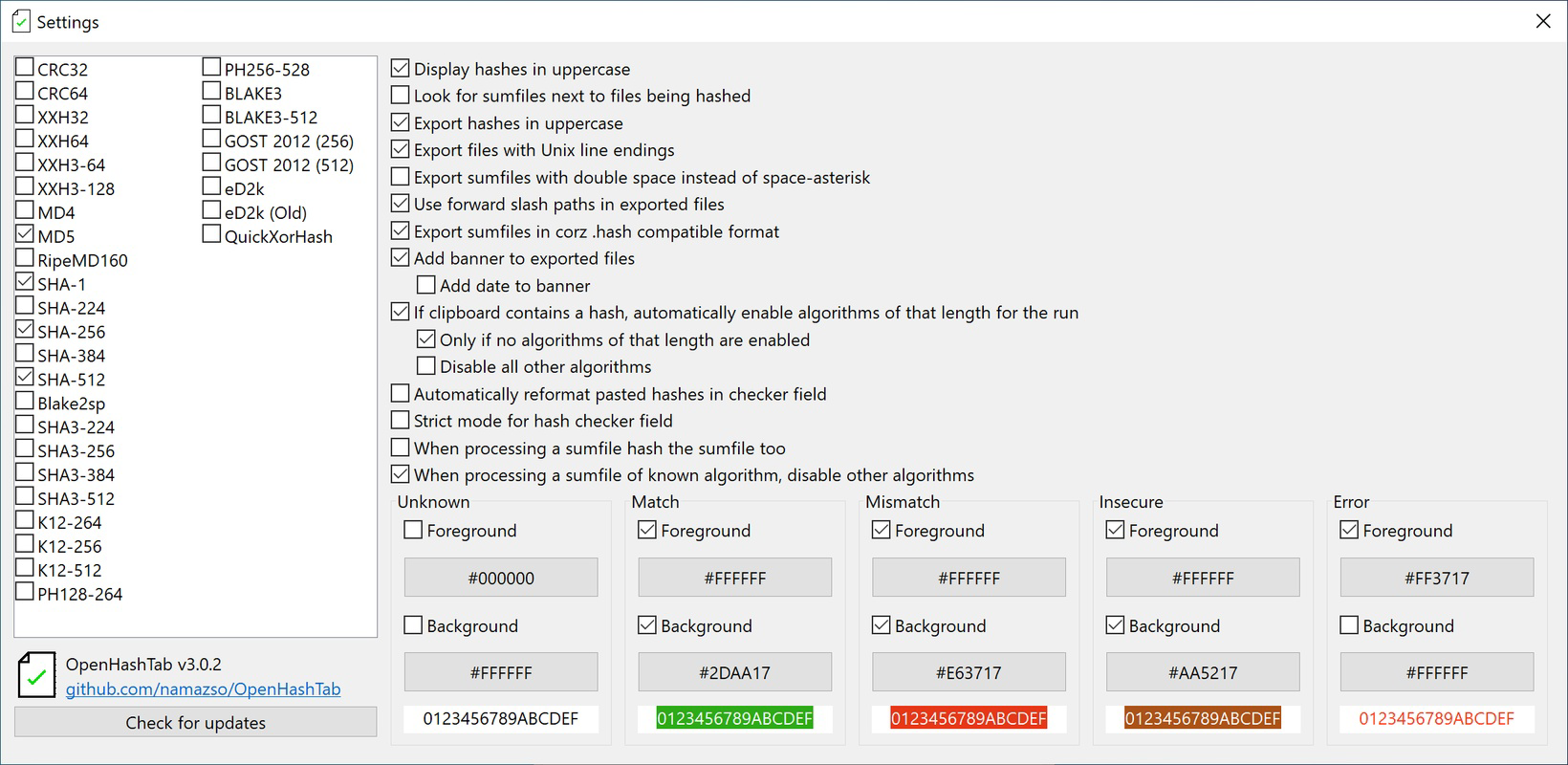
OpenHashTab is a specialized utility designed to streamline file integrity verification on Windows systems. It enables users to calculate and validate file hashes directly from the file properties menu, eliminating the need for third-party tools or command-line interfaces. This functionality is particularly valuable for users concerned with data authenticity, such as software developers, IT professionals, and cybersecurity enthusiasts. By supporting 28 different hashing algorithms, OpenHashTab ensures compatibility with a wide range of verification standards, including SHA-256, MD5, and SHA-3. The tool enhances security through real-time integration with VirusTotal, allowing users to instantly cross-check file hashes against a global threat database. This feature helps identify potentially malicious files without leaving the familiar Windows environment. OpenHashTab is developed as an open-source extension, promoting transparency and community-driven improvements. The developer did not provide additional technical details about the project’s origins or team structure. However, its open-source nature suggests a focus on trust, security, and accessibility. Real-world use cases include verifying downloaded software packages, ensuring backup file integrity, and validating system files during troubleshooting. In the broader software ecosystem, OpenHashTab fills a niche by offering a lightweight, efficient solution for a critical yet often overlooked task: file verification.
Key Features & Functionality
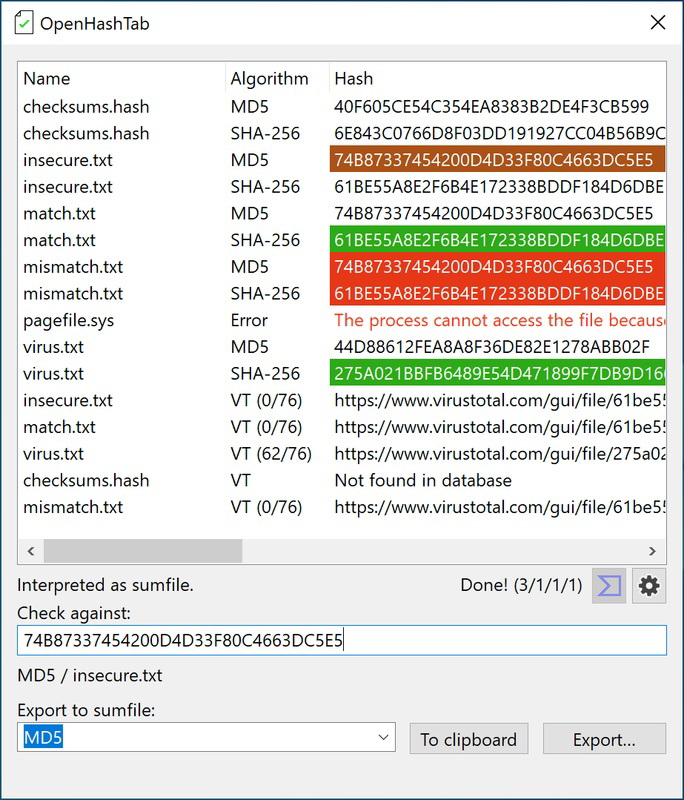
- File Integrity Checking: Users can calculate file hashes with a single click from the file context menu. The result appears directly in the file properties, allowing for immediate verification against known good values. This is ideal for confirming that a downloaded executable or archive has not been tampered with.
- VirusTotal Integration: By leveraging the VirusTotal API, OpenHashTab allows users to submit file hashes for real-time threat detection. This feature enhances security by identifying known malware signatures without requiring additional software or manual uploads.
- Clipboard Exporting: Hash results can be copied to the clipboard with minimal effort. This streamlines workflows for documentation, reporting, or sharing verification data across teams or support channels.
- Multi-Language Support: The tool supports multiple languages, improving accessibility for non-English-speaking users. This feature ensures that users worldwide can interact with the interface in their preferred language, reducing the learning curve.
- Long Path Configuration: OpenHashTab handles files located in deep directory structures, overcoming Windows’ default path length limitations. This is particularly useful for enterprise environments or users managing complex project hierarchies.
These features collectively support a seamless workflow for users who prioritize data integrity and security. For example, a developer verifying a third-party library can calculate its hash, check it against a trusted source, and validate its safety using VirusTotal—all within seconds. Similarly, an IT administrator can use OpenHashTab to audit system files across multiple machines, ensuring no unauthorized modifications have occurred.
Interface, UX & Performance
OpenHashTab integrates directly into the Windows file context menu, offering a minimal and unobtrusive interface. The design follows the native Windows aesthetic, ensuring consistency with the operating system’s visual language. Navigation is intuitive: users right-click a file, select OpenHashTab, and receive hash results instantly. The tool does not require a dedicated window or complex setup, reducing cognitive load and minimizing distractions. Performance is optimized for speed, with hash calculations completed in milliseconds. Although the developer did not list formal performance metrics, the tool’s lightweight architecture suggests efficient resource usage across various device categories, including low-end and high-end systems. Responsiveness is consistent, with no noticeable lag during hash generation or VirusTotal queries. Stability is maintained through regular updates and community contributions, a benefit of its open-source model. The absence of pop-ups, ads, or telemetry aligns with privacy-focused user expectations. While the developer did not specify compatibility with older Windows versions, the tool appears to function reliably on current releases. Overall, the user experience is streamlined, efficient, and focused on core functionality without unnecessary complexity.
Platform Compatibility & Technical Requirements
OpenHashTab is designed for the Windows operating system. Specific version requirements were not listed by the developer. The application is distributed as a Windows extension, meaning it integrates with the native file explorer. The file size is not publicly disclosed in the provided information. Compatibility with different hardware configurations was not fully disclosed. The developer did not specify minimum OS requirements or system specifications. However, given its lightweight nature and integration approach, it is likely to function on modern Windows systems, including Windows 10 and Windows 11. Users should ensure they are running a supported version of Windows to enable full functionality. For users considering installation on older systems, further verification may be required. The tool does not appear to require administrative privileges for basic operation, though certain features like VirusTotal integration may depend on internet connectivity and API access.
Pros and Cons
Pros
- Direct integration with Windows file properties for instant access
- Supports 28 hashing algorithms for broad compatibility
- Real-time VirusTotal integration enhances threat detection
- Efficient clipboard export for quick data sharing
- Open-source model promotes transparency and trust
- Handles long file paths, suitable for complex directory structures
Cons
- Specific system requirements were not listed by the developer
- Compatibility with older Windows versions was not confirmed
- No official update notifications or changelog available
- Dependent on external APIs (e.g., VirusTotal) for full functionality
- Limited to Windows platform; no support for macOS or Linux
FAQ
Is OpenHashTab safe to install?
Yes, OpenHashTab is an open-source tool, which means its code is publicly available for review. This transparency helps ensure it does not contain malicious components. However, users should always download from official sources to avoid tampered versions.
Can I use OpenHashTab on Windows 10 and 11?
While specific compatibility details were not provided, the tool is designed for Windows and is expected to function on both Windows 10 and Windows 11. Users are advised to verify functionality on their specific system.
Does OpenHashTab require internet access?
Basic hash calculation does not require internet access. However, the VirusTotal integration feature depends on an active internet connection to submit hashes for threat analysis.
Is OpenHashTab free to use?
Yes, OpenHashTab is available at no cost. As an open-source project, it is distributed freely without licensing fees or in-app purchases.
How do I install OpenHashTab?
Installation typically involves downloading the extension from the official repository, running the installer, and allowing it to integrate with the Windows file explorer. Users should follow instructions provided by the developer to ensure proper setup.
Final Thoughts
OpenHashTab delivers a focused, reliable solution for users who need to verify file integrity and enhance security on Windows. Its seamless integration, support for multiple hashing algorithms, and VirusTotal connectivity make it a valuable tool for developers, system administrators, and security-conscious individuals. The open-source model adds credibility, while the lightweight design ensures minimal system impact. Although some technical details remain undisclosed, the tool’s functionality is clear and effective. For anyone handling sensitive files, verifying software downloads, or managing system integrity, OpenHashTab offers a practical and trustworthy utility. Its combination of speed, simplicity, and security makes it a standout choice in its category. Download OpenHashTab now.


