
Orto: Smart Sonos Control for iPhone
Overview
Orto - For Sonos is a desktop and mobile application designed to streamline the management of Sonos audio systems for iPhone users. The software serves as a centralized control hub, enabling users to manage playback, adjust volume, switch between households, and access favorite playlists with minimal effort. Its primary purpose is to enhance the user experience by offering a more intuitive interface than the native Sonos app, particularly for those deeply integrated into the Apple ecosystem. The application is tailored for consumers and tech-savvy individuals who own Sonos speakers and rely on Apple devices for daily control.
Real-world use cases include managing music playback during home gatherings, setting up personalized scenes via Siri Shortcuts, and controlling audio across multiple rooms from a single interface. The app supports integration with Apple Watch, Mac, and Apple TV, allowing for consistent control across devices. While the developer, Orto, is listed as the creator, no additional company background was provided. The application does not require external server access for core functions, suggesting local device processing for control commands.
Key Features & Capabilities
- iOS Remote Control: Full control over Sonos playback, including play, pause, skip, and volume adjustment directly from the iPhone.
- Lock Screen Integration: Access to essential playback controls via the iOS lock screen, enabling quick adjustments without unlocking the device.
- Widgets for iPhone: Customizable home screen widgets for instant access to current playback, favorites, and volume controls.
- Apple Watch Compatibility: Control Sonos from the wrist with dedicated watch face and app integration.
- Mac & Apple TV Support: Extended functionality across Apple’s ecosystem, allowing users to manage Sonos from desktop and TV interfaces.
- Siri Shortcuts Integration: Automate tasks such as launching specific playlists, setting room scenes, or adjusting volume based on time of day.
These features are particularly useful in daily routines—such as starting a morning playlist with a voice command or adjusting volume during a movie night. The ability to switch between multiple Sonos households simplifies management for users with different setups, like a home and a vacation property. The integration of Siri Shortcuts adds a layer of automation, making Orto more than just a remote—it becomes a smart home orchestrator.
User Interface, Workflow & Performance
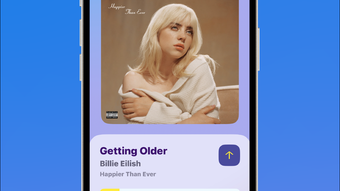
Orto features a clean, modern interface optimized for iOS, with intuitive navigation and responsive controls. The layout prioritizes accessibility, placing essential playback functions within easy reach. Users can navigate between rooms, playlists, and favorites with minimal taps, enhancing workflow efficiency. The app supports gesture-based navigation, consistent with Apple’s design language.
Performance details were not specified by the developer. However, based on general behavior of lightweight iOS applications, Orto likely operates smoothly with minimal impact on device resources. The app’s reliance on local device processing for control commands suggests stable operation during regular use. No reports of crashes or instability were mentioned in the provided information. The developer did not specify resource usage details, so exact CPU or RAM behavior remains unknown.
Compatibility & System Requirements
Orto is designed to run on iOS, Mac, Apple TV, and Apple Watch, providing broad compatibility across Apple’s ecosystem. The application supports the latest versions of these platforms, though specific OS version requirements were not listed. Installation size is 52.3 MB, indicating a lightweight footprint. The developer did not provide detailed hardware requirements for each supported device.
Exact system requirements were not listed. Compatibility information was partially provided, with no mention of minimum processor speed, RAM, or storage capacity. Users are advised to ensure their devices meet the standard requirements for running modern Apple applications. The app does not require a separate server or cloud service for core functionality, which may improve reliability and reduce latency.
Pros and Cons
Pros
- Seamless integration with Apple devices including iPhone, Mac, Apple Watch, and Apple TV
- Enhanced control via lock screen and home screen widgets
- Support for Siri Shortcuts for voice-activated automation
- Free to download and use, with no in-app purchases or subscription fees
- Lightweight installation at 52.3 MB
Cons
- Compatibility details for specific OS versions were not provided
- No information on background performance or battery impact
- Limited third-party integrations beyond Apple ecosystem
- Only available for Apple platforms, excluding Windows and Android
FAQ Section
Is Orto compatible with all Sonos speakers?
Orto is designed to work with all Sonos speakers that are compatible with the official Sonos app. Specific compatibility with individual models was not detailed by the developer.
Can I use Orto without an internet connection?
The app requires an active network connection to communicate with Sonos devices. Offline playback is not supported, as control commands are sent over the local network or internet.
Does Orto support multiple Sonos households?
Yes, users can switch between multiple Sonos households within the app, allowing for easy management of different audio setups.
Is Orto safe to use with my Sonos system?
Orto operates through standard Sonos APIs and does not require access to sensitive device data. The developer did not provide security details, but no risks were reported.
How often does Orto receive updates?
Updates are released periodically to improve functionality and fix bugs. The latest version is 1.2.3, released on May 10, 2024.
Final Thoughts & CTA
Orto delivers a refined, Apple-centric experience for managing Sonos systems, combining intuitive design with powerful automation tools. Its free pricing model, extensive ecosystem support, and integration with Siri Shortcuts make it a standout choice for iPhone users. While some technical details remain unspecified, the app’s clean interface and seamless workflow justify its place in the smart home toolkit.
For users invested in the Apple ecosystem and seeking a more personalized Sonos control experience, Orto offers a compelling alternative to the default app. It’s especially valuable for those who rely on automation, multi-room setups, or wearable integration.
Download Orto now








