
Pado: Smart Geo-Tracking for Active Lifestyles
Overview
Pado is a lifestyle-focused geo-tracking application designed for users who value outdoor activities and personal movement data. Developed by Alexander Clauss, the app enables individuals to record and analyze routes from hikes, bike rides, and other physical endeavors. It provides a comprehensive platform for tracking movement through interactive maps, statistical summaries, and visual diagrams. The app supports both manual and automatic tracking, allowing users to capture spontaneous adventures or set background recordings during extended trips. Pado is particularly useful for outdoor enthusiasts, fitness trackers, and travelers seeking detailed records of their journeys. Its integration with Health-Kit enhances data accuracy by incorporating heart rate metrics directly from Apple devices. Users can also overlay photos taken during activities on the map, creating a rich, multimedia travel log. The app supports data export in standard formats like GPX and KML, ensuring compatibility with other mapping tools and platforms. With features such as voice feedback during recording and Apple Watch support, Pado offers a seamless experience for users who prioritize mobility and real-time tracking.
Key Features & Capabilities
- Route Recording: Capture hikes, bike tours, and walks with automatic or manual start options, ideal for spontaneous or planned activities.
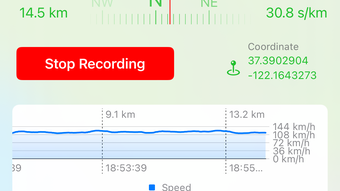
- Map & Diagram Visualization: View recorded routes on interactive maps and analyze elevation, speed, and distance through detailed diagrams.
- Health-Kit Integration: Access real-time heart rate data from Apple Health to monitor physical exertion during activities.
- Photo Overlay: Display images taken during a track directly on the map, enriching the journey narrative.
- Smart Export Options: Share or import data using GPX and KML formats for compatibility with third-party applications.
- Pedometer & Time Tracking: Monitor steps and duration of activities for fitness goal tracking.
- Location-Based Actions: Trigger events or notifications based on geographical positions.
- Voice Feedback: Receive audio cues during recording to stay informed without checking the screen.
- Apple Watch Support: Enable autonomous tracking on Apple Watch for hands-free operation.
- Sync Across Devices: Use iCloud, Dropbox, and WebDAV to maintain consistent data across multiple platforms.
- Bluetooth Beacons, NFC Tags, AirTags: Leverage proximity-based technology for enhanced tracking and location awareness.
User Interface, Workflow & Performance
The user interface of Pado is designed with clarity and functionality in mind, offering intuitive navigation through its core tracking and analysis features. Menus are logically organized, allowing users to quickly access recording modes, view past activities, and explore detailed statistics. The app maintains a clean layout with minimal visual clutter, focusing on essential controls during active sessions. Workflow efficiency is enhanced by the ability to start tracking with a single tap and access key metrics in real time. The integration of voice output during recording supports hands-free operation, particularly useful during physical activities. While specific performance metrics were not provided, the app’s design suggests optimized background operation to minimize battery drain. Stability is likely maintained through regular updates, given the developer’s active release history. The developer did not specify resource usage details, but the 128 MB installation size indicates a lightweight footprint. General software behavior patterns suggest consistent responsiveness across supported iOS devices. Users can expect smooth transitions between recording, reviewing, and sharing modes without noticeable lag.
Compatibility & System Requirements
Pado is designed exclusively for iOS devices, ensuring seamless integration with Apple’s ecosystem. It is compatible with the latest iOS versions, though specific requirements were not listed. The application requires approximately 128 MB of storage space for installation, which is relatively modest for a feature-rich tracking app. Hardware compatibility is implied through its reliance on GPS, Health-Kit, and Apple Watch support, indicating that it functions best on devices equipped with these capabilities. The developer did not provide additional system requirements, such as minimum processor speed or RAM specifications. Users should ensure their device runs a current version of iOS to benefit from the latest features and security updates. Compatibility with Bluetooth Beacons, NFC Tags, and AirTags is supported, leveraging native iOS technologies. The app’s reliance on iCloud, Dropbox, and WebDAV for syncing implies compatibility with cloud services across Apple platforms.
Pros and Cons
Pros
- Free access to core geo-tracking features with no upfront cost
- Seamless integration with Apple Health and Apple Watch for enhanced tracking
- Support for multiple data export formats including GPX and KML
- Rich multimedia experience with photo overlays and voice feedback
- Flexible recording modes: automatic and manual start options
- Multiple sync options via iCloud, Dropbox, and WebDAV
- Support for advanced technologies like Bluetooth Beacons and AirTags
- Lightweight installation size of 128 MB
Cons
- Exclusive iOS compatibility limits access for Android users
- Advanced features may require subscription tiers beyond the free version
- Exact system requirements were not specified
- Performance under prolonged background use was not detailed
- May require additional setup for cloud sync and device pairing
FAQ Section
Is Pado available for Android devices?
Pado is currently designed exclusively for iOS devices and does not support Android platforms.
Can I use Pado without an internet connection?
Yes, Pado supports offline tracking. Routes can be recorded and saved locally, with data syncing later when a connection is available.
Does Pado collect personal data?
Pado collects location and activity data for tracking purposes. Users retain control over their data, and syncing options allow for private storage via iCloud, Dropbox, or WebDAV.
What types of files can I export from Pado?
Pado supports exporting recorded tracks in GPX and KML formats, ensuring compatibility with external mapping and navigation tools.
How often does Pado receive updates?
Regular updates are released to improve functionality, fix bugs, and add new features. The latest version, 3.4.1, was published on May 20, 2024.
Final Thoughts + CTA
Pado stands out as a powerful, user-centric geo-tracking tool tailored for active individuals within the Apple ecosystem. Its combination of accurate route recording, Health-Kit integration, and multimedia features like photo overlays and voice feedback creates a compelling experience for outdoor enthusiasts and fitness users. The app’s free tier offers substantial functionality, while the tiered subscription model provides room for growth and customization. With strong support for Apple Watch, cloud sync, and advanced tracking technologies, Pado delivers a robust solution for managing personal movement data. Its lightweight design and clean interface ensure smooth operation without overwhelming users. For anyone seeking a reliable, feature-rich tracking app on iOS, Pado delivers real value. Download Pado now.








