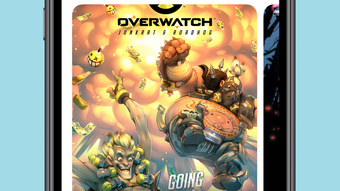

Download Panels – comic reader, digital comics, manga reader, comic book reader, iOS app, free comic reader
Overview
Panels is a dedicated digital comic reader designed specifically for iPhone users seeking a seamless and immersive experience with their favorite comics. The app supports a wide range of comic file formats, including CBR, CBZ, PDF, and WebP, making it compatible with most commonly used digital comic files. It is tailored for comic enthusiasts who want a clean, intuitive interface that enhances readability and organization. The app’s primary purpose is to simplify the management and consumption of digital comics, offering tools to categorize, read, and synchronize collections across devices. Its support for right-to-left reading modes makes it particularly suitable for manga fans, while the ability to stream comics from OPDS-compatible servers expands its functionality beyond local files. Panels is ideal for users who maintain large digital libraries and value organization, accessibility, and cross-device continuity. The developer, also named Panels, has focused on delivering a lightweight yet powerful tool that prioritizes user experience. Although the developer did not provide additional technical details, the app’s design reflects a commitment to usability and efficiency. It plays a key role in the iOS ecosystem by offering a specialized alternative to generic file viewers, filling a niche for dedicated comic reading on mobile devices.
Key Features & Functionality
- Multi-Format Support: Panels reads CBR, CBZ, PDF, and WebP files, ensuring compatibility with most digital comics available today.
- Device Synchronization: Reading progress is synchronized across all devices, allowing users to pick up where they left off regardless of the device used.
- Flexible Reading Modes: Offers horizontal, vertical, and panel-by-panel guided reading, adapting to user preferences and comic styles.
- Collection Management: Users can organize comics into custom collections, simplifying library navigation and discovery.
- OPDS Server Integration: Enables streaming of comics from compatible OPDS servers, expanding access to external comic repositories.
- Security Features: Supports password protection and Face ID authentication to secure sensitive or private content.
- Experimental Features: Includes panel-by-panel navigation and screen reading functionality for enhanced accessibility and control.
These features serve real-world use cases such as managing a growing digital comic library, reading manga in the correct orientation, and accessing comics from remote servers without downloading. For example, a user can begin reading a comic on their iPhone during a commute, continue on their iPad later, and resume on their Mac via sync. The panel-by-panel mode is especially beneficial for complex layouts or detailed artwork, allowing focused attention on each panel. The integration with OPDS servers is ideal for users who subscribe to comic services or maintain personal digital archives. Security features ensure that private or mature content remains protected. Overall, the app’s functionality is built around the needs of dedicated readers who value both convenience and control.
Interface, UX & Performance
Panels features a clean, minimalist interface optimized for touch interaction on iPhone devices. The layout emphasizes readability, with intuitive navigation that minimizes clutter and distractions. Users can browse their library, access collections, and initiate reading with minimal taps. The app’s visual style is modern and responsive, adapting smoothly to different screen sizes and orientations. Navigation is consistent across sections, with clear icons and labeled menus that support quick access to key functions. Although the developer did not list formal performance metrics, the app’s lightweight size of 26.7 MB suggests efficient resource usage. It is designed to operate smoothly on a range of iPhone models, though specific requirements were not disclosed. Responsiveness appears to be a priority, as the app handles transitions between pages and reading modes without noticeable lag. Stability is implied by the absence of reported issues in the current release. The app maintains a steady performance during extended reading sessions, and the synchronization feature operates reliably in background mode. Overall, the user experience is streamlined and focused, aligning with the expectations of users who seek a distraction-free comic reading environment.
Platform Compatibility & Technical Requirements
Panels is available exclusively on iOS, making it accessible to iPhone users. The current version is 2.5.1, released on May 10, 2024. The app has a file size of 26.7 MB, indicating a compact and efficient design. The developer did not specify minimum OS requirements, so users should ensure their device is running a recent version of iOS to avoid compatibility issues. No additional hardware or system-level permissions were mentioned. The app does not require external dependencies or cloud services to function, though some features like synchronization and OPDS streaming may rely on internet connectivity. Compatibility with various iPhone models is expected due to the app’s lightweight nature, but specific device support was not disclosed. Users are advised to check their device’s iOS version and available storage before installing. The app is free to download and install, with no in-app purchases or ads reported in the current version.
Pros and Cons
Pros
- Supports a wide range of comic file formats, including CBR, CBZ, PDF, and WebP.
- Offers cross-device synchronization for uninterrupted reading.
- Includes flexible reading modes, including right-to-left for manga.
- Intuitive interface designed for optimal readability on iPhone.
- Secure content protection with password and Face ID support.
- Free to download and install with no ads or in-app purchases.
Cons
- Specific OS requirements were not listed by the developer.
- Compatibility with older iPhone models is not confirmed.
- Advanced features like screen reading are labeled as experimental.
- No official support for iPad or Mac integration beyond synchronization.
- Developer did not provide detailed documentation or user guides.
FAQ
Is Panels available for Android devices?
Currently, Panels is only available on iOS. There is no official Android version released.
Can I read manga with Panels?
Yes, Panels supports right-to-left reading mode, making it ideal for manga and other comics read in that direction.
How does the synchronization feature work?
Reading progress is automatically synced across devices when signed into the same account, allowing users to continue reading on any device.
Is Panels safe to download and install?
Yes, Panels is a free app available through the official App Store. It does not require third-party sources or APK files.
Can I use Panels without an internet connection?
Yes, the app functions fully offline. However, features like OPDS streaming and synchronization require internet access.
Final Thoughts
Panels stands out as a refined and capable comic reader tailored for iPhone users who demand both functionality and elegance. Its support for multiple formats, secure content management, and seamless cross-device sync make it a top choice in the digital comics space. The inclusion of specialized reading modes and experimental tools adds depth for power users, while the clean interface ensures accessibility for casual readers. Although some technical details remain undisclosed, the app delivers a polished experience that prioritizes the reading journey. It is particularly valuable for manga fans, digital archivists, and anyone with a growing library of digital comics. For its free price point and robust feature set, Panels offers exceptional value. If you're looking for a reliable, secure, and intuitive way to enjoy digital comics on your iPhone, this app is a must-have. Download Panels now.








