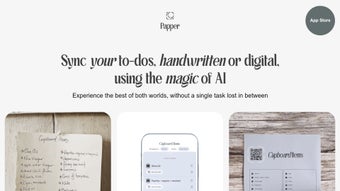

Download Papper – AI‑Powered Task Management, Handwritten OCR, iOS Planner
Papper is a web‑based, iOS‑first productivity tool that redefines how you capture and organise tasks. By marrying the natural feel of handwritten notes with the precision of digital to‑do lists, Papper lets you sketch ideas on paper, then instantly transforms them into actionable items using cutting‑edge Optical Character Recognition (OCR) and Generative Pre‑trained Transformer (GPT) technology. The moment you write a task, the app recognises the text, categorises it, and syncs it with Apple Reminders, ensuring that nothing falls through the cracks. What sets Papper apart is its “focus‑first” interface that removes visual clutter, encouraging deeper concentration while you work. In addition to real‑time conversion, the app offers a smart adjustment engine for repetitive tasks, a library of pre‑made checklists that span everything from grocery shopping to project planning, and the ability to print distraction‑free task sheets for those who still prefer a pen‑and‑paper workflow. While the core features are free, optional in‑app purchases unlock premium templates, advanced AI suggestions, and expanded export options. Compatible with any iOS device running iOS 16 or later, Papper delivers a seamless, secure, and constantly updating experience for students, professionals, and anyone looking to bridge the analog‑digital divide in their daily planning.
Key Features of Papper
- Handwritten OCR Powered by AI: Instantly converts pen‑strokes into editable digital text using advanced OCR combined with GPT for context‑aware interpretation.
- Two‑Way Sync with Apple Reminders: Every task created from a note or typed directly in Papper appears in your native Reminders app, keeping your ecosystem unified.
- Distraction‑Free Workspace: A minimalist UI that hides menus and notifications, allowing you to concentrate on the task at hand.
- Smart Repetition Engine: Detects recurring tasks and suggests automatic scheduling, saving you time on routine entries.
- Customisable Checklist Library: Access pre‑made checklists for categories such as travel, health, study, and work, then tailor them to your exact needs.
- Print‑Ready Task Sheets: Generate clean, printer‑friendly PDFs of your digital lists for offline tracking or sharing.
- Secure Cloud Sync: All data is encrypted and stored in the cloud, ensuring your notes are safe and accessible across devices.
- Free Core Version + Optional In‑App Purchases: Core functionalities are free; premium templates and AI‑enhanced suggestions are available for a modest fee.
- Regular Updates & Bug Fixes: The development team pushes monthly updates, keeping the AI models current and the app stable.
- iOS‑Only Optimisation: Designed specifically for iPhone and iPad, leveraging Apple’s hardware acceleration for fast OCR processing.
Installation & Usage Guide
Getting started with Papper is straightforward, even for users who are new to AI‑driven productivity apps. First, open the App Store on your iPhone or iPad and search for “Papper – AI Task Manager.” Tap Get and confirm the download using Face ID, Touch ID, or your Apple ID password. Once installed, launch the app and grant the necessary permissions: access to the camera (for scanning handwritten notes), notifications (for task reminders), and iCloud (for seamless sync). The onboarding wizard walks you through creating your first notebook, choosing a preferred paper style, and linking Papper to Apple Reminders.
To create a task, simply open a new note, write your item with a stylus or your finger, and press the Convert button. Papper’s AI instantly analyses the strokes, recognises the text, and suggests a task title, due date, and priority level. You can edit any of these suggestions before confirming. For existing handwritten lists, use the built‑in camera scanner: point the camera at your paper, capture the image, and let the OCR engine do the heavy lifting. The app also supports voice commands; say “Add coffee meeting tomorrow at 10 am” and Papper will create the entry without touching the keyboard.
Managing tasks is as easy as dragging items between categories, marking them complete with a single tap, or using the smart adjustment feature to set recurring frequencies (daily, weekly, monthly). The checklist library can be accessed from the side menu; pick a template, customise the items, and save it as a reusable list. When you need a physical copy, tap the Print icon to generate a PDF that strips away all UI elements, leaving only clean bullet points ready for a printer. Throughout the day, Papper pushes subtle notifications to remind you of upcoming deadlines, but respects the distraction‑free ethos by keeping alerts minimal and non‑intrusive.
Compatibility & System Requirements
Papper is engineered exclusively for Apple’s mobile ecosystem. It requires iOS 16.0 or later, which means it runs on iPhone models from the iPhone 8 onward, all iPad models released in 2017 or later, and the iPad Mini 5+. The app takes advantage of Apple’s Neural Engine for on‑device OCR processing, delivering near‑instant conversion even without an internet connection. For cloud sync and AI‑enhanced suggestions, a stable Wi‑Fi or cellular connection is recommended. Papper also supports iCloud Keychain for secure password storage and can be installed on multiple devices under the same Apple ID, ensuring that your tasks are instantly available on your iPhone, iPad, or even Mac via the web portal (the web version mirrors the iOS experience but does not include native OCR). The app is lightweight, typically occupying under 150 MB of storage, and uses minimal background processing to preserve battery life. Users with older iOS versions will receive a prompt to upgrade when attempting to download Papper, ensuring compatibility and optimal performance.
Pros and Cons
Advantages
- Seamless conversion of handwritten notes to digital tasks using AI‑driven OCR.
- Full integration with Apple Reminders for a unified task ecosystem.
- Distraction‑free UI that boosts concentration and reduces cognitive overload.
- Smart repetition engine automates recurring tasks, saving time.
- Customisable checklist library covers a broad range of use‑cases.
- Secure cloud sync with end‑to‑end encryption.
- Free core version; premium features reasonably priced.
- Regular updates keep AI models current and improve stability.
- Print‑ready PDFs for offline tracking.
- Optimised for iOS devices, leveraging Apple’s hardware acceleration.
Drawbacks
- Available only on iOS; no native Android or Windows app.
- Advanced AI suggestions require in‑app purchases.
- OCR accuracy can vary with very messy handwriting.
- Limited offline functionality for cloud‑dependent features.
- No built‑in calendar view; relies on Apple Reminders for scheduling.
Frequently Asked Questions
Is Papper really free to use?
Yes, the core functionality—including handwritten OCR, task sync with Apple Reminders, and basic checklist access—is completely free. Optional premium templates and advanced AI suggestions are available via in‑app purchases.
Can I use Papper on a Mac?
Papper does not have a native macOS app, but you can access the web version from any desktop browser. The web portal mirrors the iOS experience, though OCR and handwriting capture are only available on iOS devices.
How accurate is the handwriting recognition?
The OCR engine is powered by AI and generally achieves 95% accuracy on clear, legible handwriting. Accuracy may drop with extremely cursive or messy script, but you can always edit the recognised text before saving.
Does Papper sync across multiple iOS devices?
Yes. By signing in with your Apple ID and enabling iCloud sync, all your notes, tasks, and settings are automatically updated on every iPhone or iPad linked to the same account.
Is my data secure in Papper?
Papper encrypts all data both in transit and at rest using industry‑standard TLS and AES‑256 encryption. Your notes are stored in iCloud, which adheres to Apple’s strict privacy policies.
Conclusion & Call to Action
Papper bridges the gap between analog brainstorming and digital task management, offering a fluid workflow that feels natural yet powerful. Its AI‑driven OCR, deep integration with Apple Reminders, and distraction‑free design make it an ideal companion for anyone who prefers to sketch ideas by hand but still wants the reliability of a modern to‑do app. While the lack of Android support and occasional OCR hiccups may deter a small segment of users, the overall value—especially given the generous free tier—outweighs these limitations. If you’re an iOS user seeking a smarter way to capture, organise, and execute tasks without sacrificing the tactile joy of writing, Papper is worth a download today. Click the link below, install the app, and experience a new level of productivity that seamlessly blends pen and pixel.
Papper delivers a compelling mix of AI‑powered handwriting conversion and a clean, focused UI that truly elevates task management on iOS. The free core features are robust, and the optional premium add‑ons are priced fairly. Minor drawbacks like the absence of an Android version are outweighed by the seamless Apple ecosystem integration. Overall, a solid 4.5‑star rating.



.png)




