
Download PDF Summarizer – AI‑Powered PDF Summarization Tool for Professionals
Overview
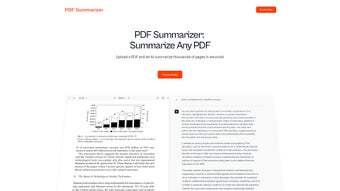
PDF Summarizer is a cloud‑based, AI‑driven web application designed to transform long, dense PDF documents into short, readable summaries in a matter of seconds. Built for researchers, analysts, students, and any professional who regularly wrestles with massive PDFs, the tool leverages large‑language‑model technology to extract the most relevant sentences, ideas, and data points without sacrificing context. Whether you need a quick briefing before a meeting, a study guide for an academic course, or a concise outline for a lengthy report, PDF Summarizer delivers a clear, well‑structured summary that can be exported or copied directly into your workflow. The service supports over 90 languages, making it a truly global solution for multilingual teams. With a subscription model that offers tiered access to different AI models, priority support, and early‑beta features, users can pick a plan that matches both their budget and performance needs. The platform accepts only PDF files—ensuring optimal processing speed and accurate layout recognition—while allowing bulk uploads and unlimited summarizations within the limits of the chosen tier. In short, PDF Summarizer streamlines knowledge extraction, cuts down reading time, and boosts productivity for anyone who must digest large amounts of written information quickly and securely.
Key Features
- AI‑Powered Summarization Engine: Uses state‑of‑the‑art large language models to generate coherent, context‑aware summaries.
- Ultra‑Fast Processing: Handles PDFs with thousands of pages in seconds, thanks to optimized cloud infrastructure.
- Multilingual Support: Summarizes documents in more than 90 languages, ideal for international research teams.
- Bulk Upload Capability: Users can drop multiple PDF files at once, receiving individual summaries for each file.
- Customizable Summary Length: Choose from concise bullet‑point abstracts to detailed paragraph‑style outlines.
- Multiple AI Model Options: Select from basic, advanced, or premium models depending on accuracy and speed requirements.
- Export Options: Download summaries as plain text, Markdown, or copy directly to clipboard for seamless integration.
- Subscription Tiers with Priority Support: Higher‑tier plans enjoy early access to new features and dedicated help‑desk assistance.
- Secure Cloud Processing: All uploads are encrypted in transit and at rest, complying with GDPR and other data‑privacy standards.
- Unlimited Summaries (Within Tier Limits): No hidden caps on the number of summaries you can generate, only limited by your subscription level.
Installation & Usage Guide
Because PDF Summarizer is a web‑based service, there is no traditional software download or installation required on your local machine. Getting started is straightforward and can be completed in three simple steps:
- Create an Account: Visit the official PDF Summarizer website and click “Sign Up.” You can register using an email address, Google, or Microsoft account. After confirming your email, you’ll be directed to the dashboard where you can choose a subscription plan or start with a free trial (if available).
- Upload Your PDF(s): From the dashboard, click the “Upload PDF” button. You can drag‑and‑drop one or multiple files, or use the file‑browser to locate PDFs on your device. The platform automatically validates the file format and size (up to 2 GB per file for premium tiers).
- Generate and Retrieve Summaries: Once the upload completes, select the desired AI model and set the summary length (e.g., 5‑bullet‑point abstract or 300‑word overview). Click “Summarize.” The cloud engine processes the document, and within seconds a summary appears on the screen. You can then copy the text, download it as a .txt or .md file, or share it directly via a generated link.
For power users, the service also provides an API key (available in the account settings) that allows integration with third‑party applications, LMS platforms, or custom scripts. Documentation includes example cURL commands and SDKs for Python, JavaScript, and Java, making it easy to embed summarization capabilities into existing workflows.
Although there is no desktop client, the responsive web interface works flawlessly on Windows, macOS, Linux, Android, and iOS browsers. For mobile users, the “Summarize on the Go” mode optimizes the UI for touch navigation, allowing you to capture key insights from conference papers or e‑books directly from your phone or tablet.
Compatibility, Pros & Cons
PDF Summarizer is platform‑agnostic because it runs entirely in the cloud. Any modern browser that supports HTML5, CSS3, and JavaScript (Chrome, Edge, Firefox, Safari, Opera) can access the service. This means you can use the tool on:
- Windows 10/11 and earlier versions with a supported browser.
- macOS Ventura, Monterey, and older releases.
- Linux distributions (Ubuntu, Fedora, Debian, etc.) via Chrome or Firefox.
- Android 8.0+ and iOS 13+ devices through mobile browsers.
Pros
- Speed: Generates summaries in seconds, even for PDFs with thousands of pages.
- Accuracy: AI models preserve context and key arguments, reducing the risk of missing important details.
- Multilingual: Handles more than 90 languages, a rare feature among PDF tools.
- Scalability: Bulk uploads and unlimited summaries (subject to subscription) suit both individual researchers and large teams.
- Security: End‑to‑end encryption and GDPR compliance protect sensitive documents.
- Flexible Export: Supports plain text, Markdown, and clipboard copying for seamless integration.
- API Access: Enables automation and integration with custom workflows.
- Responsive Design: Works equally well on desktops, laptops, tablets, and smartphones.
Cons
- PDF‑Only Support: Cannot process Word, Excel, or image‑based PDFs without OCR preprocessing.
- Subscription Model: No permanent free tier; users must commit to a monthly or annual plan for full functionality.
- Dependency on Internet: Requires a stable connection; offline use is not possible.
- Learning Curve for API: Developers need to read documentation to integrate the service, which may be a barrier for non‑technical users.
- Potential Cost for High‑Volume Users: Large enterprises may find the per‑user pricing higher than on‑premise alternatives.
Frequently Asked Questions
Can I use PDF Summarizer with scanned PDFs that contain only images?
Scanned PDFs are supported only if they include an OCR layer. If the document is a pure image without searchable text, the summarizer will not be able to extract content. You can run the PDF through an OCR tool (such as Adobe Acrobat or free online converters) before uploading.
How does the subscription pricing work?
PDF Summarizer offers three main tiers: Basic (access to the standard AI model, limited priority support), Pro (advanced model, unlimited summaries, faster processing, and email support), and Enterprise (custom AI models, dedicated account manager, SLA‑backed uptime). Prices are billed monthly or annually with a discount for yearly commitments.
Is my data safe when I upload documents?
Yes. All file transfers are encrypted using TLS 1.2, and the files are stored in encrypted buckets that are automatically deleted after processing unless you enable “persistent storage” in your account settings. The service complies with GDPR, CCPA, and ISO 27001 standards.
Can I integrate PDF Summarizer into my existing research platform?
Absolutely. The platform provides a RESTful API with authentication via API keys. Documentation includes sample code for Python, JavaScript, and Java, making it easy to embed summarization functionality directly into research management systems, LMSs, or custom dashboards.
What happens if I exceed the file size limit for my subscription tier?
If a PDF exceeds the size limit associated with your tier (e.g., 500 MB for Basic, 2 GB for Pro), the upload will be rejected with a clear error message. You can either split the document into smaller parts or upgrade to a higher tier that supports larger files.
Conclusion & Call to Action
PDF Summarizer stands out as a powerful, AI‑driven solution for anyone who needs to distill large PDF documents into concise, actionable insights quickly. Its speed, multilingual capabilities, and flexible export options make it an invaluable ally for researchers, consultants, legal professionals, and students alike. While the subscription‑only model may deter occasional users, the range of pricing plans ensures that teams of any size can find a cost‑effective entry point. Security‑focused design, bulk processing, and a robust API further cement its place as a modern productivity tool. If you regularly wrestle with lengthy PDFs and are looking for a reliable way to save time while preserving essential information, PDF Summarizer is definitely worth a trial.
Ready to experience faster reading and smarter research? Sign up today, choose the plan that fits your workflow, and start generating concise summaries in seconds. Boost your productivity, improve knowledge retention, and stay ahead of the information curve with PDF Summarizer.
PDF Summarizer delivers impressive speed and accuracy for condensing large PDFs. Its multilingual support and bulk upload features are especially valuable for global research teams. The main drawback is the lack of offline capability and the necessity of a subscription for full features. Overall, it’s a solid investment for professionals who regularly process extensive documents.



.png)




