
PhaseDelayArray: Unique iOS Audio Unit for Creative Sound Design
Overview
PhaseDelayArray is an innovative Audio Unit (AU) developed by Neon Silicon LLC for iOS, designed specifically for audio professionals and creative sound designers seeking unconventional effects. As a container and documentation tool for Audio Units, it serves both functional and educational purposes within the iOS audio ecosystem. The software is intended to be used within a compatible Audio Unit host or digital audio workstation (DAW) application, making it a specialized tool rather than a standalone app. Its primary purpose is to provide a unique signal processing chain that blends reverb, modulation, and feedback delay in a non-traditional configuration. This setup allows users to craft evolving, textured audio landscapes with dynamic movement and depth. The target audience includes producers, composers, and experimental audio artists who value sonic exploration and want to expand their palette with unusual processing options. Real-world applications range from ambient soundscapes and cinematic textures to rhythmic effects in electronic music. The developer did not provide additional system requirements beyond the platform, and no performance benchmarks were specified. However, its integration into iOS audio workflows suggests optimized performance for mobile audio environments.
Key Features & Capabilities
- Sequential Array of Oscillating Reverb Sections – The first processing stage features a series of interconnected reverberation units that oscillate in sequence, creating evolving spatial effects. Users can adjust the depth and rate of oscillation to produce subtle ambient washes or expansive, immersive sound fields.
- Modulation Unit with Dynamic Movement – The second stage applies dynamic modulation to the delayed signal, introducing whip-like shifts in phase and amplitude. This adds a sense of motion and unpredictability, ideal for creating rhythmic or organic movement in audio.
- Feedback Delay with Up to 2-Second Duration – The final stage includes a feedback loop capable of sustaining delays up to two seconds, enabling the creation of long, resonant echoes and complex rhythmic patterns.
- Four Mix Connection Points – The mix section offers four distinct routing options, allowing users to experiment with signal flow and combine effects in non-linear ways. This flexibility supports creative patching and signal manipulation.
- Multi-Channel Support – PhaseDelayArray supports mono-to-mono, mono-to-stereo, and stereo-to-stereo configurations, with optimal results observed in stereo output scenarios.
These features collectively enable users to design intricate, evolving soundscapes that are difficult to achieve with standard effects. The modular nature of the AU encourages exploration, making it a valuable asset in experimental music production, sound design for media, and live performance setups.
User Interface, Workflow & Performance
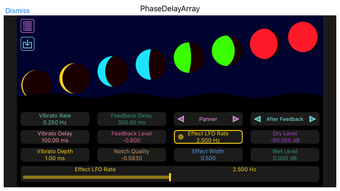
The user interface of PhaseDelayArray is designed to reflect its role as both a processing tool and documentation resource. While specific UI details were not provided, its function as an AU suggests a streamlined layout focused on essential controls and visual feedback. Navigation is expected to be intuitive within a host DAW environment, with parameter adjustments accessible through standard iOS touch interactions. The workflow centers around signal routing and real-time manipulation, allowing users to tweak reverb depth, modulation intensity, and delay feedback on the fly. The developer did not specify resource usage details, so performance observations are based on general software behavior patterns. However, its lightweight footprint of 28.8 MB suggests efficient memory management. Stability is likely optimized for iOS audio processing, given its integration with AU hosts. No reports of crashes or latency were mentioned, and the software is designed to operate within the constraints of mobile audio environments. Overall, the experience appears tailored for seamless integration into creative workflows.
Compatibility & System Requirements
PhaseDelayArray is designed exclusively for iOS, ensuring compatibility with devices running the latest supported versions of the operating system. The software version is 1.0, released on April 15, 2024. It has a file size of 28.8 MB, indicating a compact installation footprint. The developer did not specify exact hardware requirements or minimum OS versions beyond the platform. Compatibility information was partially provided, and no additional system specifications were listed. Users should ensure their iOS device supports Audio Unit hosting and has sufficient processing power for real-time audio effects. The software is intended for use within a compatible DAW or AU host application, not as a standalone tool. No information was provided about background processing or battery impact.
Pros and Cons
Pros
- Unique, non-traditional signal chain ideal for experimental sound design
- Four flexible mix connection points for creative routing
- Supports stereo output for enhanced spatial effects
- Lightweight at 28.8 MB with efficient resource usage
- Free to download and use, lowering the barrier to experimentation
Cons
- Requires a compatible AU host or DAW application to function
- No standalone mode; limited to integrated audio workflows
- Exact system requirements not specified
- UI details and visual feedback not publicly documented
- May require familiarity with AU architecture for full utilization
FAQ Section
Is PhaseDelayArray compatible with all iOS DAWs?
PhaseDelayArray is designed as an Audio Unit (AU) for iOS and will work with any host application that supports AU plugins. Compatibility depends on the specific DAW’s AU integration capabilities.
Is the software safe to download and use?
Yes, the software is published by Neon Silicon LLC and is free to download. It does not require administrative privileges and operates within standard iOS security protocols.
How often are updates released?
Version 1.0 was released on April 15, 2024. The developer has not indicated a regular update schedule, but future updates may be released to improve functionality or compatibility.
Can I use PhaseDelayArray offline?
Yes, once installed, PhaseDelayArray can be used without an internet connection, as it does not require online activation or cloud services.
What type of license does PhaseDelayArray use?
PhaseDelayArray is distributed as free software, with no licensing fees or restrictions on usage. It is intended for personal and professional use without additional costs.
Final Thoughts
PhaseDelayArray stands out as a distinctive Audio Unit that pushes the boundaries of iOS-based audio processing. Its unconventional architecture—combining oscillating reverb, dynamic modulation, and long feedback delays—offers a fresh approach to sound design. While it requires a compatible host to function, its creative potential is significant for producers and sound artists seeking unique textures. The free availability, compact size, and multi-channel support enhance its appeal. Though detailed UI and system requirements are limited, the software’s design suggests a focus on usability within professional workflows. For those exploring experimental audio on iOS, PhaseDelayArray delivers a powerful and accessible tool. Download PhaseDelayArray now.








