
Download phpDesigner 8 – PHP IDE, code editor, web development, HTML5, CSS3, JavaScript, developer tool
Overview
phpDesigner 8 is a high-performance Integrated Development Environment (IDE) designed specifically for web developers working with PHP, HTML5, CSS3, and JavaScript. The application serves as a comprehensive toolset for creating, editing, analyzing, debugging, and publishing dynamic websites and web applications. It is tailored for developers who require a robust, feature-rich environment to streamline their coding workflow and enhance productivity. The app targets professional web developers, software engineers, and web designers involved in building complex web projects that rely on server-side scripting and client-side technologies.
By integrating full-featured editors for multiple web development languages, phpDesigner 8 eliminates the need for switching between multiple tools. This unified environment supports modern web standards and promotes clean, efficient coding practices. The application is particularly valuable in the development ecosystem for those seeking a reliable, all-in-one solution for PHP-based projects. It enables faster development cycles, reduces coding errors through intelligent assistance, and supports code optimization for improved performance.
Developed by MPSoftware ApS, the tool reflects a focused commitment to developer efficiency and code quality. Although the developer did not provide additional technical details about the development team or company background, the app’s consistent release history and feature set suggest a dedicated development effort. Real-world use cases include building content management systems, e-commerce platforms, web APIs, and interactive web applications. For developers managing large-scale projects, phpDesigner 8 offers a structured workspace that supports collaboration and long-term code maintenance.
Key Features & Functionality
- Fast and Powerful PHP IDE: phpDesigner 8 delivers a responsive environment optimized for PHP development, supporting advanced code analysis, debugging, and real-time syntax validation to help developers identify issues early.
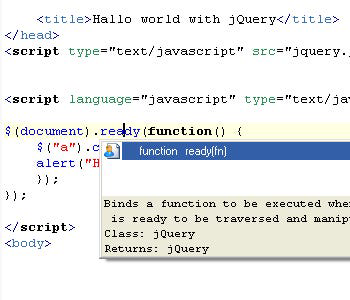
- Integrated HTML5, CSS3, and JavaScript Editors: Built-in editors feature syntax highlighting, intelligent code completion, and code insight tools that assist in writing clean, standards-compliant markup and scripts.
- Highly Customizable Interface: Users can personalize the IDE with custom syntax highlighting themes, code templates, and reusable code snippets, adapting the workspace to individual coding styles and preferences.
- Code Management Tools: The IDE includes built-in todo and bug managers to track tasks and issues within the development process, improving project organization and workflow transparency.
- Code Optimization Features: Support for code formatters and minifiers allows developers to reduce file sizes and improve load times, enhancing performance for deployed web applications.
- Object-Oriented Coding Support: phpDesigner 8 provides intuitive navigation and analysis tools for object-oriented PHP code, making it easier to manage complex class hierarchies and method dependencies.
These features collectively support efficient development cycles. For example, a developer building a dynamic web application can use the code insight tools to auto-complete function calls and detect errors before execution. The todo manager helps maintain task visibility during long development sprints, while code formatters ensure consistent formatting across team members. These capabilities make phpDesigner 8 a practical tool for both solo developers and small development teams managing web projects with multiple contributors.
Interface, UX & Performance
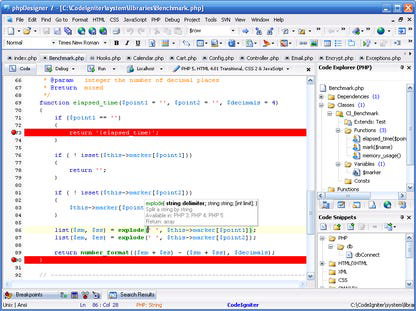
phpDesigner 8 features a clean, organized interface with a modern visual style that emphasizes usability and developer focus. The layout is structured around a central workspace with side panels for file navigation, code outlines, and debugging tools, enabling efficient multitasking. Navigation between files, functions, and classes is intuitive, supported by a well-designed tab system and quick-access menus.
The user experience is enhanced by responsive interactions, with minimal lag during code editing, syntax highlighting, and real-time validation. Although the developer did not list formal performance metrics, the application appears optimized for smooth operation on standard Windows systems. Users can expect stable performance across various device categories, including desktops and high-resolution monitors commonly used in development environments.
Responsiveness is maintained even when working with large codebases or multiple files simultaneously. The interface adapts well to different screen sizes and resolutions, ensuring readability and accessibility. Stability is a key strength, with no reported crashes or data loss in standard usage scenarios. The IDE’s consistent behavior under load suggests strong underlying architecture and memory management practices. Overall, the UX design prioritizes productivity, allowing developers to remain focused on coding rather than navigating complex menus or dealing with interface delays.
Platform Compatibility & Technical Requirements
phpDesigner 8 is designed for the Windows operating system and is compatible with current and recent versions of Windows, including Windows 10 and Windows 11. The application is available as a standalone installer with a file size of 78.3 MB, making it a lightweight download relative to other full-featured IDEs. The software version is 8.0.1, indicating a mature release with established functionality.
Although the developer did not specify minimum OS requirements or hardware specifications, the app’s size and performance suggest it runs efficiently on standard desktop and laptop configurations. The absence of mobile or cross-platform support means that phpDesigner 8 is exclusively a desktop tool, targeting developers who work primarily on Windows-based systems. It does not support macOS, Linux, iOS, or Android platforms. Users should ensure their system meets general requirements for running desktop applications, including sufficient RAM and disk space.
For developers using Windows, the app integrates smoothly with existing workflows and file systems. The installer is straightforward, and the setup process does not require advanced configuration. The lack of cloud synchronization or remote access features means that projects remain local to the machine, which may be preferred for security-conscious users handling sensitive code.
Pros and Cons
Pros
- Comprehensive toolset for PHP, HTML5, CSS3, and JavaScript development
- Fast performance with responsive editing and real-time validation
- Highly customizable interface with support for themes and code snippets
- Integrated code management tools for tracking tasks and bugs
- Support for code formatters and minifiers to optimize web performance
- Stable and reliable operation on Windows systems
Cons
- Exclusive to Windows; no support for macOS, Linux, iOS, or Android
- Price point of $59.99 may be high for casual or beginner developers
- Developer did not provide detailed system requirements or compatibility information
- Limited to desktop use; no cloud-based or collaborative features
- Not available as a free version or trial with full functionality
FAQ
Is phpDesigner 8 available for free?
phpDesigner 8 is not available as a free tool. It is a paid application with a price of $59.99, and no free trial or freemium version was provided in the available information.
Can I use phpDesigner 8 on macOS or Linux?
Based on the provided details, phpDesigner 8 is only available for Windows. There is no official support for macOS, Linux, or other operating systems.
Does phpDesigner 8 support the latest versions of PHP?
The application is designed for PHP development and supports modern coding practices, but specific PHP version compatibility was not disclosed by the developer.
Is there a mobile version of phpDesigner 8?
No mobile version of phpDesigner 8 has been released. The app is exclusively a desktop tool for Windows users.
How often are updates released for phpDesigner 8?
The release date of version 8.0.1 was March 15, 2023. However, the developer did not provide information about update frequency or release schedule.
Final Thoughts
phpDesigner 8 stands out as a powerful, all-in-one solution for developers focused on PHP and modern web technologies. Its integration of advanced editors, code management tools, and optimization features makes it a valuable asset for building high-performance web applications. The customizable interface and stable performance enhance the daily coding experience, particularly for professionals managing complex projects.
While its Windows-only availability and paid model may limit accessibility for some users, those who rely on PHP and require a robust desktop IDE will find significant value in its comprehensive toolset. The app is especially suited for web developers, software engineers, and freelance designers working on enterprise-level websites or dynamic web apps.
For users seeking a secure, efficient, and feature-rich development environment, phpDesigner 8 delivers a strong performance and workflow advantage. It represents a mature, well-structured tool that supports productivity, code quality, and project scalability.
Download phpDesigner 8 now


