


Play Pineapple OFC Poker Anytime, Anywhere
Overview
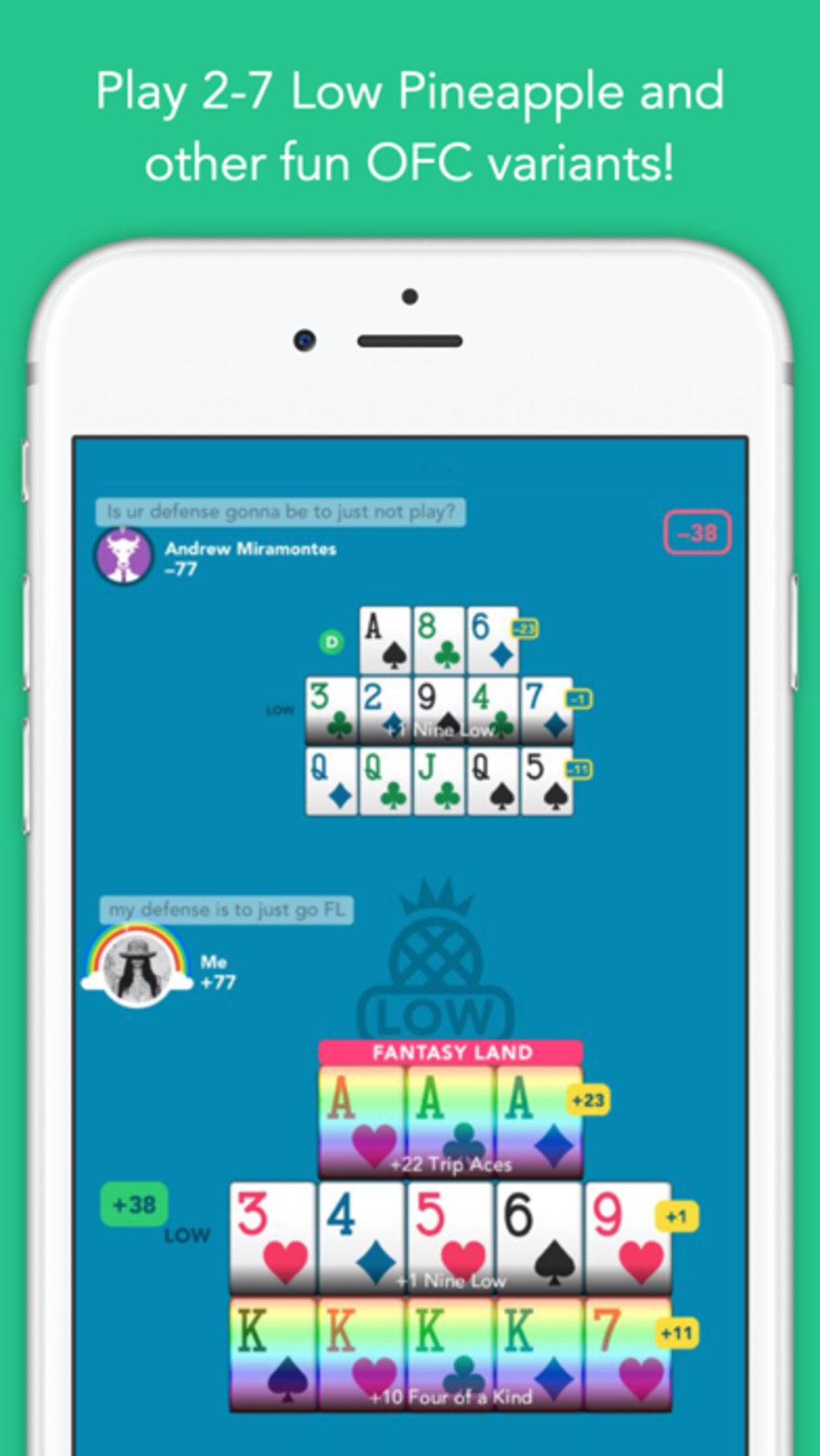
Pineapple - 13 Card Poker is a free desktop application developed by Pineapple Games Ltd., designed for players who enjoy strategic card games with a unique twist. The software brings the popular Pineapple Open-Face Chinese Poker (OFC) format to Windows and Mac platforms, offering an engaging experience for both casual and dedicated poker enthusiasts. This game is ideal for users looking to play a fast-paced, skill-based card game without the need for registration or account creation. Players can start immediately after launching the app, making it accessible for quick sessions or extended gameplay. The software supports solo play against AI bots, which can be used for training and skill development, or multiplayer matches using customizable usernames. The game’s core mechanics follow the standard Pineapple OFC rules, where players build a 13-card hand across three rows—top (three cards), middle (five cards), and bottom (five cards)—by receiving and selecting cards in turns. The unique feature of receiving three cards per turn instead of one increases strategic depth and hand-building potential. While the game is free to play, a pro subscription unlocks exclusive features for enhanced gameplay. The developer did not provide additional system requirements or performance benchmarks.
Key Features & Capabilities
- Free-to-Play Access – No registration or account setup is required. Users can launch the app and begin playing instantly, making it ideal for spontaneous gaming sessions.
- Pineapple OFC Game Mode – Implements the Pineapple variant of Open-Face Chinese Poker, where players receive three cards per turn and must select two while discarding one, increasing hand-building flexibility.
- AI Training Mode – Offers practice against AI bots, allowing players to refine their strategies and improve their understanding of hand construction and scoring.
- Multiplayer with Custom Usernames – Supports playing with friends using personalized usernames, enabling casual competition without sharing personal data like Facebook or Google accounts.
- Standard OFC Scoring & Fantasyland Rules – Retains the familiar scoring system, bonuses, and Fantasyland mechanics found in traditional Open-Face Chinese Poker, ensuring consistency for experienced players.
- Offline Play Capability – Designed for use without an internet connection, allowing uninterrupted gameplay regardless of network availability.
These features cater to users who value convenience, strategy, and privacy. The game is particularly suited for players who want to train their skills without the pressure of live competition or those who enjoy casual, on-the-go poker sessions. The absence of account requirements also makes it a secure option for users concerned about data privacy.
User Interface, Workflow & Performance
The user interface of Pineapple - 13 Card Poker is designed for simplicity and intuitive navigation. The layout clearly displays the three rows of the 13-card hand, with cards arranged in a structured grid. Players can easily select and place cards using mouse or touch input, depending on the device. The turn-based flow is straightforward: after receiving three new cards, users choose two to place and one to discard, with visual feedback guiding the decision-making process. The interface includes basic controls for starting a new game, adjusting settings, and accessing AI training. The workflow is efficient, minimizing unnecessary steps and allowing users to focus on strategy. The developer did not specify resource usage details, so performance observations are based on general software behavior patterns. The app runs within a 150MB installation size, suggesting moderate system demands. Stability during gameplay is not publicly documented, but the lack of account requirements and reliance on local processing may contribute to consistent performance. No issues related to crashes or lag were reported in the provided information.
Compatibility & System Requirements
Pineapple - 13 Card Poker is available for both Windows and Mac operating systems. The software version is 1.0.0, with a file size of 150MB. Installation is straightforward, requiring minimal disk space and no complex setup. The developer did not specify exact system requirements, such as minimum RAM, CPU, or GPU specifications. Compatibility information is limited to the supported platforms. Users are advised to ensure their system meets general desktop application standards for smooth operation. The software does not require internet access for gameplay, though some features may benefit from connectivity. The developer did not provide information about updates, version history, or future compatibility plans.
Pros and Cons
Pros
- Free to play with no registration required
- Immediate access upon launching the app
- AI bots available for skill training and practice
- Supports multiplayer with custom usernames
- Offline functionality for uninterrupted gameplay
- Compact 150MB installation size
Cons
- Tournament scoring system lacks clear explanations
- No detailed system requirements provided
- Pro version features not disclosed
- Limited public information on updates and support
- Scoring feedback in competitive modes is unclear
FAQ Section
Is Pineapple - 13 Card Poker free to download and play?
Yes, the software is free to download and play. No payment or registration is required to access the core gameplay features.
Does the app require an internet connection to function?
The app supports offline play, allowing users to enjoy the game without an active internet connection. However, some features may require connectivity.
Can I play with friends using this software?
Yes, players can join games using custom usernames, enabling social or competitive play with friends without sharing personal accounts.
Is there a pro version available? What does it offer?
Yes, a pro version exists with exclusive features, though specific details were not provided by the developer.
How often is the software updated?
Update frequency was not specified. Users are encouraged to check for new versions through official channels.
Final Thoughts
Pineapple - 13 Card Poker delivers a streamlined, accessible experience for fans of strategic card games. Its free-to-play model, no-registration policy, and offline functionality make it a strong choice for casual players and those looking to train their skills. The inclusion of AI bots and customizable usernames enhances replayability and social interaction. While the tournament scoring system lacks transparency, which may frustrate competitive users, it does not detract significantly from the core enjoyment of the game. The compact size and cross-platform availability further improve its appeal. For individuals seeking a simple, secure, and engaging poker experience on desktop, this software offers a compelling option. Download Pineapple now and start building your perfect 13-card hand today.








