

Opis
Najlepsza wtyczka wszech czasów do kategoryzowania multimediów WordPress za pomocą katalogów.
Uporządkuj katalogi biblioteki multimediów WordPress za pomocą funkcji przeciągnij i upuść.
TEST DRIVE | GO PRO (Lifetime License) 💎
FileBird transforms your WordPress media library with intuitive folder organization, smooth drag & drop, and smart sorting. Locate images faster, easily insert them into Gutenberg blocks, quickly identify and remove unused files.
Wersja bezpłatna umożliwia tworzenie nieograniczonej liczby katalogów głównych i podkatalogów.
📌 Dokumentacja | Porównanie FileBird bezpłatny i Pro
⚡️ FUNKCJE
FileBird umożliwia tworzenie wirtualnych katalogów, aby kategoryzować przesłane pliki multimedialne WordPress. Dzięki temu przenoszenie plików i katalogów nie spowoduje uszkodzenia bezpośrednich odnośników do obrazków w treści strony/wpisu.
Dzięki FileBird możesz zaoszczędzić czas na zarządzaniu multimediami WP, wyszukiwać pliki i katalogi, sortować je, dodawać galerie zdjęć produktów, pobierać/eksportować katalogi z multimediami itd. To doskonały sposób na usprawnienie przepływu pracy administracyjnej i zwiększenie produktywności.
NOWOŚĆ — Motywy drzewa katalogów (PRO)
Zamiast tradycyjnego szarego odcienia ikonki katalogu, teraz możesz przekształcić swoją „Folderellę” w motyw Dropbox lub styl Windows 11.
Pobierz katalog multimediów (PRO)
Eksportuj cały katalog multimediów, łącznie z jego podkatalogami i plikami, do jednego pliku ZIP. Zachowaj tę samą strukturę katalogów. Twórz kopie zapasowe skategoryzowanych plików multimedialnych.
Inteligentny katalog startowy
Wybierz konkretny katalog lub katalog wcześniej otwarty podczas uruchamiania. Szybko wróć do pracy. Oszczędzaj więcej czasu.
Lokalizacja pliku
Znajdź dowolny plik w oknie szczegółów i łatwo zmień katalog, w którym się znajduje.
Przyjazny interfejs użytkownika
Przeciągnij i upuść, aby przesłać lub zbiorczo przenieść pliki do katalogów. Przeciągnij i upuść, aby uporządkować katalogi i podkatalogi.
Inteligentne menu kontekstowe
Kliknij prawym przyciskiem myszy dowolny katalog FileBird, aby szybko utworzyć podkatalog, zmienić jego nazwę, ustawić kolor, wyciąć, wkleić lub usunąć go tak samo, jak robisz to na swoim komputerze.
Pełna kontrola na jednym pasku narzędzi
Zwijany panel boczny FileBird zapewnia pełną kontrolę nad wszystkimi katalogami multimediów WordPress.
Bezproblemowa migracja
Importuj i bezproblemowo synchronizuj strukturę kategorii/katalogów multimediów z Enhanced Media Library, WP Media Folder od JoomUnited, WordPress Media Library Folders od Max Foundry, Real Media Library i HappyFiles.
Eksportuj organizację katalogów
Jednym kliknięciem możesz wyeksportować całą strukturę katalogów multimediów WP, aby móc ją przenieść do swoich aktywnych witryn lub po prostu utworzyć kopię zapasową.
Widok katalogów oparty na użytkowniku
Włączenie tego trybu umożliwia administratorom i innym użytkownikom tworzenie własnych kategorii/katalogów. Użytkownik może swobodnie zarządzać swoimi katalogami bez wpływu na strukturę katalogów innych użytkowników.
Potężna funkcja wyszukiwania
Możesz sortować i wyszukiwać nazwy plików i katalogów nie tylko w Multimediach, ale także podczas przeglądania obrazków w edytorze stron/wpisów.
Różne opcje sortowania (PRO)
Wybierz zaawansowane opcje, takie jak 2 sposoby sortowania katalogów i 10 sposobów sortowania plików. To ogromna oszczędność czasu dla wszystkich zapracowanych administratorów WordPressa i webmasterów.
Sortuj pliki według rozmiaru (PRO)
Teraz możesz jednym kliknięciem obliczyć rozmiar załącznika i sortować pliki według rozmiaru.
Custom Folder Color (PRO)
Right-click on a specific folder to pick a distinct color. This helps differentiate it from numerous folders.
Wiele stylów widoku drzewa (PRO)
Oprócz hierarchicznego widoku drzewa, masz również możliwość ukrycia poziomów w widoku drzewa. Ten płaski widok drzewa jest bardzo przydatny dla użytkowników z dużą liczbą katalogów.
Kategoryzuj strony, wpisy i własne typy treści (PRO)
Łatwo włącz drzewo katalogów, aby uporządkować strony WordPress, wpisy, wtyczki, kupony WooCommerce, rabaty i inne CPT.
Konfigurowalna domyślna kolejność plików
Ustaw sposób sortowania plików alfabetycznie według nazwy pliku, tytułu, daty, modyfikacji i autora, rosnąco/malejąco.
Masowe usuwanie katalogów
Teraz możesz masowo wybierać katalogi File Bird i usuwać je jednym kliknięciem. Wszystkie te pliki zostaną przeniesione do katalogu Bez kategorii i pozostaną nienaruszone.
Obsługa RTL
FileBird obsługuje języki RTL, w tym hebrajski, arabski itp.
Obsługa wielu języków
Ta wtyczka obsługuje najpopularniejsze języki, takie jak angielski, hiszpański, włoski, francuski, niemiecki, holenderski, hebrajski, polski itd.
🙋♂️CZY WIESZ, ŻE?
Czy FileBird jest teraz wyposażony w dodatek, który pomoże Ci stworzyć samodzielną galerię dokumentów WordPress z wykorzystaniem katalogów Gutenberg i FileBird?
Koniecznie sprawdź: Biblioteka dokumentów FileBird.
👍 JAK DZIAŁA FILEBIRD?
Czy jesteś administratorem witryny internetowej WordPress?
Zarządzanie witryną WordPress oznacza, że będziesz dodawać do swojej biblioteki multimediów WP mnóstwo plików multimedialnych, takich jak obrazy, filmy, pliki audio, dokumenty itp.
W rezultacie Twoja biblioteka musi przechowywać tysiące plików i może stać się totalnym bałaganem. Domyślna funkcja wyszukiwania nazw plików WordPress jest dobra, ale nigdy nie dorówna łatwości przechodzenia bezpośrednio do katalogu. Wtedy FileBird wkracza do pomocy w zarządzaniu plikami w WordPress!
Ten menedżer plików multimedialnych daje Ci możliwość łatwego organizowania wszystkich plików poprzez przeciąganie i upuszczanie między katalogami. Z FileBird wszystko będzie o wiele lepsze niż było.
Największą zaletą struktury opartej na katalogach jest to, że znacznie ułatwia ona znalezienie potrzebnych plików i oszczędza mnóstwo czasu.
Nie zobaczysz, że biblioteka multimediów WordPress się nie załaduje, ponieważ FileBird inteligentnie ładuje jeden katalog na raz.
🚀 Wskazówki, jak zarządzać katalogami multimediów WP jak profesjonalista za pomocą FileBird
- Prześlij wiele katalogów z zawartością plików bezpośrednio ze swojego komputera do WordPressa
- Utwórz galerię z katalogów, korzystając z bloku Gutenberga galerii FileBird
- Utwórz galerię dokumentów WordPress za pomocą krótkiego kodu
- Zmień rozmiar lewego panelu bocznego, aby uzyskać podgląd wszystkich katalogów
- Prześlij pliki do określonego katalogu, wybierając katalog docelowy z listy rozwijanej
- Łatwe wyszukiwanie według nazwy pliku/katalogu
- Z poziomu edytora stron/wpisów przeglądaj pliki i katalogi w interfejsie użytkownika FileBird
- Podczas dostosowywania wiadomości e-mail WooCommerce za pomocą kreatora wiadomości e-mail z funkcją przeciągania i upuszczania możesz szybko znaleźć potrzebne obrazki
- Utrzymuj porządek w katalogach, usuwając stare pliki za pomocą funkcji Sortuj według rozmiaru pliku
- Naciśnij ESC, aby wyjść z trybu wyboru zbiorczego
⛩️ KOMPATYBILNOŚĆ PREMIUM
Dzięki FileBird Pro możesz używać katalogów do porządkowania wpisów, stron, produktów WooCommerce, kuponów, szablonów i innych własnych typów treści. Te funkcje dostępne tylko w wersji Premium obejmują integracje z motywami i wtyczkami innych firm.
MOTYWY
- Avada – Najlepiej sprzedający się motyw WordPress wszech czasów
- Divi – Motyw od ElegantThemes
- Enfold – Najbardziej przyjazny użytkownikowi motyw WordPress, jaki kiedykolwiek stworzono
- Uncode – Długo oczekiwany edytor front-endu
- Jupiter – Wielofunkcyjny motyw Elementora
- Flatsome – Najlepiej sprzedający się motyw WooCommerce
- Salient – Responsywny motyw wielofunkcyjny
- XStore – Responsywny, wielofunkcyjny motyw WordPress WooCommerce
- KLEO – Społecznościowy, wielofunkcyjny motyw BuddyPress
- Bricks Builder
- I wiele więcej +++
WTYCZKI
- WPML – Best WP plugin to translate and display your website in any language
- Polylang – Wtyczka umożliwiająca tworzenie dwujęzycznej lub wielojęzycznej witryny WordPress
- Kreator witryn Elementor
- JetEngine
- Flatsome UX Builder
- Divi Builder
- Visual Composer
- Budowniczy bóbr
- SiteOrigin Pro
- KingComposer
- Tatsu Builder
- Oxygen
- Thrive Architect
- Klasyczny edytor – Stary edytor WordPressa do wyświetlania katalogów w widoku drzewa
- Slider Revolution – Najlepiej sprzedająca się responsywna wtyczka do slajdów WordPress
- EWWW optymalizator obrazka
- Galeria zdjęć FooGallery – Responsywna galeria zdjęć
- Smush – Kompresja, optymalizacja obrazka, leniwe wczytywanie, obrazki WebP
- I wiele więcej +++
Zrzuty ekranu
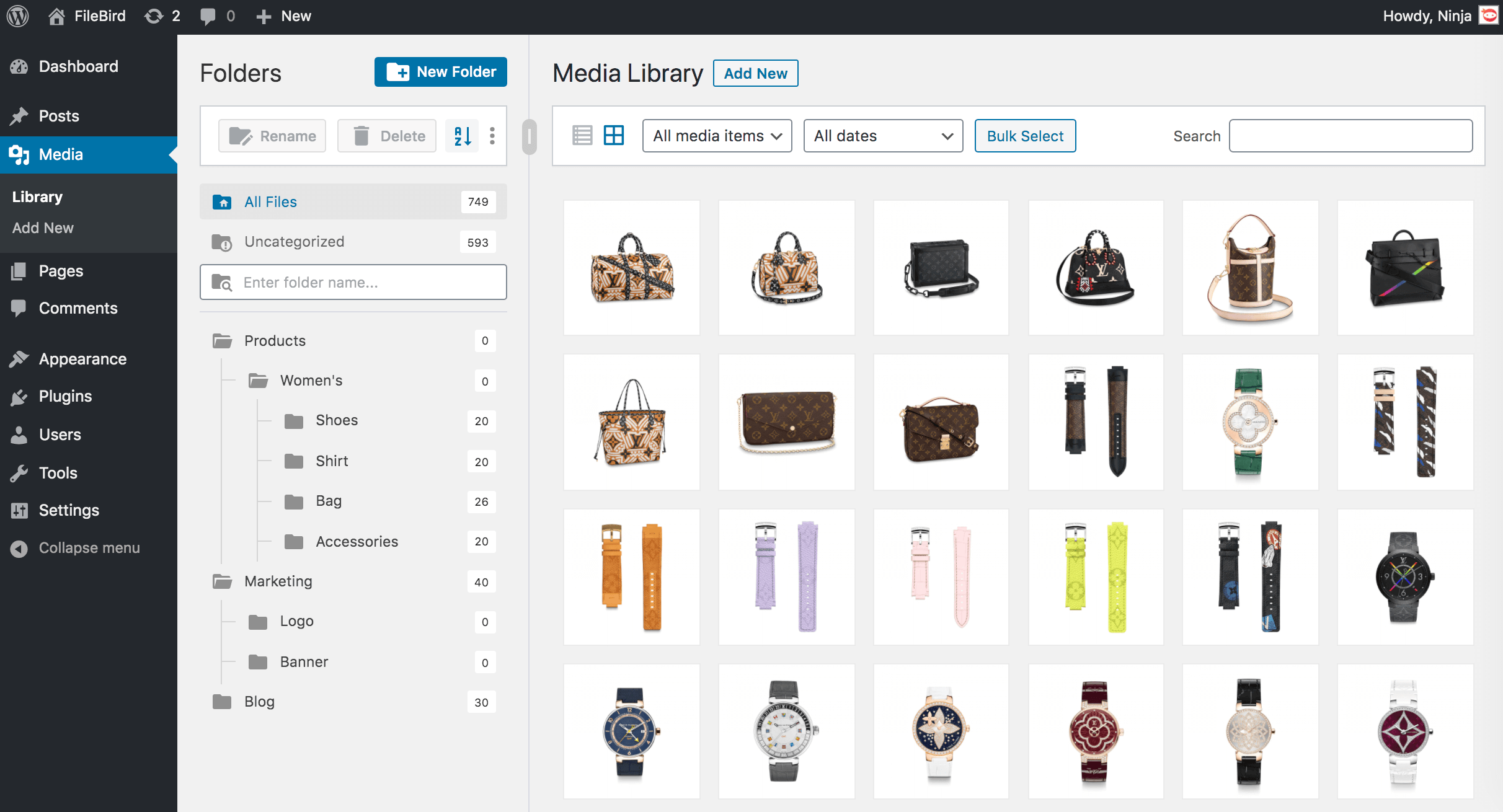
Katalogi multimediów 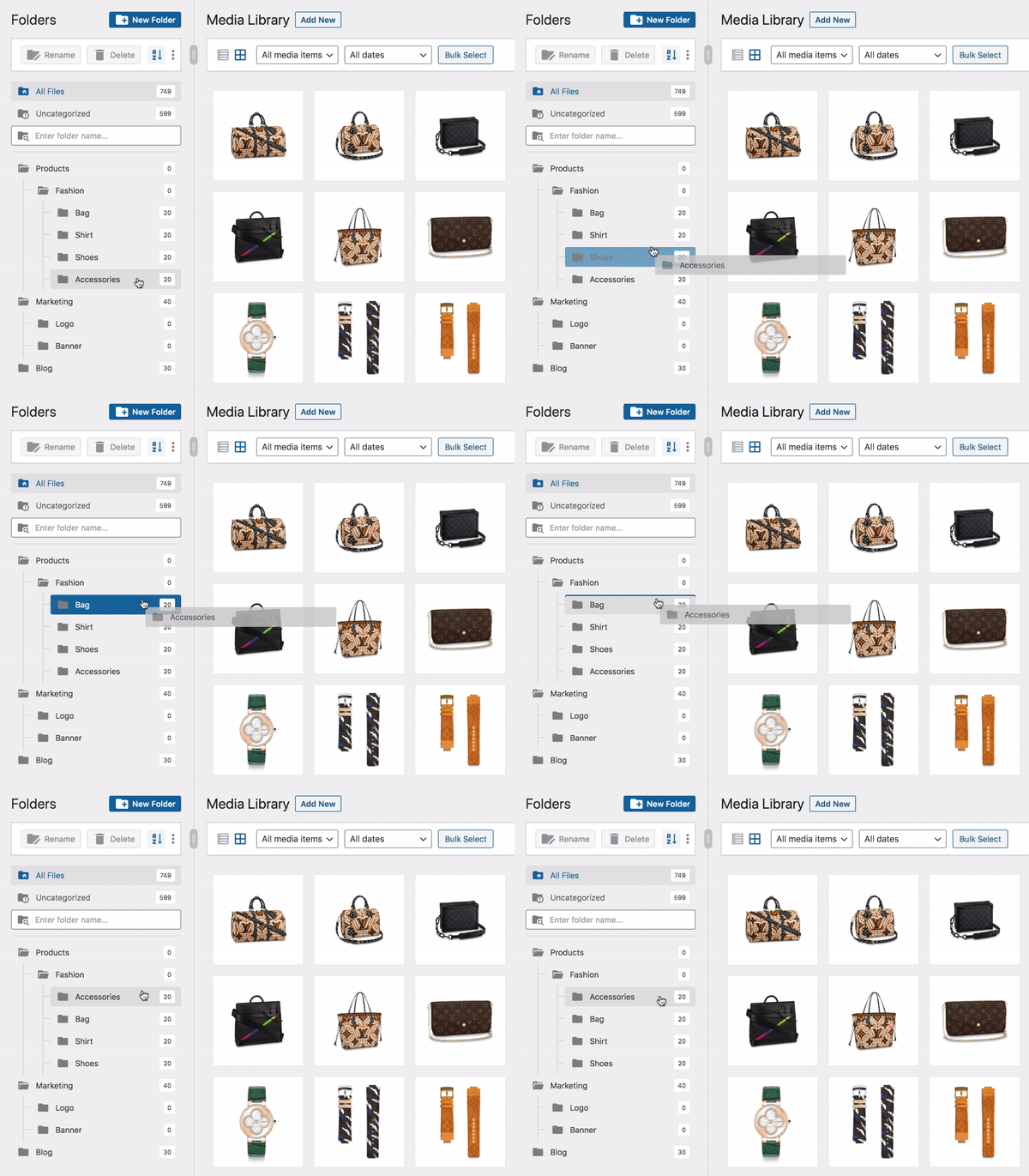
Przeciągnij i upuść, aby uporządkować katalogi 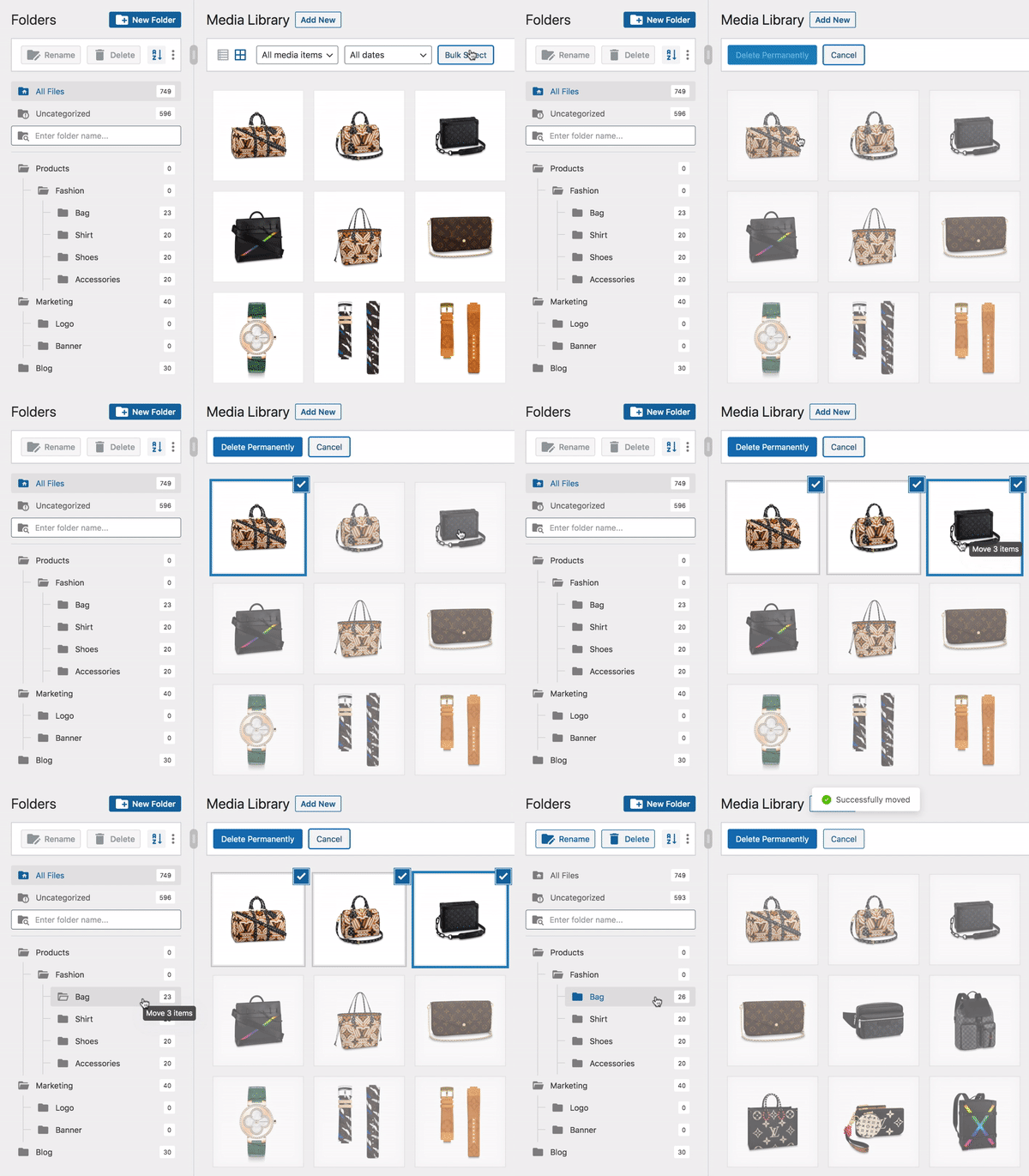
Masowe wybieranie i przenoszenie plików do katalogu 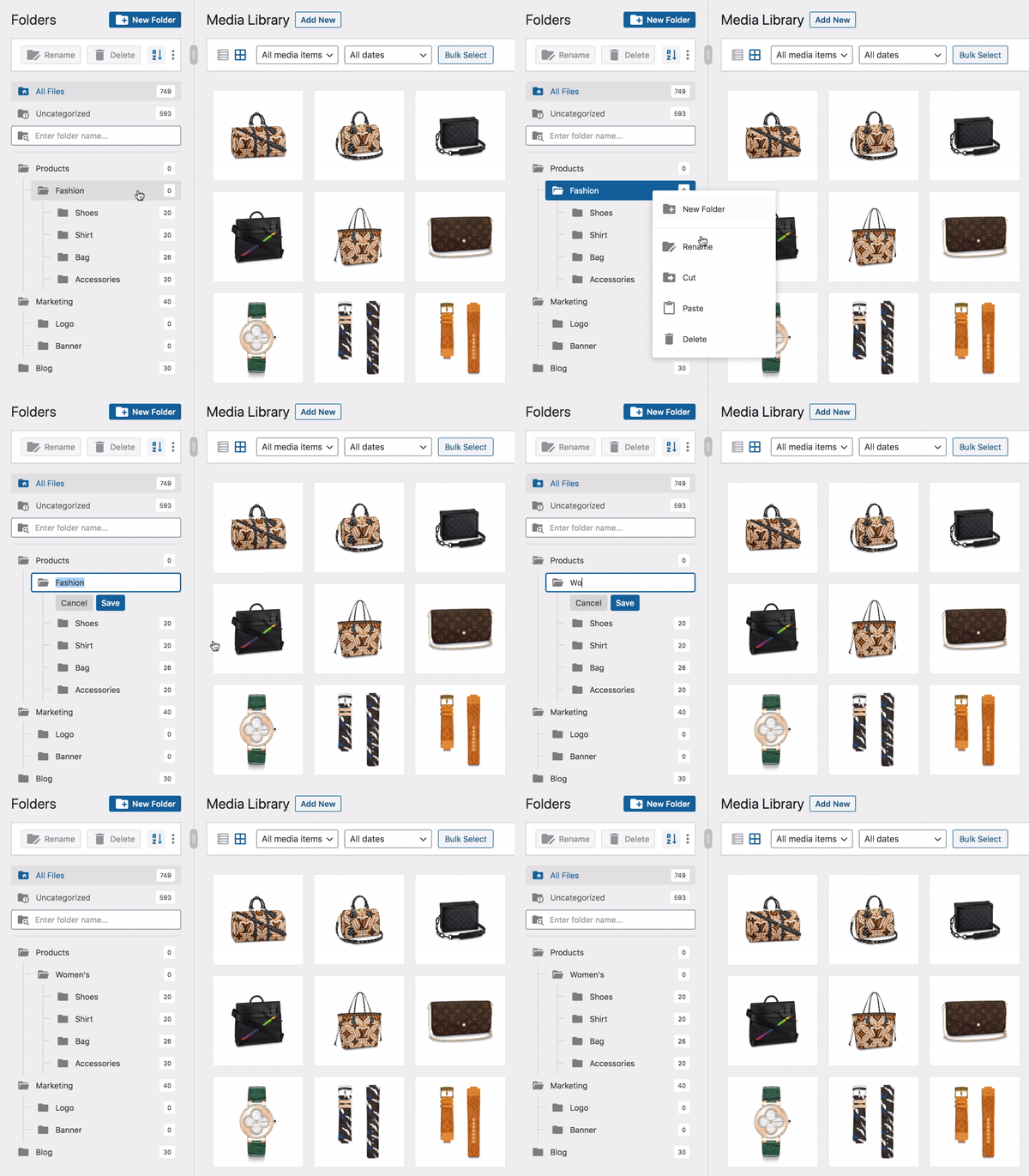
Zmień nazwę katalogu w inteligentnym menu kontekstowym 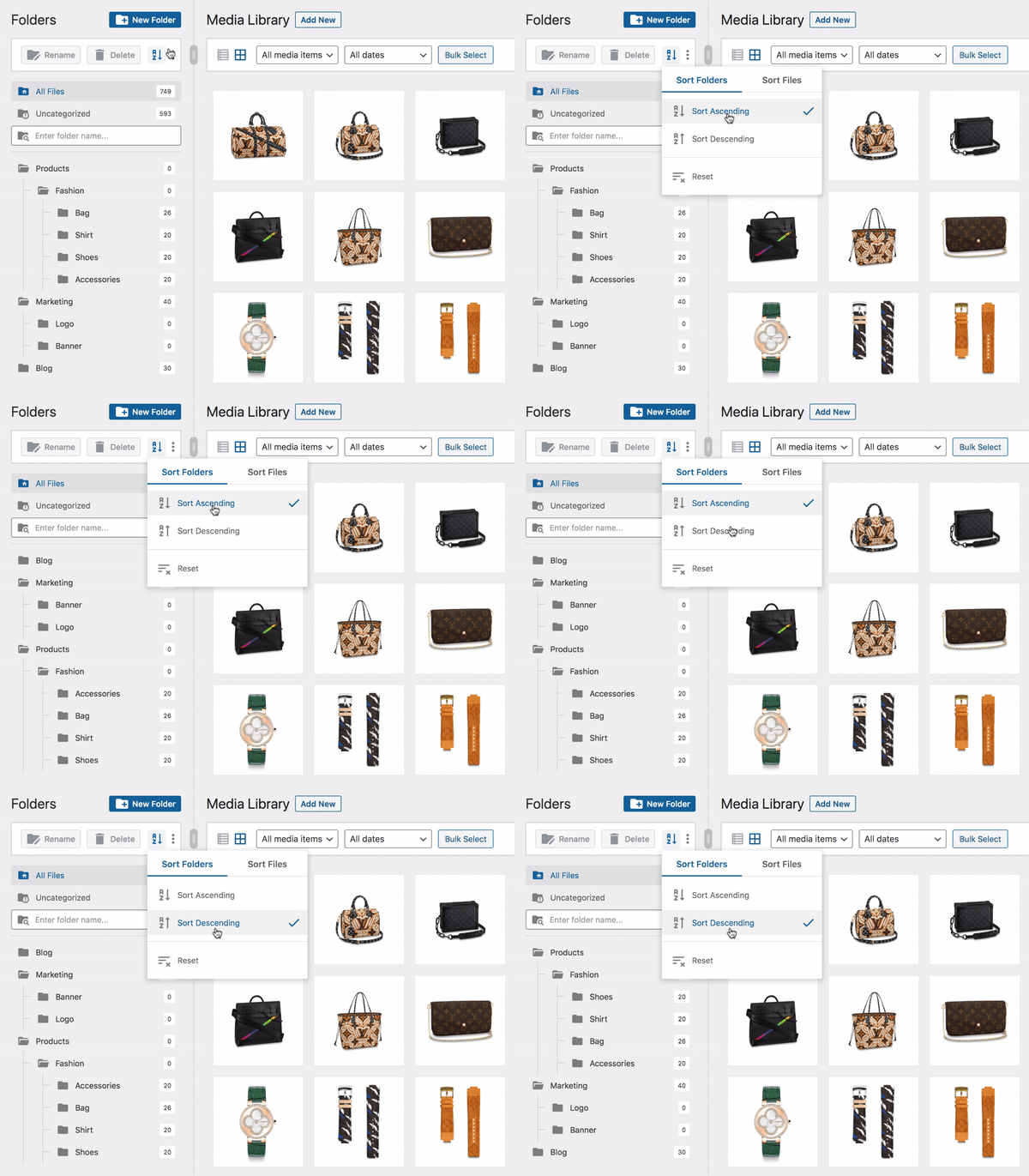
Sortuj katalogi 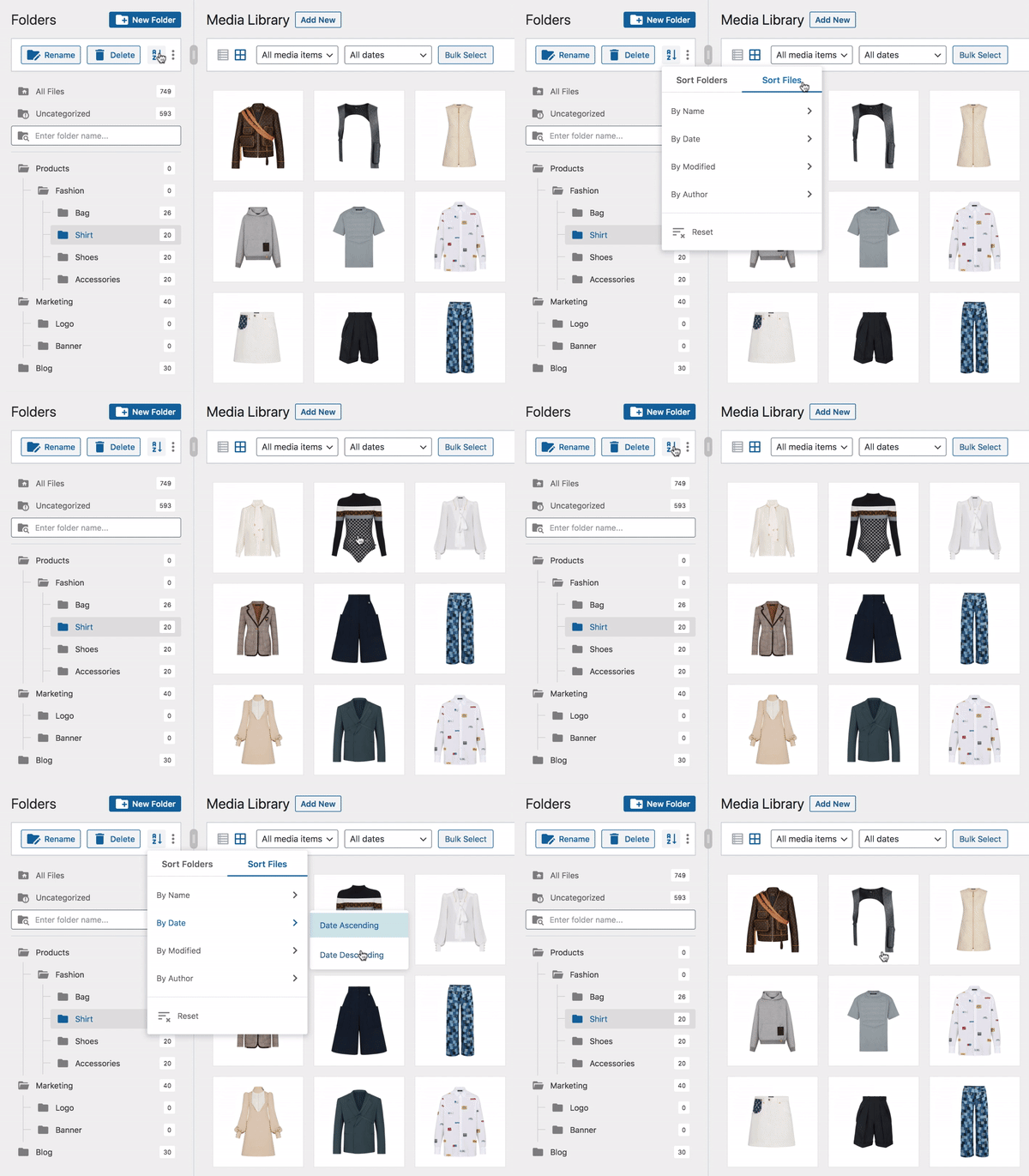
Sortuj pliki 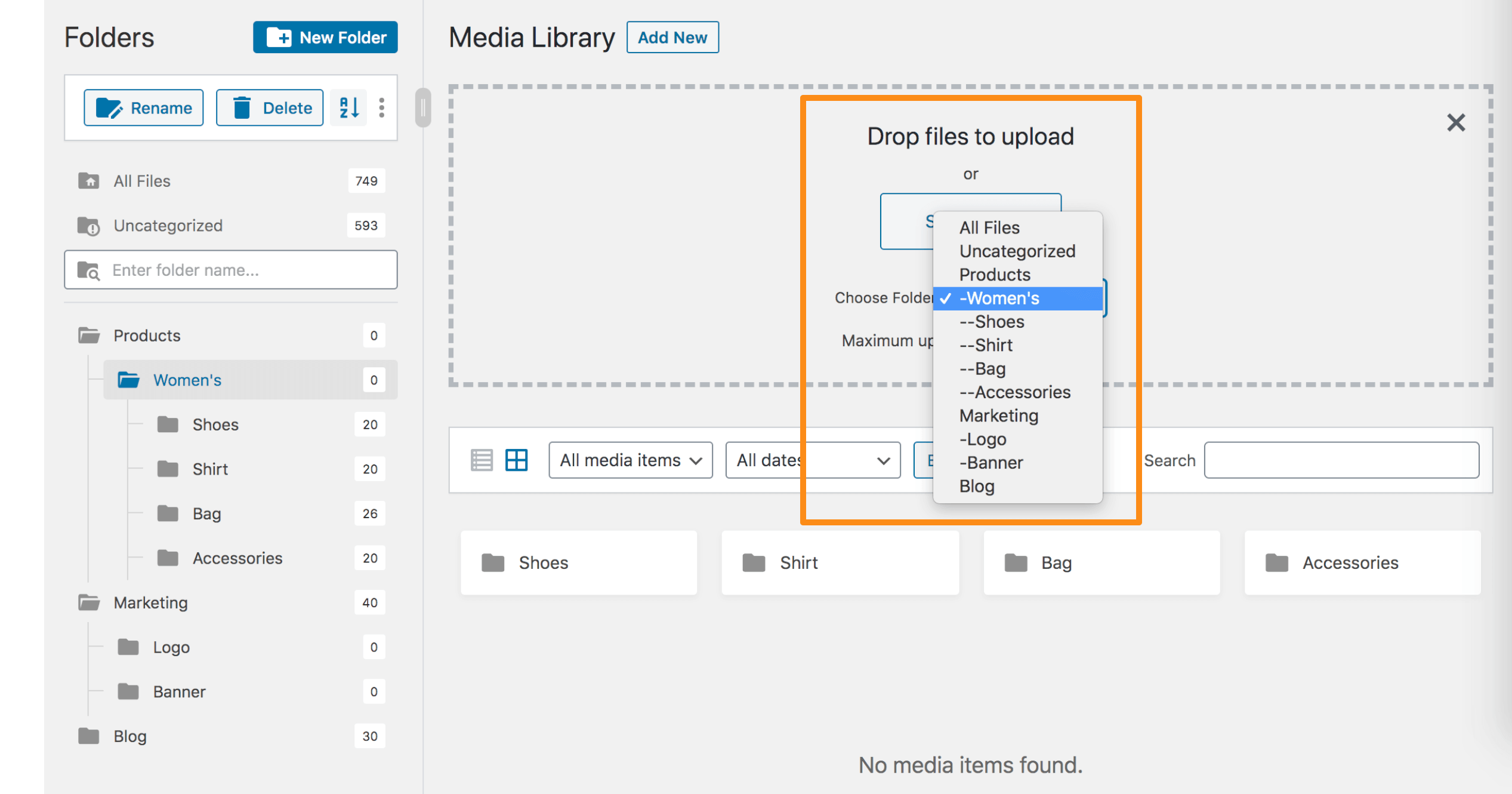
Prześlij pliki do określonego katalogu 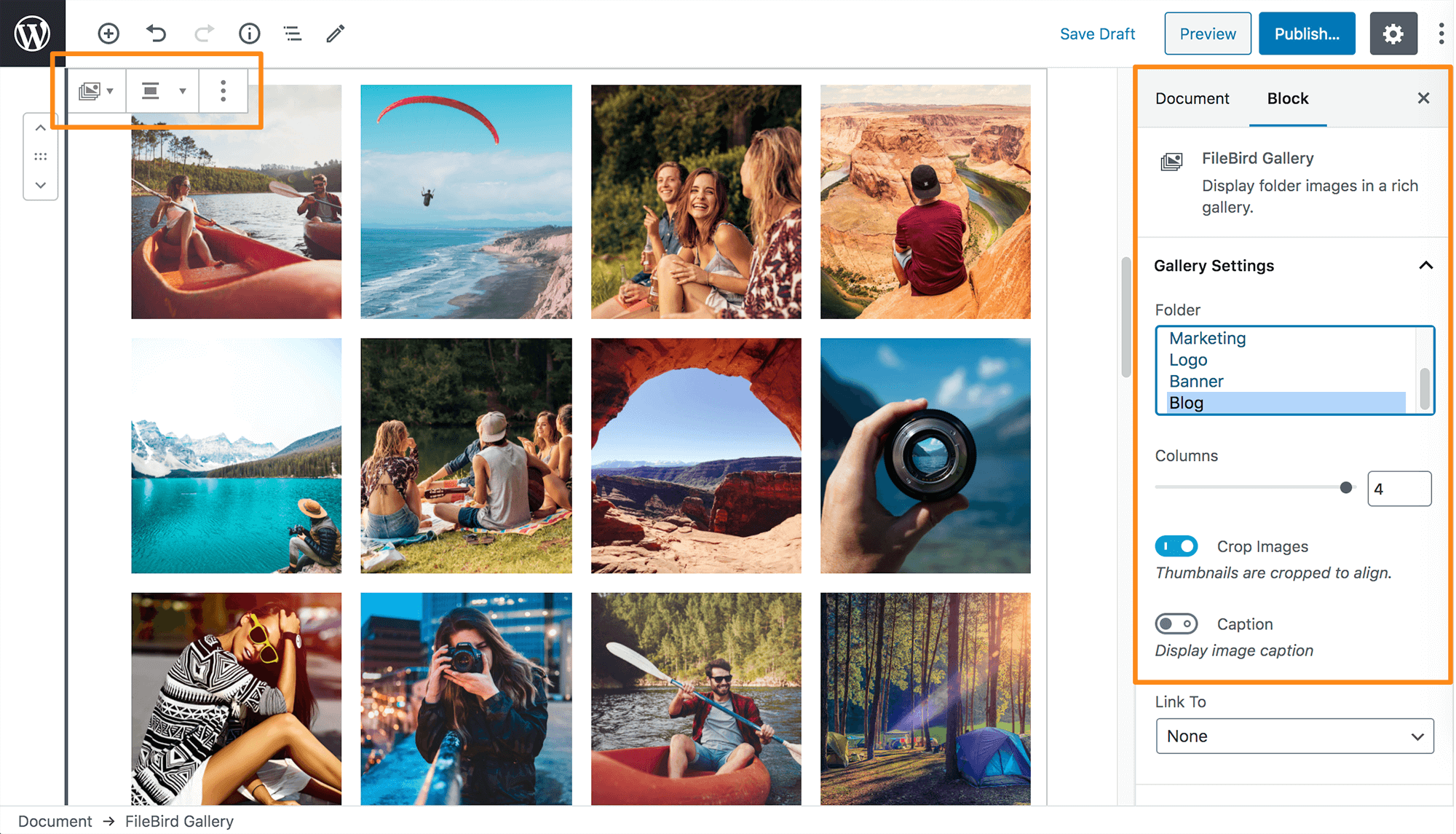
Ustawienia bloku galerii FileBird


Bloki
Wtyczka dodaje 1 blok.
- FileBird Gallery Display folder images in a rich gallery.
Instalacja
Konfiguracja FileBird (lub File Bird) jest łatwa i zajmuje mniej niż minutę.
- Pobierz wtyczkę ze strony wordpress.org, rozpakuj ją i prześlij katalog [FileBird] do katalogu wp-content/plugins/.
- Wtyczkę można aktywować poprzez menu „Wtyczki” w WordPressie.
- Przejdź do głównego menu WordPress menu > Media, aby utworzyć katalog do zarządzania plikami.
Gotowe. Miłej zabawy.
Najczęściej zadawane pytania
-
Czy wszystkie wcześniej przesłane pliki pozostaną takie same po pierwszym zainstalowaniu tej wtyczki?
-
Tak, wszystkie przesłane pliki znajdziesz w katalogu Wszystkie pliki.
-
Czy przeniesienie obrazka do innego katalogu ma wpływ na sposób jego wyświetlania na stronie/wpisie?
-
Nie, nie powoduje żadnych zmian w obrazkach wyświetlanych w interfejsie witryny.
-
Czy jeśli utworzę katalog lub kategorię, zastąpi to domyślną ścieżkę WordPress `wp-content/uploads/`?
-
Nie, nie działa. Wtyczka pomaga wizualnie uporządkować pliki w katalogach. Każdy bezpośredni odnośnik/adres URL pliku pozostaje niezmieniony.
-
Co stanie się z moją witryną, jeśli odinstaluję FileBird?
-
Bez obaw, Twoja witryna internetowa pozostanie całkowicie bez zmian. Po wyłączeniu wszystkie Twoje pliki będą dostępne w domyślnych multimediach WordPress.
-
Jak mogę uzyskać wsparcie techniczne?
-
Możesz się z nami skontaktować tutaj https://ninjateam.org/support/
-
Jeśli chcesz używać katalogów FileBird we wszystkich kreatorach stron Premium, możesz przejść na FileBird PRO. Funkcje Premium obejmują zaawansowane sortowanie i filtrowanie plików i katalogów, pobieranie całych katalogów z multimediami, obsługa większej liczby motywów, wtyczek i kreatorów stron.
-
Czy jest to jednorazowa opłata za FileBird Pro?
-
Tak! Dożywotnia licencja FileBird to jednorazowa opłata, możesz jej używać na jednej stronie i otrzymywać nieograniczoną liczbę aktualizacji.
Miłego organizowania! 😍
Recenzje


Kontrybutorzy i deweloperzy
„FileBird – Menedżer katalogów i plików multimediów WordPress” jest oprogramowaniem open source. Poniższe osoby miały wkład w rozwój wtyczki.
Zaangażowani
Wtyczka „FileBird – Menedżer katalogów i plików multimediów WordPress” została przetłumaczona na 26 języków. Podziękuj tłumaczom za ich wkład.
Przetłumacz wtyczkę “FileBird – Menedżer katalogów i plików multimediów WordPress” na swój język.
Interesuje cię rozwój wtyczki?
Przeglądaj kod, sprawdź repozytorium SVN lub czytaj dziennik rozwoju przez RSS.
Rejestr zmian
Dec 5, 2025 – Version 6.5.2
- Added: Auto rename when add new folder and it’s name exists
- Improved: Security
Oct 22, 2025 – Version 6.5.1
- Improved: Security (Access Control Authenticated (Subscriber+))
- Fixed: Inputs were not working properly
Oct 17, 2025 – Version 6.5.0
- Added: Double click folder to rename
- Improved: Security for Clear All Data function
Aug 4, 2025 – Version 6.4.9
- Added: Accessibility improvements based on WCAG guidelines
- Fixed: Security
Apr 19, 2025 – Version 6.4.8
- Added: FileBird Gallery Element for WPBakery Page Builder (PRO)
- Added: Support Import/Export Custom Post Types (PRO)
Mar 19, 2025 – Version 6.4.7
- Improved: Code for Performance and maintainability
Feb 12, 2025 – Version 6.4.6
- Added: Display caption for lightbox
- Improved: Request handling (conflict with JobBoardWP plugin)
- Fixed: Security (reported by researcher Revan Arifio)
Dec 11, 2024 – Version 6.4.2.1
- Fixed: Zoom out feature in Gutenberg editor is disabled
- Updated: Block uses Tree instead of Select
Oct 17, 2024 – Version 6.4.2
- Added: Auto Select Previous Folder in Upload New Media Page
- Added: Change some user settings to global settings, not belong to each user anymore (Folder counter, Theme, Breadcrumb)
- Updated: Polish pl_PL language
- Added: Some new filter hooks
- Fixed: Laggy text selection when using with Divi Builder
- Fixed: Sort folders (display wrong order) in custom post types
- Fixed: An issue where the script sometimes doesn’t load
Aug 23, 2024 – Version 6.3.4
- Fixed: CSV Export Vulnerability
- Fixed: Change to use Translations files from wp.org (https://wordpress.org/support/topic/translation-conflict-with-filebird-plugin/)
- Fixed: Exclude trashed posts out of folder count
Jun 25, 2024 – Version 6.3.3
- Fixed: Plugin dependencies
Jun 25, 2024 – Version 6.3.2
- Fixed: Issue with loading media in Add New Media File page
- Fixed: CSS hiding all admin notices
Jun 24, 2024 – Version 6.3
- Added: FileBird folder column in Media list and Post Type table (PRO)
- Improved: WordPress TableList Drag/Drop
- Fixed: WordPress VIP service doesn’t load FileBird styles
- Fixed: WPML/Polylang not sync file to folder when add new attachment (PRO)
Jun 14, 2024 – Version 6.2.5
- Fixed: Folder dropdown not showing in Featured Image upload tab when Elementor is activated
May 23, 2024 – Version 6.2.3
- New: Full compatibility of folders for pages, posts, custom post types with WPML, Polylang, etc.
- New: SVG upload & sanitization
- New: Each user can now experience new folder skins in different themes
- New: Quickly display folder ID
- New: File counter options for each user
- New: UI/UX & icon design
- Required: At least PHP 7.4
- Improved: Unstyled component
- Improved: Smooth resizeable folder sidebar
- Improved: Lightweight plugin bundle with minified packages
- Improved: Faster performance
- Improved: Smart load assets per task
- Improved: File search scope in list view
- Improved: Performance
- Fixed: Default folder settings not working in Elementor
- Fixed: Default folder settings not saved in some CPTs
- Fixed: PHP 8.0 auto-update library
Mar 29, 2024 – Version 5.6.4
- Fixed: Wordfence bug report
Mar 11, 2024 – Version 5.6.3
- Fixed: Compatible with PHP 8.2
- Added: Show Buy Banner in Zion Builder
Mar 2, 2024 – Version 5.6.2
- Updated: Open for Elementor free version
- Added: Import folder from Mediamatic plugin
- Improved: Image gallery
Jan 19, 2024 – Version 5.6.1
- Fixed: XSS vulnerability
Jan 9, 2024 – Version 5.6.0
- Fixed: Firewall blocking (Sucuri, GoDaddy, etc.)
Jan 9, 2024 – Version 5.5.9
- Fixed: I18N issues
- Fixed: Support SVG file
- Fixed: Special symbols in folder name when exported
- Updated: POT file
Dec 7, 2023 – Version 5.5.8.1
- Fixed: Folder names in document library not seen on mobile
Nov 28, 2023 – Version 5.5.8
- Fixed: Compatible with Polylang latest version
Nov 22, 2023 – Version 5.5.7
- Added: Support YooTheme ver 4 and greater
- Fixed: Conflict with ATUM Purchase Order Pro plugin (by Stock Management Labs™)
Nov 13, 2023 – Version 5.5.6
- Fixed: Sorting in WooCommerce Products (PRO)
Nov 8, 2023 – Version 5.5.5
- Fixed: Compatible with WP 6.4
- Improved: Review suggestion
Oct 25, 2023 – Version 5.5.4
- Fixed: Not show folder tree in post types (PRO)
Oct 24, 2023 – Version 5.5.3
- Improved: Work with cache
Aug 31, 2023 – Version 5.5.2
- Fixed: Counter wrong in popup modal with WPML (PRO)
- Fixed: Support Betheme latest version (PRO)
- Fixed: Conflict tooltip style with Betheme builder (PRO)
- Fixed: Drag/drop attachment not working correctly (conflict with betheme builder drag/drop) (PRO)
Aug 23, 2023 – Version 5.5.1
- Fixed: Error with WP 6.0.x
Aug 3, 2023 – Version 5.5
- Added: New filter for Post Types Support: filebird_post_types
- Added: Label All Posts/Pages/Items (PRO) & Logo Empty Folder
- Added: Counter of folder on the right
- Fixed: Tooltip of folder on the right
- Fixed: Laggy moving
- Improved: Logic and performance
- Updated: POT files, updated Dutch Language
Jul 7, 2023 – Version 5.4.5
- Added: Compatible with PDF Image Generator (By Mizuho Ogino)
- Updated: Document Link
- Fixed: PHP 8 warning
Jul 3, 2023 – Version 5.4.4
- Added: Compatible with text block of UX builder (Theme Flatsome)
- Fixed: Drop item when a subfolder is deleted
- Fixed: Conpatible with Twenty twenty three theme
Jun 27, 2023 – Version 5.4.3
- Fixed: Conflict with plugin CMS Tree Page View
- Fixed: Set folder for cropped image
Jun 20, 2023 – Version 5.4.2
- Added: Sync WPML
Jun 7, 2023 – Version 5.4.1
- Fixed: Compatible with the latest version of Beaver Builder (PRO)
- Fixed: PostType Tree keep loading with Editor Role (PRO)
Jun 5, 2023 – Version 5.4
- Added: Support migrate folders from Wicked Folders plugin
May 15, 2023 – Version 5.3.2
- Fixed: SQL security
May 11, 2023 – Version 5.3.1
- Fixed: Guide link
May 8, 2023 – Version 5.3
- Added: Options Choose user folder when import CSV (with attachments)
- Fixed: Compatible with PHP 5.6, PHP 8.2
- Fixed: Disable button Bulk select after moving files
Apr 18, 2023 – Version 5.2
- Added: Folders for other post types (PRO)
- Fixed: Error with layout of woo product
- Fixed: Move files
- Fixed: sql_require_primary_key
Apr 10, 2023 – Version 5.1.6
- Fixed: Sql_require_primary_key in Digital Ocean
- Fixed: Can not active when email has plus character
Mar 23, 2023 – Version 5.1.5
- Supported: LearnPress
- Supported: BeTheme
- Fixed: Permission for generate-key api
- Fixed: Gutenberg scroll folder
Jan 9, 2023 – Version 5.1.4
- Fixed: Special symbol in image alt in gallery
Jan 4, 2023 – Version 5.1.3
- Fixed: Conflict with PHP <7.4
Jan 3, 2023 – Version 5.1.2
- Fixed: Download folder error (PRO)
Dec 28, 2022 – Version 5.1.1
- Fixed and improved: Sort by file name (PRO)
Nov 15, 2022 – Version 5.1
- Fixed: Import folders from WP Media Folders (by Damien Barrère)
- Fixed: Move attachment
Nov 10, 2022 – Version 5.0.9
- Added: Import folders from WP Media Folders (by Damien Barrère)
Oct 10, 2022 – Version 5.0.8
- Improved: Review notice (display after 3 days when activated the first time)
- Added: Hook for not create folder when uploading
- Added: Open folder tree view for CPT UI plugin
- Fixed: Small CSS
Sep 16, 2022 – Version 5.0.7
- Updated: New algorithm
Sep 12, 2022 – Version 5.0.6
- Fixed: SVG Icon in Safari
- Added: Notice when create/update folder fail
- Fixed: FileBird Gallery not display image when using EWWW Image Optimizer plugin
- Fixed: Some bugs
Aug 11, 2022 – Version 5.0.5
- Fixed: Some bugs
Aug 9, 2022 – Version 5.0.4
- Fixed: Issue with wordpress.com
- Fixed: Compatible with Themify
- Fixed: PHP warnings
Jul 25, 2022 – Version 5.0.3
- Fixed: Import from 3rd party plugins
Jul 21, 2022 – Version 5.0.2
- Removed: CSS Gallery when not using Gutenberg
- Improved: UI on mobile
- Fixed: PHP warning
Jul 5, 2022 – Version 5.0.1
- Updated: Korean Language
- Removed: All .DS_Store files
- Fixed: Module build failed
Jun 30, 2022 – Version 5.0
- Added: FileBird Gallery Layouts (Flex | Manasory | Grid) and Lightbox
- Added: New API method for Dev
- Added: Some new settings
- Added: Full Support Gutenberg Block Translation with new json file (you can generate by using wp i18n make-json which have been published by WP version 5)
- Added: Support Korean Language
- Added: Support Themify
- Added: Recommended plugins
- Optimized: Performance (FileBird 5 loads the previous versions, refactored code base, optimized query, removed some library, changed structure)
- Improved: UI and notices
- Updated: POT file
- Fixed: CSS with LMS Plugin
- Fixed: Minimize Upload Popup
- Fixed: Warning in PHP 8 (Tested in PHP 8.1)
- Fixed: Compatible with Enhanced Media plugin
- Fixed: Some bugs
Feb 9, 2022 – Version 4.9.9.1
- Optimized code
Jan 7, 2022 – Version 4.9.9
- Fixed: Slow query
- Fixed: File permissions
- Fixed: Hide tab Import/Export error
Dec 30, 2021 – Version 4.9.8
- Added: Import/Export folder structure into CSV
- Added: Flat/Default tree view in modal
- Improved: UI and text
- Fixed: Conflict with Envato Market plugin
Dec 14, 2021 – Version 4.9.7
- Fixed: Conflict with ACF
- Fixed: Error in folder.php
Dec 06, 2021 – Version 4.9.6
- Added: Support MailPoet
Dec 02, 2021 – Version 4.9.5
- Added: Folder selector in Edit media
- Fixed: WooCommerce conflict (break Upload Theme button)
Nov 10, 2021 – Version 4.9.4
- Fixed: Elementor With PolyLang wrong folder counter
- Fixed: Image ALT in FileBird Gutenberg Gallery
Sep 30, 2021
- Updated: Some notice
Sep 14, 2021 – Version 4.9.3
- Added: Import folders for Folders by Premio
- Fixed: Compatible with WordPress old version.
Sep 9, 2021 – Version 4.9.2
- Improved: Import notice
- Fixed: Some small bugs
Aug 25, 2021 – Version 4.9.1
- Fixed: Gutenberg widgets missing
Aug 13, 2021 – Version 4.9
- Added: Infinite scroll
- Added: Plugin activation alert
- Added: Sorting by File Name in FileBird Gallery
- Improved: Folder name sorting
- Improved: German translation
- Fixed: Drag files in Tablet
Jul 21, 2021 – Version 4.8
- Fixed: Compatible with WordPress 5.8
- Fixed: Replace image
Jul 15, 2021 – Version 4.7.8
- Fixed: Conflict with Photo Gallery plugin
- Fixed: ACF warning
- Fixed: ACF meta field image can’t load
- Fixed: WPML Counter (in WPML last version 4.4.10)
Jul 2, 2021 – Version 4.7.7
- Added: Notice when a license was used
- Supported: Enhanced Media Library
- Supported: Media Library Assistant
- Improved: Load large files
- Improved: Translation (Added missing strings)
- Fixed: Loading Uncategorized folder
- Fixed: Context menu position
- Fixed: Security
- Fixed: Small bugs
Jun 11, 2021 – Version 4.7.4
- Updated: Languages
- Fixed: JS conflict with Divi builder
- Fixed: WPML non translated mode make folder counter and files in folders get wrong
- Fixed: Conflict with Debug Bar plugin
- Fixed: PolyLang get missing files in folder
- Fixed: Folder always loading
- Fixed: Important security updates.
May 26, 2021 – Version 4.7.3
- Improved: FileBird UI in Mobile
- Improved: Library
- Improved: Translations, update POT file
- Fixed: Auto Update function conflict with plugins and themes
- Fixed: Image validation for ACF plugin
- Fixed: Gutenberg issues (Wrong tag in frontend, Large images chosen when create gallery)
- Fixed: Missing language „NL”
- Fixed: RestAPI (404 Error)
- Fixed: WPML/Polylang Full Compatible modes in Setting Media, support „All languages in admin bar”, Counter
Apr 07, 2021 – Version 4.7.2
- Improved: Tooltip
- Improved: UI
- Optimized: FileBird zip size
- Fixed: Can’t set folder Uncategorized as default in folder load
- Fixed: Update database make folders duplicated when „Each user folder mode” enabled
Apr 01, 2021 – Version 4.7.1
- Added: Upload multiple images in multiple folders when upload processing
- Fixed: Append wrong folders in right side
Mar 30, 2021 – Version 4.7
- Added: New Resize bar
- Improved: Performance
- Improved: Optimize code
- Improved: UI
- Improved: Text
- Supported: PHP 8 and greater
- Supported: Tatsu Builder
- Fixed: Counter in WPML
- Fixed: Tooltip bugs
- Fixed: Can’t set „Uncategorized” default folder load
- Fixed: Reorder on Edit gallery
- Fixed: Small bugs
Feb 5, 2021 – Version 4.5
- New feature: Download folder (Pro)
- Added: Unlimited folders
- Added: Limited file explorer with 3rd party plugins
- Improved: Performance
- Fixed: Draggable for tablet
- Fixed: Edit Gallery
- Fixed: Over The Max Number Of attachmentID
- Fixed: FileBird Gallery selector in Gutenberg
- Fixed: Duplicate folder when import
- Fixed: Folder scroll
- Fixed: Folder counter bug when moving images in user-based folder mode
- Fixed: Conflict with Picu plugin
- Fixed: Conflict with TutorLMS plugin
- Disable: Draggable attachment in Mobile
Dec 21, 2020 – Version 4.3.1
- Added: Support shortcode for Document Gallery
- Added: API – Get folder detail by folder_id
- Fixed: Modal append (Conflict with Yoast SEO)
- Fixed: Conflict with Uncode theme
- Fixed: Not loading media when uploaded by different modal in Elementor
- Fixed: Reset file selection when move file in bulk select
Dec 14, 2020 – Version 4.3
- Added: Press ESC key to exit Bulk select mode
- Improved: Alert text
- Improved: Icon size and default folders with long names in some languages
- Fixed: Missing folder container
- Fixed: Security
- Fixed: SQL
- Fixed: Upload new image can’t insert to the post in modal
- Fixed: Prevent reload attachments when sort folders
Nov 25, 2020 – Version 4.2
- Added: Set previous folder selected as default folder
- Added: Compatible with Oxygen Builder
- Fixed: ACF warning
- Fixed: Conflict with WPML rest API
- Fixed: CSS conflict with The Grid plugin
- Improved: Prevent warning when upload folder containing desktop.ini or .DS_Store file
Oct 27, 2020 – Version 4.1
- Added: Set default folder to open
- Added: New APIs
- Added: Support ACF
- Improved: Notice of creating the first folder
- Removed: Folder selector when no item available in modal popup
- Fixed: Some bugs in folder container
Sep 16, 2020 – Version 4.0.7
- Added: User can use API to create folders
- Improved: Cut/Paste function
- Fixed: Counter with Polylang
- Fixed: Import function
- Fixed: Counter in import message
Aug 26, 2020 – Version 4.0.6
- Added: Compatible with Cornerstone Page Builder (From X Theme)
- Fixed: Browser security issue with Microsoft Edge, Firefox
- Fixed: Conflict jQuery-UI with ACF plugin
- Fixed: Can’t create table 'fbv_attachment_folder’
- Fixed: Screen Option hidden in Media Upload
4.0.5
- Fixed: Cache issues
- Fixed: Mobile view
- Fixed: Compatible with The7 theme
- Fixed: Improve performance on modal
- Fixed: Upload bugs
- Fixed: Count on parent folder
- Fixed: Small bugs
4.0.4
- Improved: Notifications
- Improved: Keep old folders from 4.0 version
- Improved: Performance
4.0.3
- Added: Gutenberg block
- Improved: Keep old folders from 4.0 version after update database
- Improved: UI/UX
4.0.2
- Fixed: Update FileBird database
- Fixed: Bulk delete folders
- Fixed: Some small bugs
4.0.1
- Fixed: Auto import folders from old version
4.0
- Added: New designs
- Added: Use new technology
- Added: Smooth performance for unlimited folders and large numbers of files
- Added: REST API for developers
- Added: Sort files by Name, Date, Modified, Author (PRO)
- Added: Bulk select folders
- Added: Bulk delete folders
- Added: Wipe old data
- Added: Clean all data
- Added: Import from Media Library Assistant
- Added: Import from WP Media Folder by JoomUnited
- Added: Support Brizy builder
- Added: Support Fusion builder (PRO)
- Added: Compatible with KnowherePro theme
- Improved: Switchers
- Improved: Text and Popups
- Improved: Documentation
- Fixed: Special characters in folder name
- Fixed: Auto detect site width
- Fixed: SQL syntax errors
- Fixed: Bugs in list view
- Fixed: Duplicate queries
- Fixed: Bugs with WPML
- Fixed: Small bugs
2.8
- Added: Support Thrive Architect
- Added: Language files for Taiwan (Thanks to soga172)
- Fixed: List view order item bug
- Fixed: WPML bug
- Fixed: Scroll bar
- Fixed: Some smart bugs
- Fixed: Tree view show modal
2.7
- Added: New FileBird layout
- Added: New icon
- Added: Separate Folder(s) for different user
- Added: Import files from 2 media library plugins (Enhanced Media Library by webbistro and WordPress Media Library Folders by Max Foundry)
- Added: Folder sort, folder search
- Fixed: Support PolyLang
- Fixed: Count
- Fixed: Splitter
- Fixed: Rename folder in list view mode
- Fixed: Some bugs in right to left screen
- Fixed: Move large folders
- Fixed: Filter is hidden when using Smush plugin
- Removed: Unused css
- Removed: Unused libraries
2.6
- Added: FileBird Gallery Block
- Improved: Optimize FileBird Modal
- Fixed: Can’t edit Image in media setting
- Fixed: CSS corrupts site menu
- Fixed: Conflict with Menubar icon plugin
- Fixed: Uncategorised view the following error message
- Fixed: Some small bugs
2.5.1
- Improved: Remove unuse CSS
- Fixed: Elementor
- Fixed: List view don’t load images
- Fixed: ACF plugin CSS conflict
- Fixed: Remove trigger which conflict with Divi builder
- Fixed: Conflict with Gridd Theme
- Fixed: Count uncategories items
2.5
- Added: Option turn on/off load FileBird JS at front-end for page builders
- Improved: Removed CDN for customScrollBar
- Fixed: Small bug will Elementor
- Fixed: Select option doesn’t not change in modal popup upload
- Fixed: Only call move image when moving folder position
2.4.2
- Fixed: Go Pro version links
2.4.1
- Fixed: Security required
2.4
- Improved: Performance and Optimize Code
- Improved: Optimize Code
- Improved: Optimize Code
- Fixed: Sorting error in list view
- Fixed: Conflict with WordPress Customize Function
- Fixed: Some small bugs
- Fixed: „nt_wmc_folder” in Google Search Console results
- Fixed: Error in full front end Divi Page Builder editor
- Fixed: PHP notice on line 582 and 586
- Fixed: Load JS script on front end
- Fixed: Error „FileBird is loading” on Elementor builder
- Fixed: Compatible with FooGallery and Final Tiles Grid Gallery
- Fixed: Warning notice in WordPress
- Fixed: Margin Overlay
- Fixed: Other small bugs
2.3
Jul 24, 2019 – Version 2.3
* Improved: Fast append treeview
* Improved: Prevent public folders link
* Improved: CSS UI
* Fixed: Prevent plublic taxonomy folder
* Fixed: Query database callback alltime
* Fixed: FileBird treeview show on top left in product editor in WooCommerce
* Fixed: Can’t drop file when create first folder
* Fixed: Work with WPML when Post Types Translation: Media tick not translatable
* Fixed: 10 folders create in Lite version
* Fixed: Bulk select moving images into folders by itself
* Fixed: Move folder with length folder text
* Fixed: Resize bar not save in min minimum width
* Fixed: Remove map file library
* Fixed: Conflict photo gallery
2.2
Jun 13, 2019 – Version 2.2
* Added: RTL display
* Added: Hebrew language
* Added: Support Advanced Custom Field
* Fixed: Create new folders in edit attachment page
* Fixed: RTL languages in Beaver and Divi builder
2.1
Jun 04, 2019 – Version 2.1
* Improved: Change drag-drop library
* Improved: Optimize drag-drop
* Improved: Change drag-drop to trigger folders, list view
* Improved: Change syntax jQuery
* Fixed: CSS not show in all folders treeview from classic editor
* Fixed: Move many files
* Fixed: Move all categories
* Fixed: Auto Deselect bulk when none file
* Fixed: Count file selected in bulk select
* Fixed: Conflict with Avada theme
* Updated: CSS
* Removed: Unused files
2.0
May 29, 2019 – Version 2.0
* Added: Treeview interface in page, post, custom post type
* Added: Treeview interface in Divi Builder, Beaver Builder, Visual Composer, WPBakery Page Builder, Elementor Builder
* Added: Treeview interface for Gutenberg
* Added: Bulk auto deselect when change folder
* Added: Compatible with WPML 4.x version
* Fixed: WPML 3.9 conflict
* Fixed: Move one file not click image
* Fixed: CSS over when edit folder
* Fixed: Load too much database
* Fixed: Treeview interface Elementor Builder
* Fixed: Upload images
* Improved: No load FileBird files on frontend if not use builder
* Improved: Optimize FileBird
* Improved: UI/UX
* Removed: Unused files
1.8
Mar 13, 2019 – Version 1.8
* Added: Compatible with Elementor
* Added: Compatible with Visual Composer
* Added: Compatible with Beaver Builder
* Added: Refresh folder
* Added: Save position for resizable sidebar
* Added: Russian Translation
* Improved: Languages and Documentation
Improved: Doesn’t jump to destination folder when moving files
* Improved: CSS
* Improved: Clean code
* Fixed: Removed WordPress notification
* Fixed: Categories dropdown from Media Library popup
* Fixed: Folder structure when insert files in page/post
* Fixed: Press double clicks for OK/cancel button
* Fixed: Bulk select error
* Fixed: Scroll to view folders
* Fixed: Many small bugs
1.7
Dec 14, 2018 – Version 1.7
* Added: Drag and drop files to folders for List mode
* Added: Count items after dragging
* Added: Load effect while dragging
* Added: Hover effect (List mode and gird mode)
* Added: Show loading progress bar when upload file
* Improved: CSS
* Improved: Clean code
* Improved: Loading effect smoother
* Fixed: Resize bug when dragging back
* Fixed: Hide list attachments after load attachment
* Fixed: Conflict with 404 to 301 plugin
* Fixed: Error in Theme Customize Tab
* Fixed: Some small bugs
1.6
Aug 15, 2018 – Version 1.6
* Fixed: Some small bugs
1.5
July 2, 2018 – Version 1.5
* Added: Display location latest folder place use.
* Improved: New UI/UX
* Improved: Change icons
* Improved: CSS styles
1.4
March 28, 2018 – Version 1.4
* Improved: New drag and drop Javascript
* Fixed: JS conflicts
1.3
March 18, 2018 – Version 1.3
* Fixed: Load files in folder
* Fixed: More bugs
1.2
March 10, 2018 – Version 1.2
* Fixed: Drag and drop files
* Fixed: More bugs
1.1
March 5, 2018 – Version 1.1
* Fixed: JS conflicts
* Fixed: Drag and drop folders
1.0
May 1, 2016 – Version 1.0
* Version 1.0 Initial Release
