
Plankpad: Fun Fitness with Interactive Games
Overview
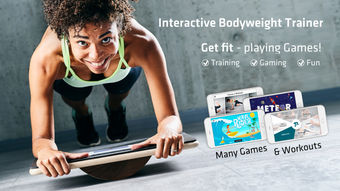
Plankpad is a fitness-focused desktop application designed to transform traditional bodyweight training into an engaging, game-driven experience. By integrating physical exercise with interactive gameplay on iPhone and iPad, the software aims to help users maintain longer plank positions and achieve fitness goals more efficiently. The app is specifically tailored for individuals seeking to strengthen their core, improve balance, and enhance overall body coordination through enjoyable, gamified workouts. It targets fitness enthusiasts, home exercisers, and users looking for a more entertaining way to stay active without relying on conventional timers or monotonous routines.
Developed by Plankpad Inc., the software is designed to work in tandem with a physical device, the Plankpad, which serves as both a stability platform and a game controller. The integration between the hardware and the app allows for real-time synchronization when the device is placed on the Plankpad, initiating workouts or games. The software provides visual guidance for proper plank form, ensuring users maintain correct posture during training. This makes it especially useful for beginners or those recovering from back pain who want to build strength safely. The combination of fun and function helps users stay motivated and engaged, turning routine exercises into dynamic sessions.
Key Features & Capabilities
- Interactive Game-Based Workouts – Users can choose from a variety of games such as Candy Monster, Pong Soccer, Duck Shoot, Meteor Madness, Wave Rider, and Snow Cruisin’. Each game is designed to extend workout duration by keeping users mentally engaged and focused on gameplay rather than time.
- Plank Form Guidance – The app includes visual instructions to help users maintain the correct plank position, promoting safe and effective training.
- Balance Board Functionality – The Plankpad device doubles as a balance board, enabling users to train motor coordination and reaction time through specially designed games that simulate surfing and snowboarding.
- Real-Time Synchronization – The app automatically connects with the Plankpad device when placed on it, enabling seamless workout initiation and data tracking.
- Progressive Difficulty – Games increase in challenge as users improve, encouraging consistent use and long-term engagement.
These features allow users to train their core muscles while simultaneously improving balance and coordination. For example, playing Wave Rider requires users to shift their weight dynamically, engaging lower-body stabilizers. Similarly, Snow Cruisin’ challenges balance and timing, making it ideal for injury prevention and athletic development. The software’s ability to blend fitness with entertainment supports sustained user motivation, especially for those who struggle with traditional workout routines.
User Interface, Workflow & Performance
The user interface of Plankpad is designed with simplicity and visual clarity in mind, aligning with iOS design principles. Navigation is intuitive, allowing users to quickly access games, workouts, and form guidance. The layout emphasizes large, responsive buttons and clear visual cues, minimizing the learning curve for new users. The workflow begins with placing the iPhone or iPad on the Plankpad device, which triggers automatic synchronization and prompts the user to select a game or workout.
Once selected, the app provides real-time feedback through visual indicators and game mechanics, helping users maintain proper posture and balance. The performance of the app appears optimized for iOS devices, with smooth transitions and responsive gameplay. However, exact performance details such as CPU or RAM usage were not specified. Stability is expected to be consistent given the app’s focus on real-time sensor integration and minimal background processing. The developer did not provide additional system requirements or performance benchmarks.
Compatibility & System Requirements
Plankpad is compatible with iOS devices, specifically iPhone and iPad models that support the required sensor integration and app functionality. The software is available as version 1.0 and has a download size of 125 MB. The developer did not specify exact hardware requirements, such as minimum processor speed, RAM, or iOS version. Compatibility information was partially provided, with the app confirmed to run on iPhone and iPad platforms.
Users should ensure their device supports the necessary Bluetooth or proximity sensors for synchronization with the Plankpad hardware. The developer did not provide details on whether the app supports older iOS versions or specific iPad models. Installation is straightforward, and the app is designed to work seamlessly with the physical device upon setup.
Pros and Cons
Pros
- Engaging game-based approach to plank training increases workout duration and user motivation.
- Combines core strengthening with balance and coordination training through dual functionality.
- Clear visual instructions improve form and reduce injury risk during exercises.
- Seamless synchronization with the Plankpad hardware enables instant workout initiation.
- Free to download and use, with no upfront cost for core features.
Cons
- Requires purchase of the Plankpad physical device to use the full functionality.
- Limited to iOS devices; no support for Android or desktop platforms.
- Exact system requirements and compatibility details were not listed.
- Performance under heavy usage or extended sessions was not specified.
FAQ Section
Is Plankpad compatible with all iPhone and iPad models?
Plankpad is designed for iPhone and iPad devices, but specific compatibility details were not provided by the developer. Users should ensure their device supports the necessary sensors for synchronization with the Plankpad hardware.
Is the app safe to use without the physical Plankpad device?
The app requires the Plankpad device to initiate workouts and games. It cannot function independently without the physical hardware.
Does Plankpad offer automatic updates?
Updates are managed through the App Store. Users are encouraged to keep the app updated to ensure compatibility and access to new features.
What type of license does Plankpad use?
Plankpad is free to download and use. The software does not require a paid license or subscription for core functionality.
Can I use Plankpad offline?
Yes, the app can be used offline after initial setup. Games and workouts do not require an internet connection once downloaded.
Final Thoughts + CTA
Plankpad stands out as a unique fitness solution that successfully merges physical training with interactive gaming. By transforming the often tedious plank exercise into a fun and dynamic experience, it appeals to users who struggle with consistency in their routines. The dual functionality as both a core trainer and balance board enhances its value, offering a comprehensive approach to fitness that supports strength, coordination, and injury prevention. While the app is limited to iOS and requires a dedicated hardware component, its engaging design and free access make it a compelling choice for home fitness enthusiasts.
For anyone looking to strengthen their core, improve balance, or simply make exercise more enjoyable, Plankpad delivers on its promise of fun, effective training. The combination of game mechanics, form guidance, and real-time feedback creates a compelling user experience that promotes long-term engagement.
Download Plankpad now








