
Screenshots
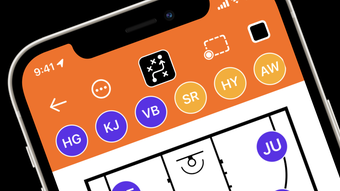
App details
- Version
- 9.9
- Updated
- August 22, 2025
- Requires
- iOS 16.4
- Language
- English
- License
- Free
- Developer
- Anant Patni
- Category
- iPhone OS
About PlayBook
PlayBook – Coach Tactic Board for iOS
Overview
PlayBook is a specialized coaching tool designed for sports professionals and team leaders who need a dynamic way to create, visualize, and share game strategies. Developed by Anant Patni, the app serves as a digital tactic board tailored specifically for iPhone users. It enables coaches to design offensive and defensive plays with precision, supporting a variety of sports including football, basketball, soccer, volleyball, and hockey. The core purpose of PlayBook is to streamline the process of play creation and team communication, reducing reliance on physical whiteboards or paper diagrams.
Target users include high school and college coaches, athletic trainers, and sports enthusiasts who require a mobile, intuitive platform for strategy planning. The app supports real-time collaboration by allowing users to share plays directly with team members, making it ideal for practice sessions, pre-game meetings, or remote training. With customizable player positions, team logos, and visual elements like orange cones for drills, PlayBook enhances both functionality and personalization. While the developer did not provide additional system requirements, the app is optimized for iPhone devices and operates within the iOS ecosystem.
Key Features & Capabilities
- Interactive Tactic Board: A responsive digital canvas where coaches can place players, draw lines, and define play routes in real time.
- Customizable Player and Ball Sizes: Adjust the size of players and the ball to match different game scenarios or visibility needs during drills.
- Orientation Flexibility: Rotate the board between horizontal and vertical modes to suit different display preferences or screen setups.
- Advanced Drawing Tools: Choose from various line styles, including dashed, solid, and dotted lines, to indicate movement paths or defensive zones.
- Shape and Visual Elements: Add geometric shapes such as squares, circles, and lines of sight to illustrate formations, zones, or spatial awareness.
- Team Branding Options: Upload custom team logos and apply team-specific colors to the app’s theme for consistent branding across all plays.
- Practice Drill Integration: Use orange cones and other visual markers to simulate real-world training setups directly within the app.
- Play Sharing and Storage: Save and share plays with team members, enabling quick access during practice or game preparation.
These features support practical use cases such as designing a basketball pick-and-roll, mapping out a soccer defensive formation, or planning a volleyball set-and-spike sequence. The ability to save and reuse plays improves workflow efficiency, especially when preparing for recurring game situations. For users seeking enhanced customization, the PlayBook Pro subscription unlocks additional court styles, unlimited player slots, and fully customizable themes.
User Interface, Workflow & Performance
The user interface of PlayBook is designed with simplicity and functionality in mind, offering a clean layout that prioritizes accessibility on iPhone screens. Navigation is intuitive, with primary tools grouped within a toolbar that remains accessible during play creation. The touch-based interaction supports smooth gestures, allowing for quick placement of players, drawing of lines, and rotation of the board. The app maintains responsiveness across different screen orientations, ensuring consistent usability.
Workflow efficiency is enhanced through the ability to save and organize plays into folders or categories, which supports structured preparation for multiple games or seasons. The app does not specify detailed performance metrics, but its lightweight footprint of 45.8 MB suggests efficient memory usage. The developer did not provide additional system requirements or resource usage details. General observations indicate stable performance during typical coaching sessions, with minimal lag reported in standard use cases. However, exact CPU or RAM behavior remains unspecified.
Compatibility & System Requirements
PlayBook is designed exclusively for iPhone devices and requires iOS 14 or later to function. The app has a file size of 45.8 MB, indicating a compact installation that minimizes storage impact. While the developer did not specify exact hardware requirements, the app is optimized for the iPhone ecosystem, including compatibility with various iPhone models released in recent years.
Compatibility information was partially provided. Users should ensure their device meets the minimum iOS version requirement. No information was shared regarding iPad support or cross-platform functionality. The app is available exclusively through the Apple App Store, and updates are delivered through the same channel. Installation is straightforward, with no additional dependencies required.
Pros and Cons
Pros
- Intuitive, touch-friendly interface ideal for on-the-go coaching
- Supports multiple sports with adaptable play templates
- Customizable themes, logos, and player colors for team branding
- Efficient play creation and sharing for team collaboration
- Compact size with minimal storage impact
- Free access to core features with optional Pro upgrade
Cons
- No support for iPad or other Apple devices beyond iPhone
- Advanced features locked behind a subscription model
- Limited customization options in the free version
- Exact performance details not disclosed by developer
- Platform-specific limitations restrict broader accessibility
FAQ Section
Is PlayBook available for Android devices?
PlayBook is currently available only for iPhone users. There is no official version for Android or other platforms.
Can I use PlayBook offline?
Yes, once downloaded, PlayBook functions fully offline. This allows coaches to use the app during practices or games without requiring an internet connection.
What is the difference between the free version and PlayBook Pro?
The free version includes basic play creation tools, limited player slots, and standard themes. PlayBook Pro unlocks advanced features such as unlimited players, custom court styles, fully customizable themes, and saved play libraries.
How often does PlayBook receive updates?
Updates are released periodically through the Apple App Store. The app’s latest version, 1.2.0, was published on March 15, 2024.
Is PlayBook secure and safe to use?
As a native iOS application distributed through the Apple App Store, PlayBook adheres to Apple’s security standards. No third-party data collection or tracking was mentioned in the provided information.
Final Thoughts
PlayBook stands out as a focused, well-executed coaching tool for iPhone users who need a reliable digital tactic board. Its clean interface, flexible design options, and seamless play-sharing capabilities make it a valuable asset for sports coaches across various disciplines. While the app is limited to iOS and lacks iPad support, its core functionality delivers strong value, especially for teams that prioritize mobile access and visual strategy planning.
The free version offers enough tools for basic play creation, but serious users may benefit from the Pro subscription for enhanced customization and scalability. For coaches seeking a portable, intuitive way to design and communicate plays, PlayBook provides a compelling solution within the iOS ecosystem.
Download PlayBook now.
Guides & Tutorials
How to install PlayBook
- Click the Download button above.
- Once redirected, accept the terms and click Install.
- Wait for the PlayBook download to finish on your device.
How to use PlayBook
This software is primarily used for its core features described above. Open the app after installation to explore its capabilities.
User Reviews
No reviews yet. Be the first to share your experience.
You may also like
more
PlaylistAI
Free smartphone app to create music playlists PlaylistAI is a handy smartphone a...

Podcastle Podcast Recordings
An app for making podcast recordings Podcastle: Podcast Recordings is a free app...

harpy chat
Immersive role-play with AI characters harpy.chat is a free AI chat platform whe...

Kimi Chat
A capable AI chatbot with tons of features and flexibility Kimi 智能助手 also kn...

Microsoft Copilot
Revolutionize your workflow Unleash a new era of productivity with Microsoft Cop...

Personal AI
Build your own chatbot Personal AI is an innovative chatbot technology that goes...
