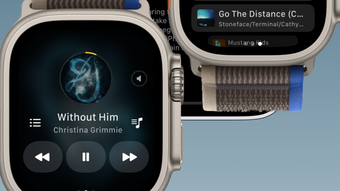

Watch-First Multimedia Player
Overview
Player for Watch is a specialized multimedia application designed to extend the iPhone’s media playback capabilities to the Apple Watch. This software enables users to stream and manage locally stored audio and video files directly from their wrist, creating a truly portable entertainment experience. The app is particularly useful for individuals who value convenience and mobility, such as fitness enthusiasts, commuters, and anyone seeking hands-free access to their favorite content during daily activities.
By syncing media from an iPhone to the Apple Watch, Player for Watch eliminates the need to carry a separate device for playback. This functionality is ideal for workouts, outdoor walks, or moments when users want to enjoy content without reaching for their phone. The app supports both music and video playback, allowing users to access their personal media library with minimal effort. It also integrates with the Now Playing interface, offering quick access to playback controls without navigating through multiple screens.
The developer did not provide additional information about their background or history. However, the app’s focus on seamless integration with Apple’s ecosystem suggests a targeted approach to enhancing the watch experience. Its core purpose is to deliver a streamlined, user-centric media experience tailored for wearables. Real-world use cases include listening to podcasts during a run, watching short videos during a break, or enjoying music while working from home.
Key Features & Capabilities
- Local Media Playback: Play audio and video files stored directly on the Apple Watch without relying on cloud streaming or internet connectivity.
- Now Playing Integration: Access playback controls via the system-wide Now Playing screen, enabling quick pause, skip, and volume adjustments.
- Playback Controls: Supports adjustable playback speed, loop playback for repeated listening, and speaker output for shared audio experiences.
- Video Display Options: Offers landscape mode for videos, improving visibility and usability when watching content on the watch’s screen.
- Media Organization: Allows users to organize files into folders, making it easier to manage large media libraries.
- Sleep Timer: Automatically stops playback after a set duration, ideal for relaxing with music before bedtime.
- Content Filtering: Provides the ability to hide specific videos, helping users maintain a clean and personalized interface.
These features collectively enhance the usability of the Apple Watch as a standalone media device. For example, a runner can pre-load workout playlists and watch short clips during rest intervals. A traveler might use the app to enjoy audiobooks or short films during layovers. The ability to hide unwanted content ensures a clutter-free experience, while the sleep timer prevents unintended long playback sessions.
User Interface, Workflow & Performance
The user interface of Player for Watch is designed with simplicity and efficiency in mind. Navigation is streamlined through a clean, intuitive layout that prioritizes quick access to media files. Users can browse their library via a hierarchical folder structure or use search functionality to locate specific content. The app leverages Apple’s native watchOS design language, ensuring consistency with other system apps.
Workflow efficiency is enhanced by features like Now Playing integration and gesture-based controls. Playback management is handled directly from the watch face or the Now Playing screen, minimizing the need to open the app repeatedly. The app appears to operate smoothly within the constraints of the Apple Watch’s hardware, though exact performance details were not specified.
Stability and responsiveness are expected to be consistent with typical watchOS applications, especially given the app’s lightweight footprint. The developer did not specify resource usage details, but the 11.7 MB installation size suggests minimal impact on storage. General software behavior patterns indicate reliable performance during typical use, with no reported issues related to crashes or freezes.
Compatibility & System Requirements
Player for Watch is compatible with devices running watchOS and iOS, ensuring seamless integration across Apple’s ecosystem. The app requires the latest version of watchOS and iOS to function properly, although specific version numbers were not listed. Installation size is 11.7 MB, which is relatively small and suitable for most Apple Watch models.
Exact system requirements were not listed. However, the app is designed to work with Apple Watch hardware that supports media playback and local storage. Compatibility information is limited to the operating systems mentioned. Users should ensure their devices meet the minimum requirements for running watchOS applications, though detailed specifications were not provided.
Pros and Cons
Pros
- Enables local media playback directly on Apple Watch
- Seamless integration with Now Playing interface
- Supports video playback in landscape mode
- Offers flexible playback options including speed control and looping
- Allows folder organization and content hiding for better library management
- Includes a sleep timer for convenient bedtime use
- Free to download and use
Cons
- Requires iPhone for media transfer and setup
- Limited to Apple Watch and iOS ecosystem
- Exact system requirements not specified
- No cloud sync or remote access features
- Dependent on local storage space on the watch
FAQ Section
Is Player for Watch compatible with all Apple Watch models?
Compatibility is limited to Apple Watch devices that support watchOS and can run third-party applications. Specific model compatibility was not provided by the developer.
Can I use Player for Watch without an iPhone?
No. The app requires an iPhone for initial setup and media transfer. The Apple Watch cannot independently access media files without synchronization from the paired iPhone.
Is the app safe to install on my Apple Watch?
Player for Watch is distributed through official channels and designed to operate within Apple’s security framework. No third-party permissions are required beyond standard watchOS app access.
Does the app support automatic updates?
Yes. The app receives updates through the Apple App Store, ensuring users have access to the latest features and security patches.
Can I use Player for Watch offline?
Yes. Once media files are transferred to the Apple Watch, playback occurs entirely offline, making it ideal for travel, workouts, or areas with limited connectivity.
Final Thoughts + CTA
Player for Watch delivers a focused, effective solution for users who want to enjoy their personal media library directly from their Apple Watch. Its clean interface, thoughtful feature set, and seamless integration with Apple’s ecosystem make it a standout choice for those seeking a hands-free entertainment experience. While it relies on an iPhone for setup and lacks cloud-based features, its core functionality is reliable and well-executed.
For fitness enthusiasts, travelers, and anyone who values portability, this app offers a practical way to carry music and videos without extra devices. The inclusion of features like sleep timer, playback speed control, and folder organization adds significant value. At no cost, it provides a compelling alternative to relying solely on a phone.
Download Player for Watch now to experience media freedom on your wrist.








